 熊猫出海编辑团队
Last updated: 16 November 2026. TikTok API for Business (v1.3), the TikTok for Business MCP Server, Anthropic and OpenAI documentation checked that day.
After Meta and Google, TikTok now has its own official ads MCP: the TikTok for Business MCP Server. It wraps about 400 TikTok API for Business endpoints as tools covering campaign management (including Upgraded Smart+ and GMV Max), reporting, catalogs, creatives, audiences and Business Center operations (overview). So, can AI agents now run your TikTok ads? Technically yes. That is why setup matters.
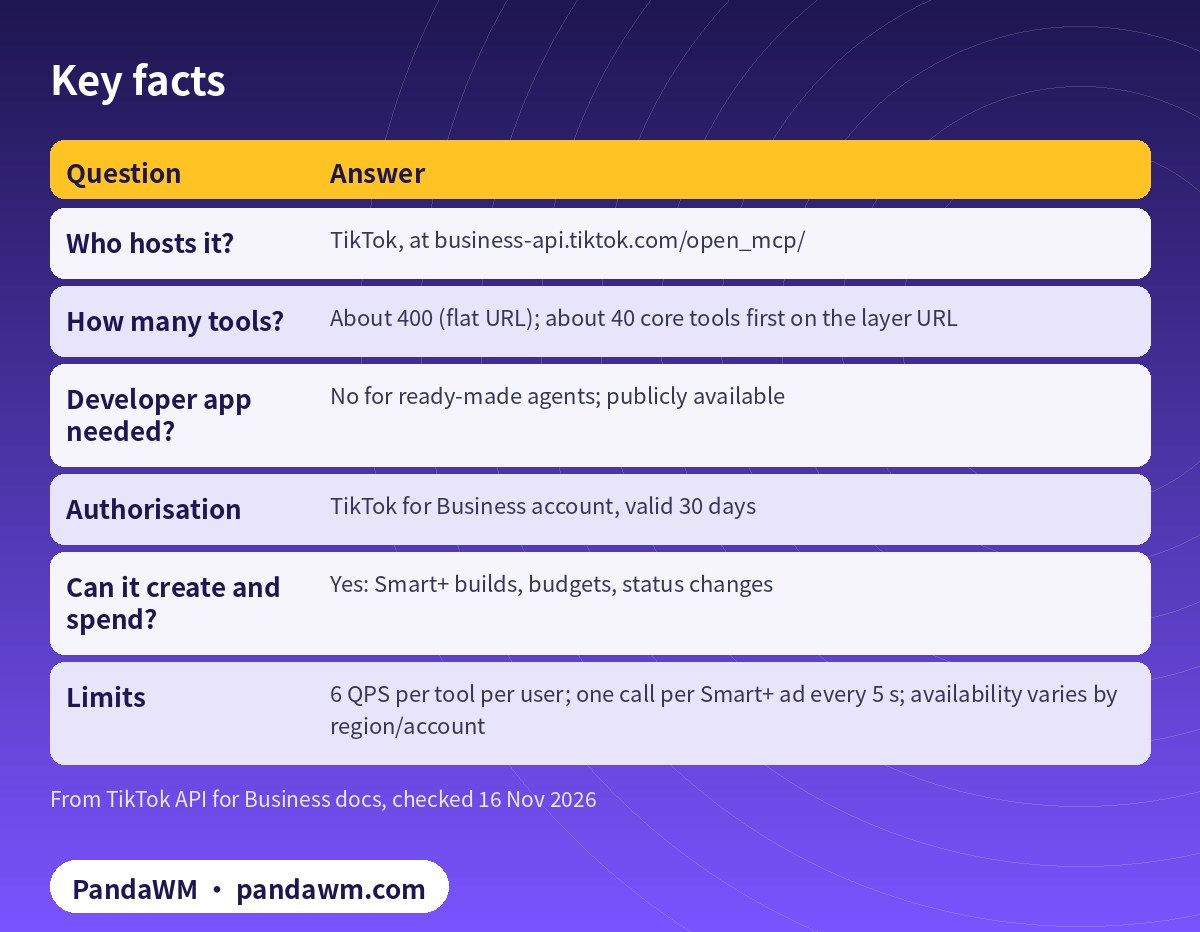
Key facts
| Question | Answer |
|---|---|
| Who hosts it? | TikTok, at business-api.tiktok.com/open_mcp/ |
| How many tools? | About 400 (flat URL); about 40 core tools first on the layer URL |
| Developer app needed? | No for ready-made agents; publicly available |
| Authorisation | TikTok for Business account, valid 30 days |
| Can it create and spend? | Yes: Smart+ builds, budgets, status changes |
| Limits | 6 QPS per tool per user; one call per Smart+ ad every 5 s; availability varies by region/account |
Supported ready-made agents listed by TikTok include ChatGPT, Claude, Claude Code, Codex, Cursor, Doubao, Gemini CLI, Hermes Agent, Kimi Code CLI, Manus, Perplexity, Trae and WorkBuddy (connection guide). Custom agents can use OAuth 2.0 with PKCE or a Marketing API access token (custom agent guide).
Beyond endpoint wrappers
Two tools are TikTok’s own agents, called agent-to-agent: tiktok_ads_diagnosis_agent troubleshoots non-GMV Max accounts, campaigns and ad groups, and tiktok_ads_creative_testing_agent creates, manages and reviews creative tests in an existing ad group (tool list).
What to watch
- Smart+ campaigns default to
operation_status: ENABLE; ask agents to send DISABLE ( - Smart+ docs
- ).
- From 1 January 2027, legacy create endpoints stop creating non-Search Legacy Manual campaigns for Sales, App Promotion and Lead Generation; build on Smart+.
- Claude omitted tools beyond 256 for a time in July (fixed 20 July); refresh the tool list or use the layer URL.
- Business Center, member and payment tools are in the library too; deny them for agents.
How it compares
Google’s official ads MCP is open source, self-hosted and limited to reporting, assets and labels (Google Ads MCP server explained). Meta’s hosted server can build paused campaigns (Meta Ads MCP server explained). TikTok’s has the widest tool library of the three, which puts the burden on your permissions.
A safe setup
- Authorise with a TikTok for Business user that is assigned only the needed accounts in your own Business Center.
- Use the layer URL unless you need the full library.
- Allow reads, ask for creates, budgets and status, deny Business Center and payment tools (Claude:
- Claude Code guardrails for the TikTok Ads MCP server
- ; Codex:
- Codex config.toml for the TikTok for Business MCP server
- ).
- Add an argument check that blocks ENABLE and budgets above a ceiling.
- Re-authorise every 30 days.
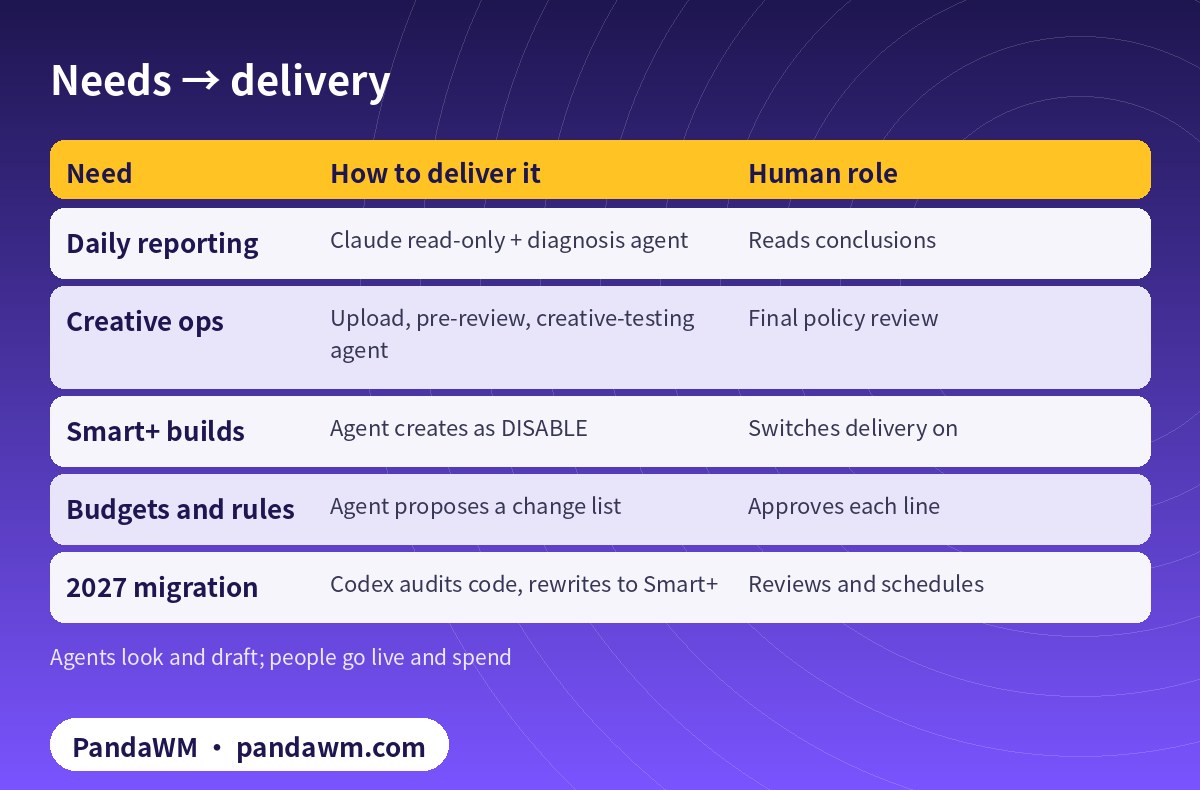
Needs → delivery
| Need | How to deliver it | Human role |
|---|---|---|
| Daily reporting | Claude read-only + diagnosis agent | Reads conclusions |
| Creative ops | Upload, pre-review, creative-testing agent | Final policy review |
| Smart+ builds | Agent creates as DISABLE | Switches delivery on |
| Budgets and rules | Agent proposes a change list | Approves each line |
| 2027 migration | Codex audits code, rewrites to Smart+ | Reviews and schedules |
PandaWM’s full solution: Claude + Codex + TikTok ad accounts for faster delivery
The TikTok for Business MCP Server is hosted by TikTok, exposes a large tool library and can write. That puts “AI runs the ads” within reach, and it makes permissions and review matter more. PandaWM’s end-to-end service for companies going global covers:
- Compliant account opening: we help you open your own TikTok ad account under your real business entity, apply for industry entry where your category needs it, or open through an authorised agency. The account is yours; nothing is rented or shared.
- Business Center and permissions: assign accounts and member roles in your own Business Center so the TikTok for Business user you authorise for AI only reaches the accounts it needs.
- Pixel, events and catalogs: set up the Pixel and events, catalogs and TikTok Shop authorisation so Smart+ and GMV Max get reliable signals.
- Claude on the TikTok MCP server: daily reporting, TikTok’s official diagnosis and creative-testing agents, and Smart+ build plans, with write tools set to ask every time and turning delivery on left to a person.
- Codex for API scripts: bulk reporting, rate-limit retries, Smart+ builds created as DISABLE, and migrating Legacy Manual flows that stop working on 1 January 2027.
- Human review and retros: media buyers approve going live, budget increases and sensitive-industry creatives, and we review time saved and performance weekly.
This describes a service capability only, with no prices or rebates. PandaWM is not an official partner of TikTok, Anthropic or OpenAI. See TikTok Ads account opening & management (PandaWM service page).
FAQ
Is it official?
Yes. It is documented on TikTok’s API for Business portal and hosted by TikTok.
Do I need API access approval?
Not for ready-made agents; TikTok says the server is publicly available to all users.
Can it run GMV Max?
There are GMV Max tools, including a dedicated report tool; settings differ from Smart+.
Is Claude or Codex available everywhere?
No. Check Anthropic’s and OpenAI’s supported regions; mainland China and Hong Kong are not supported.
Compliance note: Use every workflow in this guide only on TikTok ad accounts (including accounts assigned to you in a Business Center) that your company owns or is formally authorised to manage, through TikTok’s official TikTok API for Business, the TikTok for Business MCP Server or TikTok Ads Manager. Follow TikTok’s advertising policies, industry entry requirements and API rate limits, and keep a human review step before anything that can spend money. PandaWM does not sell, rent, share or transfer ad accounts, Business Centers or API credentials, does not help anyone bypass ad review, industry entry, regional restrictions or identity verification, and is not an official partner of TikTok, Anthropic or OpenAI. Claude and OpenAI services are only offered in their supported countries and regions; the account holder should be an entity legitimately established and operating in a supported region.
Related guides
- TikTok Ads account opening & management (PandaWM service page)
- Overseas AI Token service: account setup + API access (PandaWM)
- How to connect Claude to TikTok Ads (step by step)
- Claude for TikTok Upgraded Smart+ campaign automation
- Claude Code guardrails for the TikTok Ads MCP server
- Codex config.toml for the TikTok for Business MCP server
- TikTok MCP (Simplified Chinese)
- Google Ads MCP server: let AI agents work on your ads
- Meta ads MCP server: let AI agents manage your ads
- Prompt injection explained: enterprise defense
Talk to PandaWM: TikTok Ads accounts + AI-assisted delivery
Tell us where your company is registered, your industry (and whether it needs industry entry approval), target countries, landing page, app or TikTok Shop, and expected monthly budget, plus which part you want to automate first (reporting, creatives, Smart+ builds or rules). We pre-check eligibility and creatives, help you open your own TikTok ad account compliantly, and wire Claude / Codex into your workflow.
WhatsApp: +852 5904 8602Telegram: @PANDA0134WeChat: szcwh99
Official sources
- TikTok API for Business: TikTok for Business MCP Server overview
- TikTok: How to connect a ready-made agent to TikTok for Business MCP Server
- TikTok: How to connect a custom agent to TikTok for Business MCP Server
- TikTok: Available tools in TikTok for Business MCP Server
- TikTok: Create an Upgraded Smart+ campaign
- Anthropic: Supported regions
- OpenAI: Supported countries and territories
All official pages checked on 2026-11-16. API versions, tool names and permission requirements change; the official pages prevail.
 微信扫一扫打赏
 支付宝扫一扫打赏