 熊猫出海编辑团队
Last updated: 16 November 2026. Google Ads API (v26.2), Anthropic and OpenAI documentation checked that day.
Google’s open-source Google Ads MCP server is great for reporting and assets, but it explicitly cannot create, modify, pause or enable campaigns, ad groups, ads, budgets or bids (Google’s guide). For that you need the Google Ads API, and that is where OpenAI Codex shines: it writes, tests and maintains the pipeline code in your repository. Here is the pipeline we use, built on the official google-ads Python library (v26.2 is the current API version, released 11 November 2026, release notes).
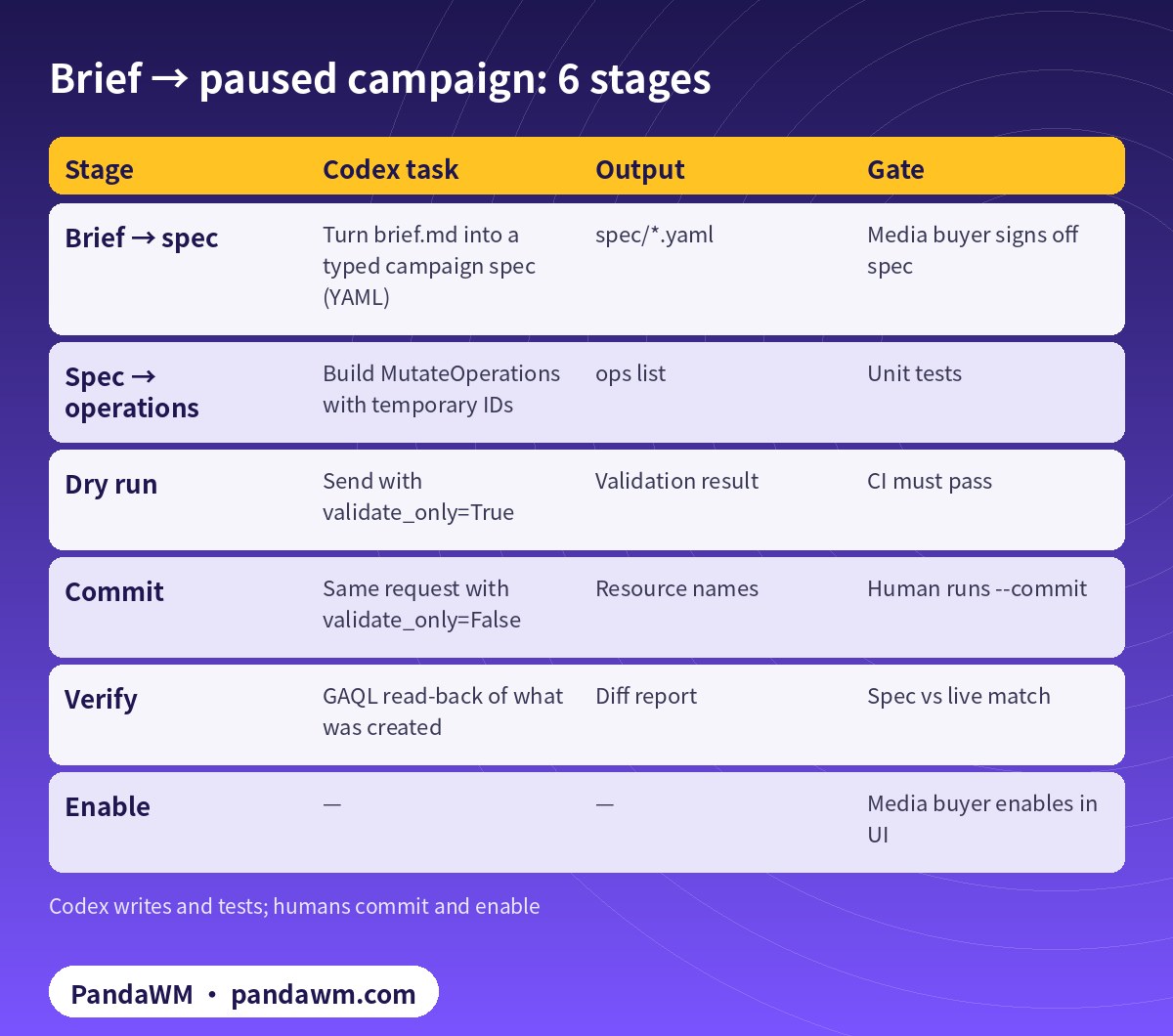
The pipeline at a glance
| Stage | Codex task | Output | Gate |
|---|---|---|---|
| Brief → spec | Turn brief.md into a typed campaign spec (YAML) | spec/*.yaml | Media buyer signs off spec |
| Spec → operations | Build MutateOperations with temporary IDs | ops list | Unit tests |
| Dry run | Send with validate_only=True | Validation result | CI must pass |
| Commit | Same request with validate_only=False | Resource names | Human runs –commit |
| Verify | GAQL read-back of what was created | Diff report | Spec vs live match |
| Enable | — | — | Media buyer enables in UI |
1. Credentials without a developer token
Developer tokens were sunset on 9 September 2026; you may still send one, but it is ignored. Access levels now come from the Google Cloud project that owns your OAuth client or service account (Google’s FAQ). The library config therefore needs only one auth group plus use_proto_plus (configuration):
# google-ads.yaml - no developer_token needed after the 2026-09-09 sunset
# Option A: application default credentials (google-ads >= 28.3.0)
use_application_default_credentials: True
# Option B: OAuth user refresh token (use ONE auth group only)
# client_id: ${from secret manager}
# client_secret: ${from secret manager}
# refresh_token: ${from secret manager}
login_customer_id: 1234567890      # manager account, 10 digits, no hyphens
use_proto_plus: True
2. Atomic build with temporary resource names
Within one GoogleAdsService.Mutate call you can create a budget with resource name customers/CID/campaignBudgets/-1 and have the campaign reference -1. Temporary IDs must be negative, defined before use, unique within the request and are not remembered across requests (mutate best practices). Two fields Codex must never forget: status defaults to ENABLED if omitted, so set PAUSED; and contains_eu_political_advertising is required (create campaigns).
# create_paused.py - budget + Search campaign in ONE atomic mutate, validate first
import sys
from google.ads.googleads.client import GoogleAdsClient

def build(client, cid, name, daily_budget):
    ga = client.get_service("GoogleAdsService")
    budget_rn = ga.campaign_budget_path(cid, "-1")        # temporary resource name
    op_b = client.get_type("MutateOperation")
    b = op_b.campaign_budget_operation.create
    b.resource_name = budget_rn
    b.name = f"{name} budget"
    b.amount_micros = int(daily_budget * 1_000_000)       # account currency x 1e6
    b.delivery_method = client.enums.BudgetDeliveryMethodEnum.STANDARD
    b.explicitly_shared = False

    op_c = client.get_type("MutateOperation")
    c = op_c.campaign_operation.create
    c.name = name
    c.campaign_budget = budget_rn                         # refers to -1 above
    c.advertising_channel_type = client.enums.AdvertisingChannelTypeEnum.SEARCH
    c.status = client.enums.CampaignStatusEnum.PAUSED     # default would be ENABLED
    c.target_spend.cpc_bid_ceiling_micros = 2_000_000     # Maximize clicks + CPC cap
    c.network_settings.target_google_search = True
    c.network_settings.target_search_network = True
    c.contains_eu_political_advertising = (
        client.enums.EuPoliticalAdvertisingStatusEnum.DOES_NOT_CONTAIN_EU_POLITICAL_ADVERTISING)
    return ga, [op_b, op_c]

def run(cid, name, daily_budget, commit=False):
    client = GoogleAdsClient.load_from_storage("google-ads.yaml")
    ga, ops = build(client, cid, name, daily_budget)
    req = client.get_type("MutateGoogleAdsRequest")
    req.customer_id = cid
    req.mutate_operations.extend(ops)
    req.validate_only = not commit                        # dry run unless --commit
    resp = ga.mutate(request=req)
    print("validated only" if not commit else resp.mutate_operation_responses)

if __name__ == "__main__":
    run(sys.argv[1], sys.argv[2], float(sys.argv[3]), commit="--commit" in sys.argv)
We ran this exact request builder against google-ads 35.1.0 offline to confirm the payload shape before publishing.
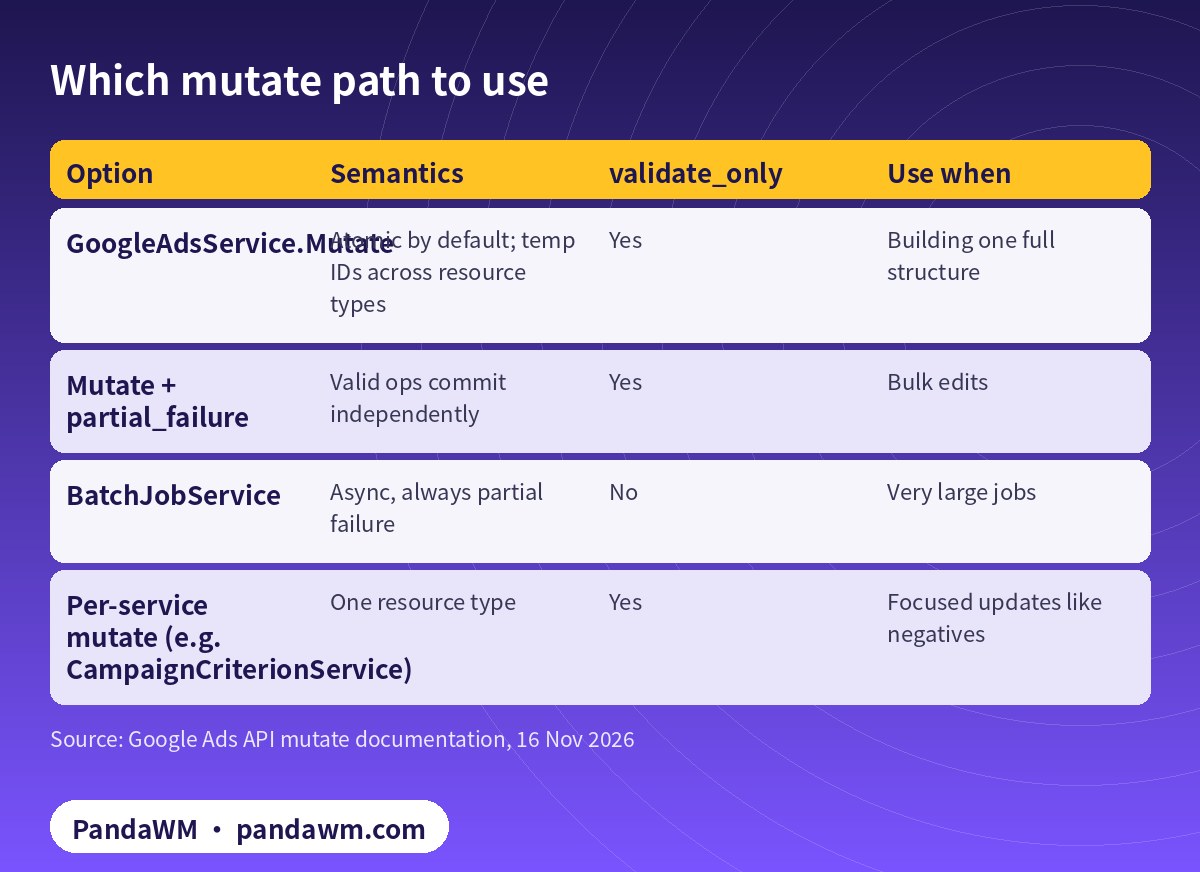
3. Pick the right mutate path
| Option | Semantics | validate_only | Use when |
|---|---|---|---|
| GoogleAdsService.Mutate | Atomic by default; temp IDs across resource types | Yes | Building one full structure |
| Mutate + partial_failure | Valid ops commit independently | Yes | Bulk edits |
| BatchJobService | Async, always partial failure | No | Very large jobs |
| Per-service mutate (e.g. CampaignCriterionService) | One resource type | Yes | Focused updates like negatives |
Every mutate request targets a single customer_id; an account cannot mutate objects created by another account unless it authenticates as an authorised manager account with the login-customer-id header (mutate resources).
4. Tell Codex the rules once
# AGENTS.md (repo root) - rules Codex reads before every task
## Google Ads automation rules
- Only touch customer IDs listed in accounts.allowlist (our own / client-authorised).
- Credentials come from ADC or a secret manager. Never print, log, commit or paste
  client secrets or refresh tokens. No developer token is needed (sunset 2026-09-09).
- Every new campaign is created with status=PAUSED. Never enable campaigns or raise
  budgets; output a change list for a human instead.
- Money fields are micros (1 unit = 1,000,000). Budget change > 20% needs a human.
- Run every mutate with validate_only=True first; commit only with --commit.
- Stay within our access level quota (Explorer: 2,880 ops/day on production).
- Ad text must follow Google Ads policies; flag health, finance, gambling,
  employment, housing and political content for human review.
- Run `pytest -q` before proposing changes.
Codex reads AGENTS.md before every task (AGENTS.md). Ask it to add a pytest suite that mocks GoogleAdsService.mutate and asserts that every campaign operation has status PAUSED and a budget in micros.
5. Run it in CI without live credentials
In CI, Codex runs unit tests only. The live validate_only call happens on a machine with ADC configured, and --commit is run by a person. codex exec defaults to a read-only sandbox, and workspace-write has network access off by default (approvals & security), which suits this split.
Quota maths
- Explorer: up to 2,880 operations per day on production accounts; Basic: 15,000; Standard: unlimited (
- access levels
- ).
- Up to 10,000 mutate operations per request (
- quotas
- ).
- Failed requests that return a GoogleAdsFailure still count, so validate first and cap retries.
How PandaWM uses Claude, Codex and Google Ads accounts to speed up client ad delivery
This guide focuses on Codex, but in day-to-day client work PandaWM combines Claude, Codex and Google Ads accounts to help companies going global move faster through the repetitive loop of account and conversion setup → campaign builds → ad copy and assets → reports and search terms → budget and negative-keyword changes, so media buyers spend their time on strategy, bidding judgement and creative.
- Ad accounts: the client’s own Google Ads account, or one opened compliantly through PandaWM’s account-opening service. The account belongs to the client and is never rented or shared; multi-account access goes through the client’s own manager account.
- Claude: natural-language reporting (GAQL) through Google’s open-source Google Ads MCP server, impression-share and search-term diagnosis, RSA headline/description and asset drafts, and asset or label creation in propose-and-confirm mode.
- Codex: writing and maintaining google-ads Python scripts (daily reports, search-term clean-up, paused campaign builds, validate_only pre-checks) that run in a sandbox, on a schedule or in CI.
- Human sign-off: a media buyer approves enabling campaigns, budget increases and bid-strategy changes, and a person makes the final call on Google Ads policy and landing-page compliance.
This describes a service capability only. There are no prices or rebates here, and PandaWM is not an official partner of Google, Anthropic or OpenAI. See Google Ads account opening & management (PandaWM service page) for account opening and management.
FAQ
Why not let Codex call the API directly with –commit?
You can, but committing is a spend decision. We keep commit and enable with people and let Codex own code, tests and dry runs.
Can the same pipeline build Performance Max?
Yes, through the API, but PMax needs asset groups and more resources; start with Search and extend.
Does Explorer access allow everything here?
Campaign, budget and criteria mutates are fine. Explorer restricts account creation, user management, planning services and billing services.
Where do I start if I have no production account?
Create a test manager account and test client accounts; they do not serve ads and have no billing (test accounts).
Compliance note: Use every workflow in this guide only on Google Ads accounts (including client accounts under a manager account) that your company owns or is formally authorised to manage, through Google’s official Google Ads API, Google’s open-source Google Ads MCP server or official tools such as Google Ads Editor. Follow the Google Ads API Terms and Conditions, API quotas and Google Ads policies, and keep a human review step before anything that can spend money. PandaWM does not sell, rent, share or transfer ad accounts, manager accounts or API credentials, does not help anyone bypass ad review, regional restrictions, identity verification or payment controls, and is not an official partner of Google, Anthropic or OpenAI. Claude and OpenAI services are only offered in their supported countries and regions; the account holder should be an entity legitimately established and operating in a supported region.
Related guides
- Google Ads account opening & management (PandaWM service page)
- Overseas AI Token service: account setup + API access (PandaWM)
- Codex config.toml for the Google Ads MCP server
- Claude × Google Ads API campaign creation (Traditional Chinese)
- How to connect Claude to Google Ads (step by step)
- Google Ads MCP server: let AI agents work on your ads
- Codex + Facebook Marketing API campaign creation pipeline
- How to get an OpenAI API key
Talk to PandaWM: Google Ads accounts + AI-assisted delivery
Tell us where your company is registered, your industry, target countries, landing page and expected monthly budget, and which part you want to automate first (reporting, search terms, assets or campaign builds). We pre-check eligibility and landing pages, help you open your own Google Ads account compliantly, and wire Claude / Codex into your workflow.
WhatsApp: +852 5904 8602Telegram: @PANDA0134WeChat: szcwh99

Official sources
- Google: Create campaigns
- Google: Mutate best practices
- Google: Mutate resources
- Google: Python client library (google-ads)
- Google: Python client library configuration
- Google: Google Ads API release notes
- Google: Developer token sunset (2026-09-09) and FAQ
- Google: Google Ads API access levels
- Google: API limits and quotas
- Google: Test accounts
- Google: Google Ads MCP server – developer integration guide
- OpenAI: Custom instructions with AGENTS.md
- OpenAI: Codex agent approvals & security
All official pages checked on 2026-11-16. API versions, tool names and permission requirements change; the official pages prevail.
 微信扫一扫打赏
 支付宝扫一扫打赏