 熊猫出海编辑团队
Last updated: 16 November 2026. Google Ads API (v26.2), Anthropic and OpenAI documentation checked that day.
Google now has an official answer to “can my AI agent work on Google Ads?”: the open-source Google Ads MCP server on GitHub (googleads/google-ads-mcp), documented in the Google Ads API developer toolkit (integration guide). It exposes Google Ads through the Model Context Protocol, so Claude, Codex, Gemini CLI, Antigravity and other MCP clients can query and act through natural language. The short version: excellent for reading and for assets, deliberately not for changing delivery.
Key facts
- Open source and self-hosted: Python 3.10+, version 0.0.6, stdio locally or Streamable HTTP on Cloud Run. It is not a Google-hosted endpoint.
- Auth: Application Default Credentials locally; an OAuth web client for remote deployments.
- Access: developer tokens were sunset on 9 September 2026; your Google Cloud project’s access level (Test, Explorer, Basic, Standard) decides what you can reach (
- FAQ
- ,
- access levels
- ).
- Support: community support via GitHub issues and the #ads-api-ai-tools channel on Discord.
Capability map
| Capability | Supported? | Notes |
|---|---|---|
| GAQL reporting | Yes | search_search builds SearchStream queries |
| Field metadata | Yes | metadata_get_resource_metadata |
| Create assets | Yes | TEXT, IMAGE, YOUTUBE_VIDEO, SITELINK, CALLOUT, STRUCTURED_SNIPPET, more via extra_params |
| Upload video | Yes, stdio only | Uploads to YouTube via the API |
| Labels | Yes | Campaign, customer, ad group, ad group criterion |
| Link assets to campaigns | No | Use UI, Editor or API |
| Campaigns, ads, budgets, bids | No | Use the Google Ads API with review |
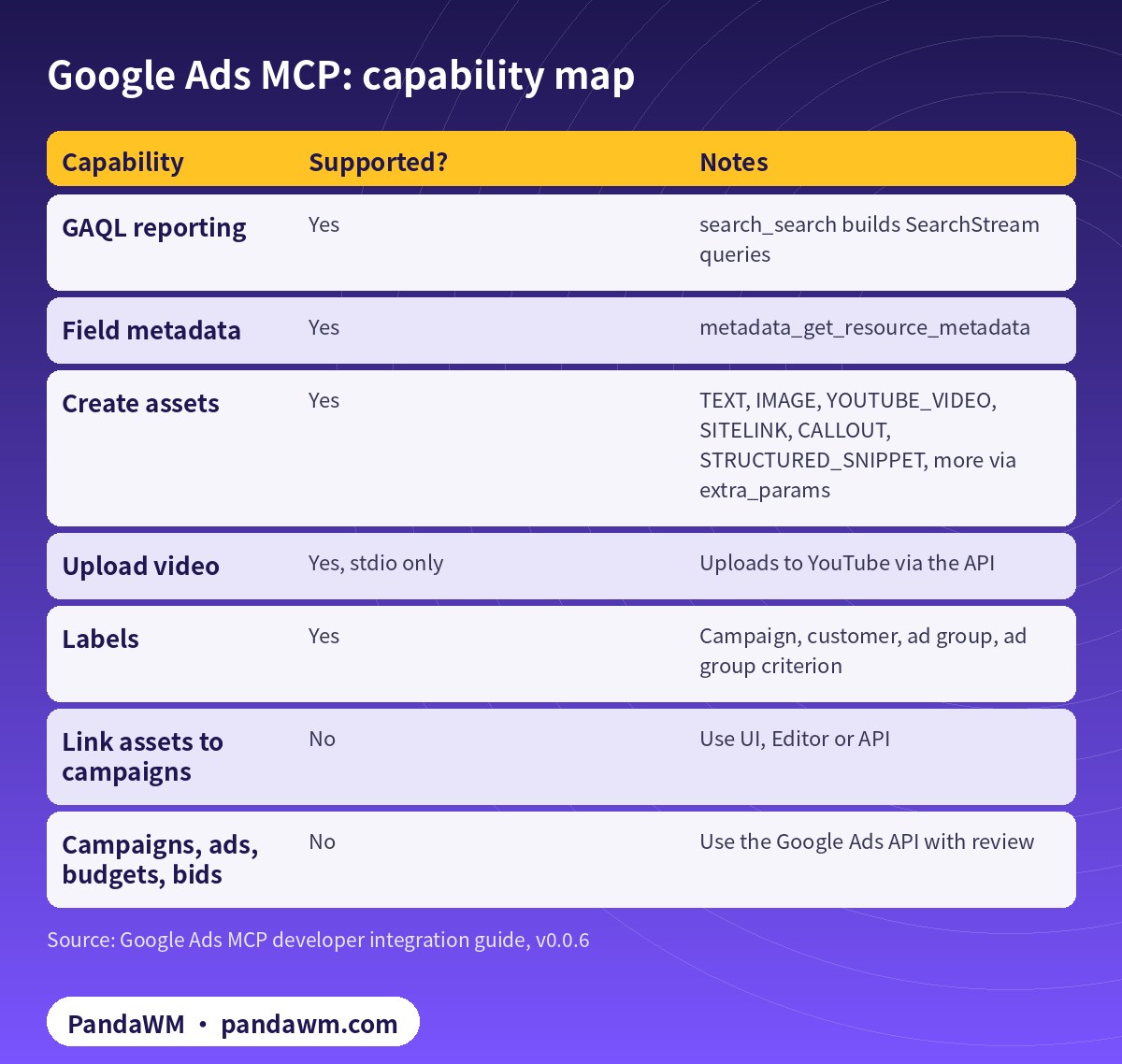
Google is explicit that the server cannot link assets, configure ad-level asset automation settings, or create, modify, pause or enable campaigns, ad groups, ads, budgets or bids. For those, it points to companion code-generation tools: agent skills and the Google Ads API Developer Assistant (agent skills).
How a request flows
- You ask, e.g. “How is my campaign performance this week?”
- The model inspects the server’s tools and resources and picks one.
- Read tools call the Google Ads API directly; write tools run in propose mode with
validate_only=True. - The server returns results, or proposed
change_itemsplus a checksum digest. - The model answers or asks you to confirm; on approval it calls again with
validate_only=Falseand the matching checksum.
Safety model
The checksum is an unkeyed SHA-256 digest of the request parameters. It prevents accidental parameter drift across turns but, in Google’s words, does not replace access control. To hard-block mutations, disable the labels and assets namespaces:
# tools_config.yaml - strictly read-only deployment
# (point GOOGLE_ADS_MCP_TOOLS_CONFIG at this file)
namespaces:
  customers: true
  search: true
  metadata: true
  labels: false
  assets: false
How it compares with Meta’s ads MCP server
Meta runs a hosted ads MCP server whose write tools can create campaigns, ad sets and ads in a paused state (see Meta ads MCP server: let AI agents manage your ads). Google’s server takes the opposite stance: self-hosted and read-heavy, with structural changes left to the API. Plan your automation accordingly.
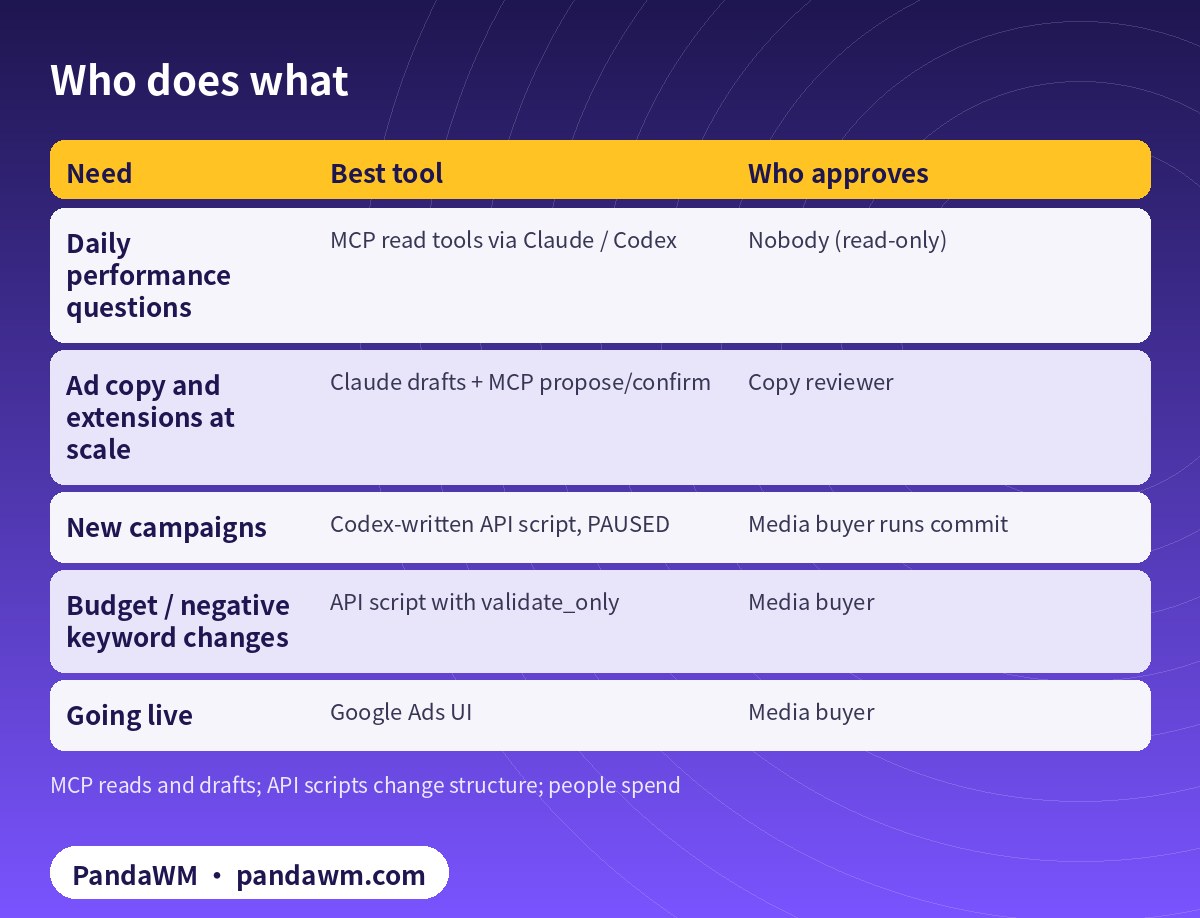
Putting it to work
| Need | Best tool | Who approves |
|---|---|---|
| Daily performance questions | MCP read tools via Claude / Codex | Nobody (read-only) |
| Ad copy and extensions at scale | Claude drafts + MCP propose/confirm | Copy reviewer |
| New campaigns | Codex-written API script, PAUSED | Media buyer runs commit |
| Budget / negative keyword changes | API script with validate_only | Media buyer |
| Going live | Google Ads UI | Media buyer |
Connection guides: Claude Code in How to connect Claude to Google Ads (step by step), Claude.ai via Cloud Run in Connect Claude.ai to Google Ads with a remote MCP server on Cloud Run, Codex in Codex config.toml for the Google Ads MCP server.
PandaWM’s full solution: Claude + Codex + Google Ads accounts for faster delivery
The Google Ads MCP server is an interface, and its write support is deliberately narrow. What actually speeds up delivery is getting accounts, AI and human process right together. PandaWM’s end-to-end service for companies going global covers:
- Compliant account opening and tracking: we help you open your own Google Ads account (or tidy up existing accounts and manager-account structure) and set up conversion tracking, enhanced conversions and GA4. The account is yours; nothing is rented or shared.
- Cloud project and permissions: enable the Google Ads API in your own Google Cloud project and apply for the right access level (Explorer, Basic or Standard). You keep the OAuth client and service accounts.
- Claude on the Google Ads MCP server: daily reporting, impression-share and search-term diagnosis, RSA and asset drafts, and asset or label creation in propose-and-confirm mode.
- Codex for API scripts: the parts the MCP server cannot do (paused campaign builds, budget changes, negative keywords). Every write runs with validate_only first and is committed only after a media buyer approves.
- Human review and retros: media buyers approve enabling, budget increases and sensitive-industry ads, and we review time saved and performance weekly.
This describes a service capability only, with no prices or rebates. PandaWM is not an official partner of Google, Anthropic or OpenAI. See Google Ads account opening & management (PandaWM service page).
FAQ
Is the Google Ads MCP server official?
It is an open-source project in Google’s googleads GitHub organisation, documented on developers.google.com, with community support.
Can an agent launch campaigns through it?
No. Use the Google Ads API for campaigns; we create them PAUSED and let a media buyer enable them.
Which API version does it target?
It bundles the google-ads Python library; when Google releases a new API version such as v26.2 you upgrade the package (pipx upgrade google-ads-mcp).
Can I use it with ChatGPT or Gemini as well?
Google’s guide includes redirect URIs for chatgpt.com and antigravity.google and config for Gemini CLI. Availability on each client depends on that client’s MCP support.
Compliance note: Use every workflow in this guide only on Google Ads accounts (including client accounts under a manager account) that your company owns or is formally authorised to manage, through Google’s official Google Ads API, Google’s open-source Google Ads MCP server or official tools such as Google Ads Editor. Follow the Google Ads API Terms and Conditions, API quotas and Google Ads policies, and keep a human review step before anything that can spend money. PandaWM does not sell, rent, share or transfer ad accounts, manager accounts or API credentials, does not help anyone bypass ad review, regional restrictions, identity verification or payment controls, and is not an official partner of Google, Anthropic or OpenAI. Claude and OpenAI services are only offered in their supported countries and regions; the account holder should be an entity legitimately established and operating in a supported region.
Related guides
- Google Ads account opening & management (PandaWM service page)
- Overseas AI Token service: account setup + API access (PandaWM)
- How to connect Claude to Google Ads (step by step)
- Connect Claude.ai to Google Ads with a remote MCP server on Cloud Run
- Claude Code guardrails for Google Ads: read-only mode and approvals
- Codex + Google Ads API Python campaign pipeline
- Google Ads MCP 服务器解读(中文版)
- Meta ads MCP server
- Prompt injection explained: enterprise defense
Talk to PandaWM: Google Ads accounts + AI-assisted delivery
Tell us where your company is registered, your industry, target countries, landing page and expected monthly budget, and which part you want to automate first (reporting, search terms, assets or campaign builds). We pre-check eligibility and landing pages, help you open your own Google Ads account compliantly, and wire Claude / Codex into your workflow.
WhatsApp: +852 5904 8602Telegram: @PANDA0134WeChat: szcwh99

Official sources
- Google: Google Ads MCP server – developer integration guide
- GitHub: googleads/google-ads-mcp
- Google: Developer token sunset (2026-09-09) and FAQ
- Google: Google Ads API access levels
- Google: Google Ads API AI agent skills
- Google: Google Ads API release notes
- Anthropic: Supported regions
- OpenAI: Supported countries and territories
All official pages checked on 2026-11-16. API versions, tool names and permission requirements change; the official pages prevail.
Further reading: TikTok Ads MCP server: let AI agents run your ads; How to connect Claude to TikTok Ads (step by step).
 微信扫一扫打赏
 支付宝扫一扫打赏