 熊猫出海编辑团队
Last updated: 16 November 2026. TikTok API for Business (v1.3), the TikTok for Business MCP Server, Anthropic and OpenAI documentation checked that day.
Claude’s apps connect to TikTok’s MCP server with a few clicks (How to connect Claude to TikTok Ads (step by step)). If you are building your own agent, for example a reporting bot or an internal media-buying assistant on the Claude Agent SDK, TikTok documents two ways to authenticate (custom agent guide).
Two authentication paths
| Path 1: OAuth 2.0 + PKCE | Path 2: API access token | |
|---|---|---|
| Who it suits | Agents acting for many TikTok users | Your own server-side jobs |
| Client registration | CIMD or DCR | Developer app on TikTok API for Business |
| Credential | Access token (~24 h) + refresh token (~30 days) | Long-term Marketing API token |
| How it is sent | Authorization: Bearer | Access-Token header |
| Scope | mcp:tt4b, bound to one server path | The advertisers that authorised your app |
| Limits | MCP limits (6 QPS per tool per user) | Plus your app’s API rate limits |
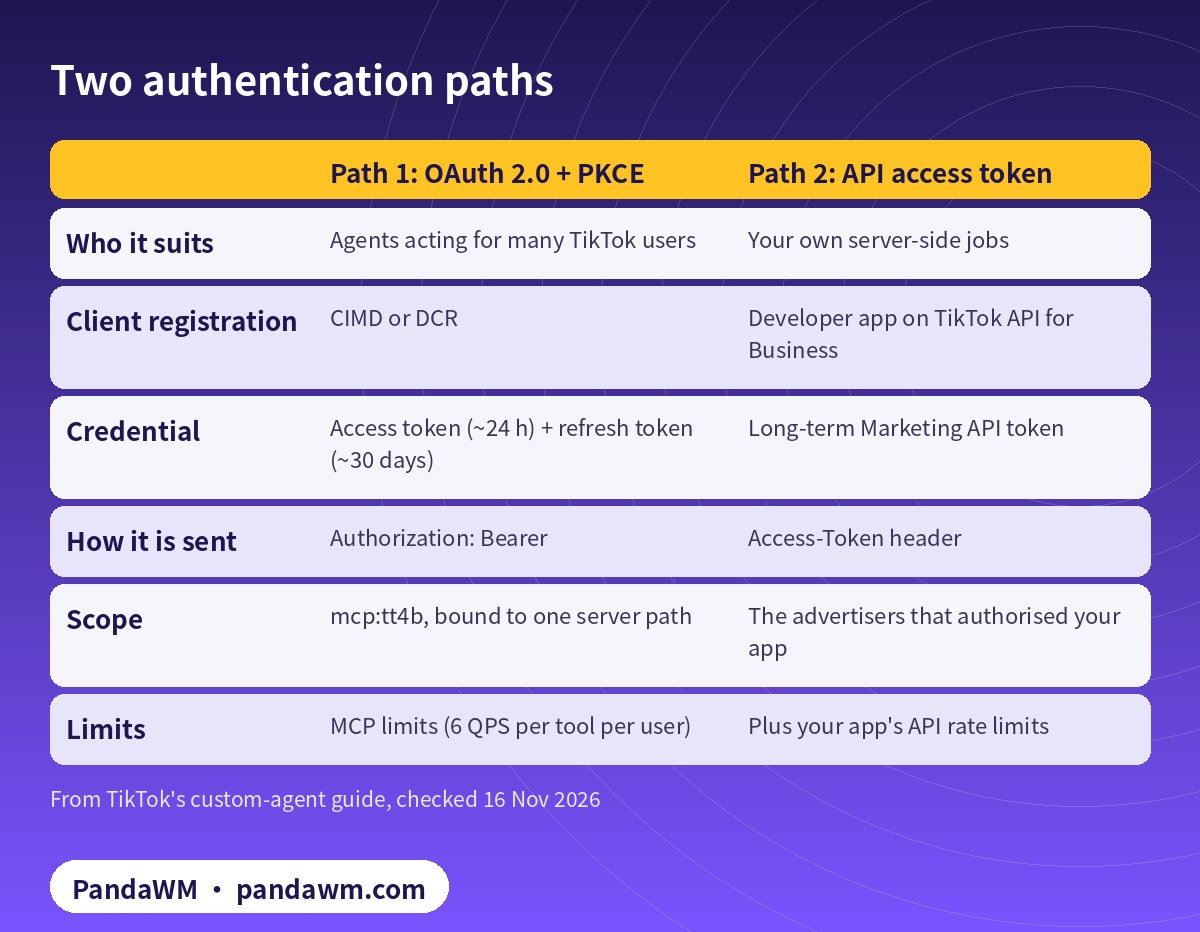
Path 1: OAuth 2.0 with PKCE
TikTok’s server supports OAuth 2.0 with PKCE (S256) and client registration through a Client ID Metadata Document (CIMD) or Dynamic Client Registration (DCR). Endpoints are discovered per server path, and tokens are scoped to the path they were issued for, so a token for -layer does not work on -flat.
# Custom agent, Path 1 (OAuth 2.0 + PKCE S256) - endpoints are per server path
SERVER=tt-ads-mcp-layer
curl -s https://business-api.tiktok.com/open_mcp/$SERVER/oauth/.well-known/openid-configuration
# authorize: https://business-api.tiktok.com/portal/mcp-tt4b-authorize
#            scope=mcp:tt4b  code_challenge_method=S256
#            resource=https://business-api.tiktok.com/open_mcp/$SERVER
# token:     https://business-api.tiktok.com/open_mcp/$SERVER/oauth/token
# access token ~24h, refresh token ~30 days; a token for -layer does not work on -flat
Path 2: an access token header
If you already have a Marketing API access token from your developer app (see Codex + TikTok Marketing API: Python Smart+ pipeline), send it in an Access-Token header. API rate limits apply in addition to MCP limits (Rate limits).
Agent SDK configuration with an approval gate
# agent.py - Claude Agent SDK + TikTok MCP via a Marketing API access token (Path 2)
import asyncio, os
from claude_agent_sdk import ClaudeSDKClient, ClaudeAgentOptions
from claude_agent_sdk.types import PermissionResultAllow, PermissionResultDeny

P = "mcp__tiktok-ads__"
READ = {P + t for t in ("advertiser_info_get", "campaign_get", "adgroup_get",
                        "ad_get", "report_integrated_get")}

async def gate(tool_name, tool_input, context):
    if tool_name in READ:
        return PermissionResultAllow(updated_input=tool_input)
    if str(tool_input.get("operation_status", "")).upper() == "ENABLE":
        return PermissionResultDeny(message="Go-live is done by a human", interrupt=True)
    if tool_name.startswith(P):
        print("\nAgent wants:", tool_name, tool_input)
        if input("Approve? [y/N] ").strip().lower() == "y":
            return PermissionResultAllow(updated_input=tool_input)
    return PermissionResultDeny(message="Not approved")

options = ClaudeAgentOptions(
    mcp_servers={"tiktok-ads": {"type": "http",
        "url": "https://business-api.tiktok.com/open_mcp/tt-ads-mcp-layer",
        "headers": {"Access-Token": os.environ["TIKTOK_ACCESS_TOKEN"]}}},
    can_use_tool=gate,          # do not also list gated tools in allowed_tools
    strict_mcp_config=True,
)

async def main():
    async with ClaudeSDKClient(options=options) as client:
        await client.query("List my advertisers and last 7 days spend by campaign.")
        async for msg in client.receive_response():
            print(msg)

asyncio.run(main())| Decision | Rule in can_use_tool |
|---|---|
| Read tools (get, report) | Allow |
| Any input with operation_status ENABLE | Deny and interrupt |
| Other tiktok-ads tools | Show the call and ask a human |
| Anything else | Deny |
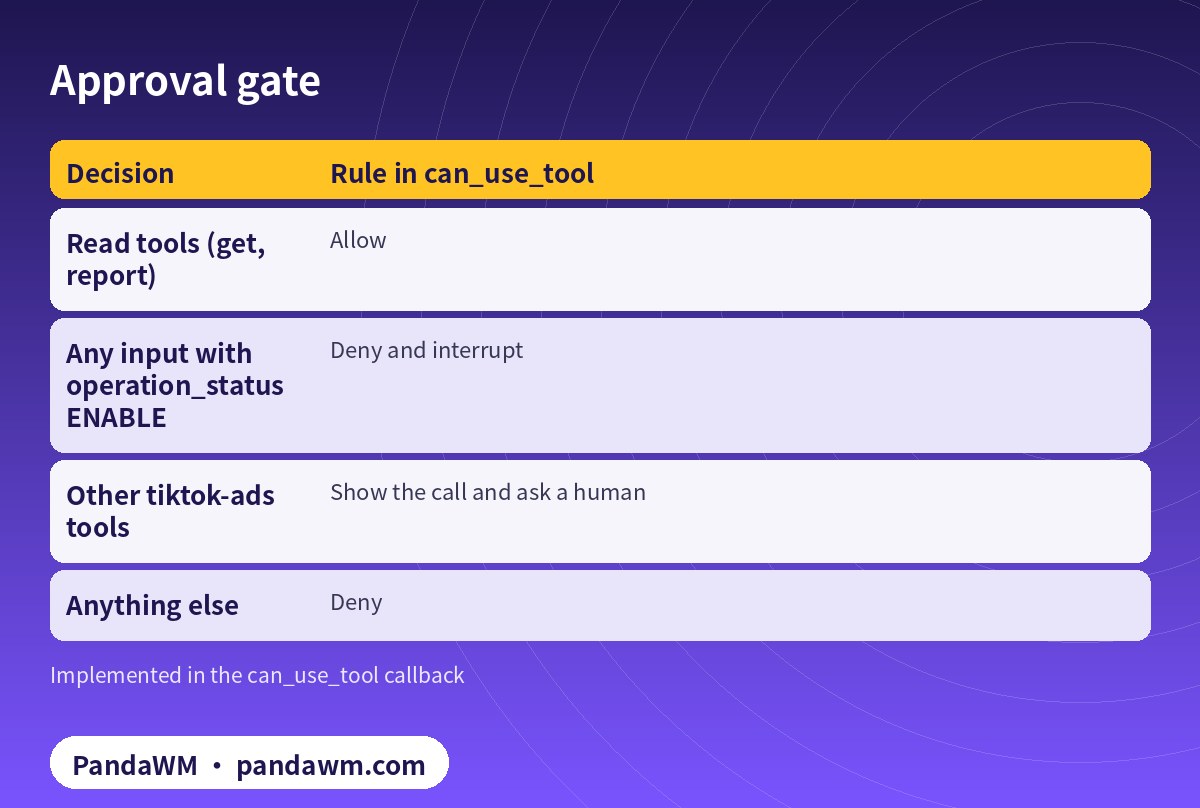
The can_use_tool callback runs before every tool call that is not already allowed (Agent SDK Python reference). Do not also list gated tools in allowed_tools, or they will bypass the gate.
Talking to the server directly
TikTok’s server speaks standard MCP JSON-RPC over Streamable HTTP. Tools carry annotations such as readOnlyHint, which your gate can use instead of a hard-coded list:
# JSON-RPC over Streamable HTTP: list tools, then call one
{"jsonrpc":"2.0","id":1,"method":"tools/list"}
{"jsonrpc":"2.0","id":2,"method":"tools/call",
 "params":{"name":"report_integrated_get",
           "arguments":{"advertiser_id":"<ADVERTISER_ID>","report_type":"BASIC",
                        "data_level":"AUCTION_CAMPAIGN",
                        "dimensions":["campaign_id"],"metrics":["spend","clicks"],
                        "start_date":"2026-11-09","end_date":"2026-11-15"}}}
Production checklist
- Store tokens in a secret manager; never in prompts, logs or git.
- Use the layer server unless you need the full library in context.
- Space calls on a single Upgraded Smart+ ad at least 5 seconds apart (
- TikTok guide
- ).
- Revoke tokens you no longer use; TikTok provides a revoke endpoint for OAuth tokens.
How PandaWM uses Claude, Codex and TikTok ad accounts to speed up client ad delivery
This guide focuses on Claude, but in day-to-day client work PandaWM combines Claude, Codex and TikTok ad accounts to help companies going global move faster through the repetitive loop of account and pixel/event setup → Smart+ campaign builds → creative upload and pre-review → reports and diagnosis → budget and rule changes, so media buyers spend their time on creative strategy, bidding judgement and scaling.
- Ad accounts: the client’s own TikTok ad account opened under its real business entity; accounts that need industry entry approval (games, finance and similar) go through TikTok’s industry entry process; accounts can also be opened through an authorised agency. Every account belongs to the client, is never rented or shared, and is managed in the client’s own Business Center.
- Claude: natural-language reporting, TikTok’s official diagnosis agent, creative organisation and Smart+ build plans through the official TikTok for Business MCP Server, with every write tool confirmed before it runs.
- Codex: Python scripts on Marketing API v1.3 (report pulls, rate-limit retries, Smart+ builds created as DISABLE with idempotent request_id) that run in a sandbox or on a schedule.
- Human sign-off: a media buyer approves turning delivery on, budget increases and bid changes, and a person makes the final call on TikTok advertising policy for creatives and landing pages.
This describes a service capability only. There are no prices or rebates here, and PandaWM is not an official partner of TikTok, Anthropic or OpenAI. See TikTok Ads account opening & management (PandaWM service page) for account opening and management.
FAQ
OAuth or token?
OAuth if your agent acts for different TikTok users; a token for your own back-office jobs.
Do I need a developer app for OAuth?
TikTok’s custom-agent guide uses CIMD or DCR for registration; a developer app is needed for the Marketing API token path.
Can I reuse a token across flat and layer?
No. OAuth tokens are bound to the server path they were issued for.
Where do I get a Claude API key?
See How to get a Claude (Anthropic) API key.
Compliance note: Use every workflow in this guide only on TikTok ad accounts (including accounts assigned to you in a Business Center) that your company owns or is formally authorised to manage, through TikTok’s official TikTok API for Business, the TikTok for Business MCP Server or TikTok Ads Manager. Follow TikTok’s advertising policies, industry entry requirements and API rate limits, and keep a human review step before anything that can spend money. PandaWM does not sell, rent, share or transfer ad accounts, Business Centers or API credentials, does not help anyone bypass ad review, industry entry, regional restrictions or identity verification, and is not an official partner of TikTok, Anthropic or OpenAI. Claude and OpenAI services are only offered in their supported countries and regions; the account holder should be an entity legitimately established and operating in a supported region.
Related guides
- TikTok Ads account opening & management (PandaWM service page)
- Overseas AI Token service: account setup + API access (PandaWM)
- How to connect Claude to TikTok Ads (step by step)
- Claude Code guardrails for the TikTok Ads MCP server
- Codex + TikTok Marketing API: Python Smart+ pipeline
- Codex config.toml for the TikTok for Business MCP server
- TikTok Ads MCP server: let AI agents run your ads
- Connect Claude.ai to Google Ads via Cloud Run (Google)
- How to get a Claude (Anthropic) API key
- Prompt injection explained: enterprise defense
Talk to PandaWM: TikTok Ads accounts + AI-assisted delivery
Tell us where your company is registered, your industry (and whether it needs industry entry approval), target countries, landing page, app or TikTok Shop, and expected monthly budget, plus which part you want to automate first (reporting, creatives, Smart+ builds or rules). We pre-check eligibility and creatives, help you open your own TikTok ad account compliantly, and wire Claude / Codex into your workflow.
WhatsApp: +852 5904 8602Telegram: @PANDA0134WeChat: szcwh99
Official sources
- TikTok: How to connect a custom agent to TikTok for Business MCP Server
- TikTok: How to connect a ready-made agent to TikTok for Business MCP Server
- TikTok API for Business: TikTok for Business MCP Server overview
- TikTok: Marketing API authentication
- TikTok: Rate limits (API for Business)
- Anthropic: Agent SDK overview
- Anthropic: Agent SDK Python reference
- Anthropic: Supported regions
All official pages checked on 2026-11-16. API versions, tool names and permission requirements change; the official pages prevail.
 微信扫一扫打赏
 支付宝扫一扫打赏