 熊猫出海编辑团队
Last updated: 2026-11-11
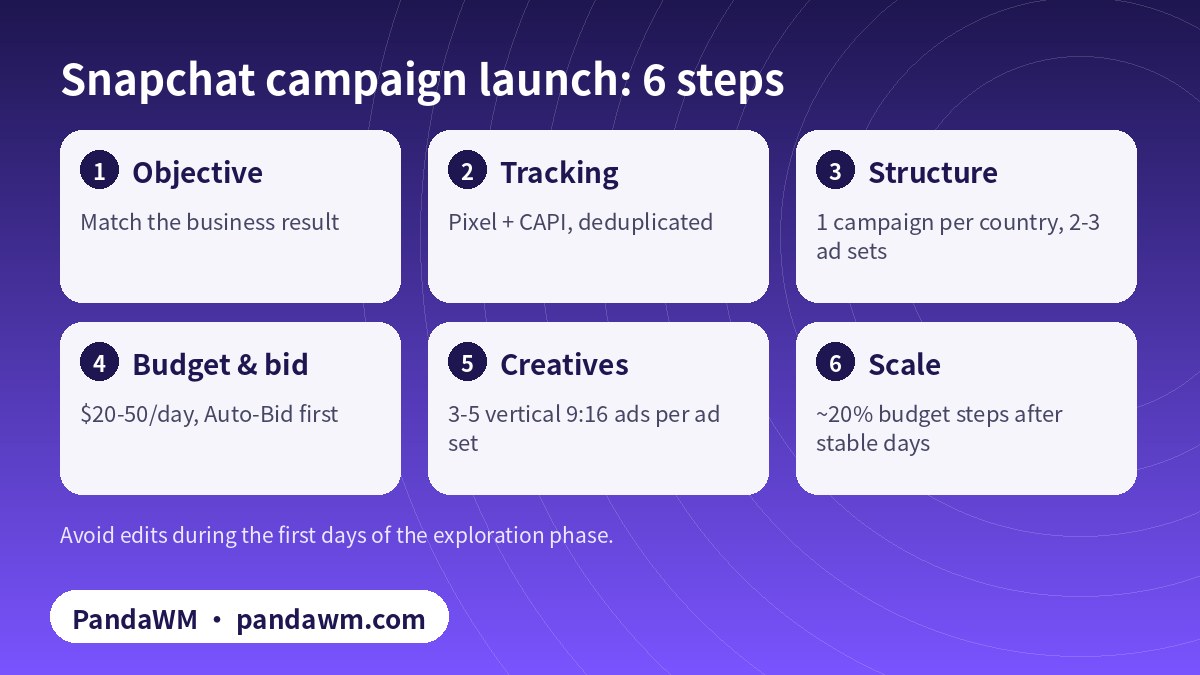
You have a Snapchat ad account. Now what? This guide is for advertisers running Snapchat from an agency or “overseas” account, often brands and app developers based in Asia selling into the US, Europe and the Gulf. It walks through the decisions that matter most in the first 30 days: the objective, tracking with Snap Pixel and the Conversions API, account structure, bidding and budget, creative testing and scaling.
If you do not have an account yet, start with Snapchat Ads agency account opening: documents and process. For a platform overview, including Ads Manager navigation, formats and cost, see Snapchat Ads Guide 2026: Ads Manager, cost and formats.
1. Choose the right objective
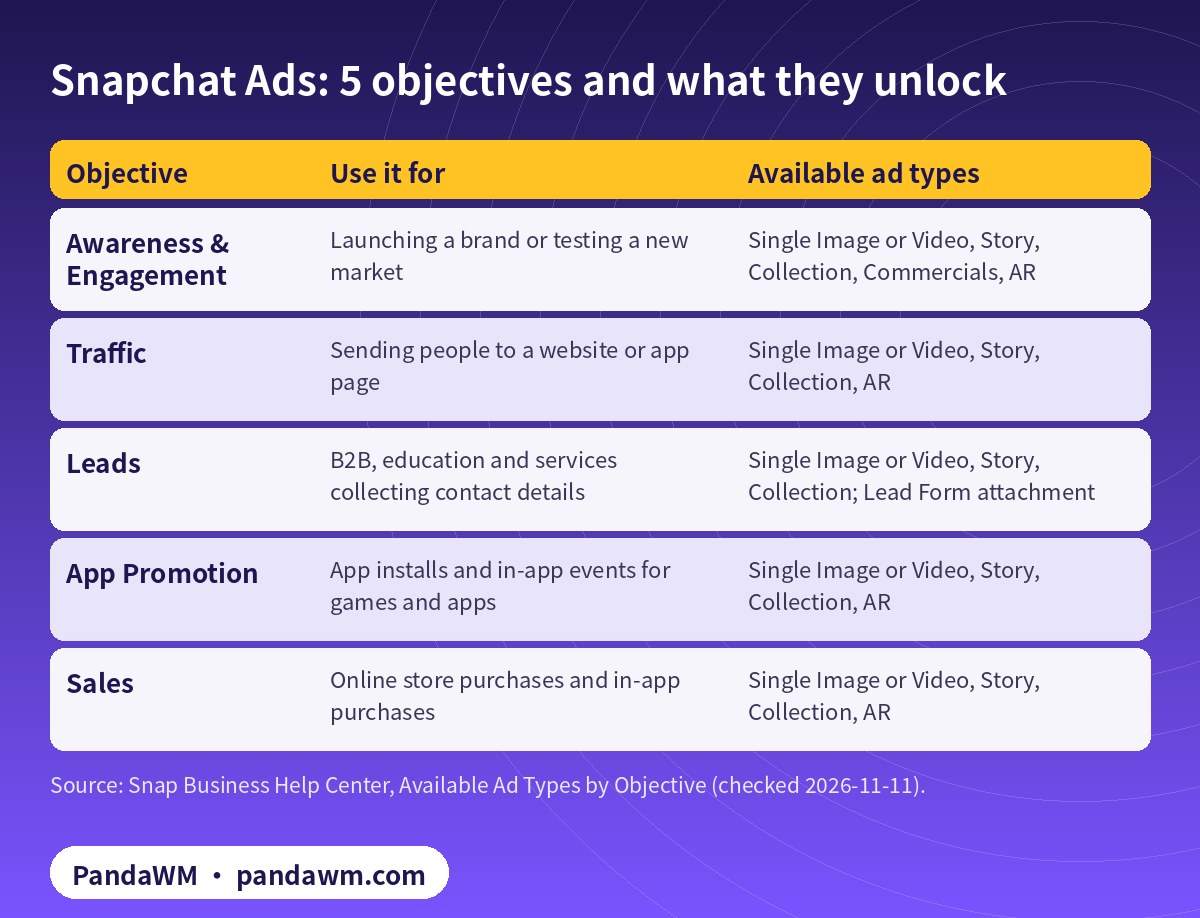
Snap has consolidated its objectives into five. The objective you choose determines which ad types are available (Snap: Available Ad Types by Objective).
| Objective | Use it for | Available ad types |
|---|---|---|
| Awareness & Engagement | Launching a brand or testing a new market | Single Image or Video, Story, Collection, Commercials, AR |
| Traffic | Sending people to a website or app page | Single Image or Video, Story, Collection, AR |
| Leads | B2B, education and services collecting contact details | Single Image or Video, Story, Collection; Lead Form attachment |
| App Promotion | App installs and in-app events for games and apps | Single Image or Video, Story, Collection, AR |
| Sales | Online store purchases and in-app purchases | Single Image or Video, Story, Collection, AR |
- Online stores: use Sales and optimise for purchases tracked by your Pixel.
- Apps and mobile games: use App Promotion for installs, then move to in-app events once you have volume.
- B2B, education and services: use Leads, either with Snap’s Lead Form or your own landing page.
- New markets: Awareness & Engagement can build initial reach, but move to a conversion objective quickly.
2. Tracking: Snap Pixel plus Conversions API
Conversion campaigns are only as good as the signals you send. Snap recommends that web advertisers run the Conversions API (CAPI) alongside the Snap Pixel, and that app advertisers run CAPI alongside an MMP (Snap: Conversions API).
2.1 What to send
- For each event:
event_name,action_source,event_timeandevent_source_url, plususer_data. - At least one matching key: hashed email, hashed phone number, or client IP address with user agent (mobile advertising ID for app events).
- Purchase value and currency for Sales campaigns, so you can read ROAS.
2.2 Deduplicate Pixel and CAPI events
When the same conversion arrives from both the Pixel and CAPI, give both the same unique ID: client_dedup_id on the Pixel and event_id in CAPI, with matching event names and the same Pixel ID. The cross-channel dedup window is 48 hours; for purchases, transaction_id and order_id can be matched for up to 30 days. Use one ID per conversion, not per session, and never send placeholders such as {{order_id}} or null (Snap: Deduplication).
2.3 Check signal health
Snap provides three tools: the Snap Pixel Helper Chrome extension, the Events Manager Test Events tool and the Event Quality Score (EQS). Snap’s guidance is to prioritise parameters most likely to match a Snapchatter, avoid duplicate requests and hard-coded values, and add CAPI to match more events (Snap: Test Signal Health).
3. Account structure that learns fast
- One campaign per country at first, so one market does not absorb the whole budget.
- Two or three ad sets per campaign: broad, interest-based and retargeting audiences.
- Smart Placement for scale; split out placements only when you have enough data to compare.
- Three to five creatives per ad set, so delivery can favour the winners.
- Exclusions: exclude recent purchasers from prospecting ad sets once your Pixel audiences are large enough.
4. Budget and bidding
Snap’s minimum daily spend is $5, but Snap recommends at least $20–50 per day so ads complete the exploration phase, which typically lasts 4 days or more depending on the objective (Snap: Snapchat Ads Pricing). Daily budgets work on calendar days, and dayparting needs a lifetime budget (Snap: Set an Ad Set Budget).
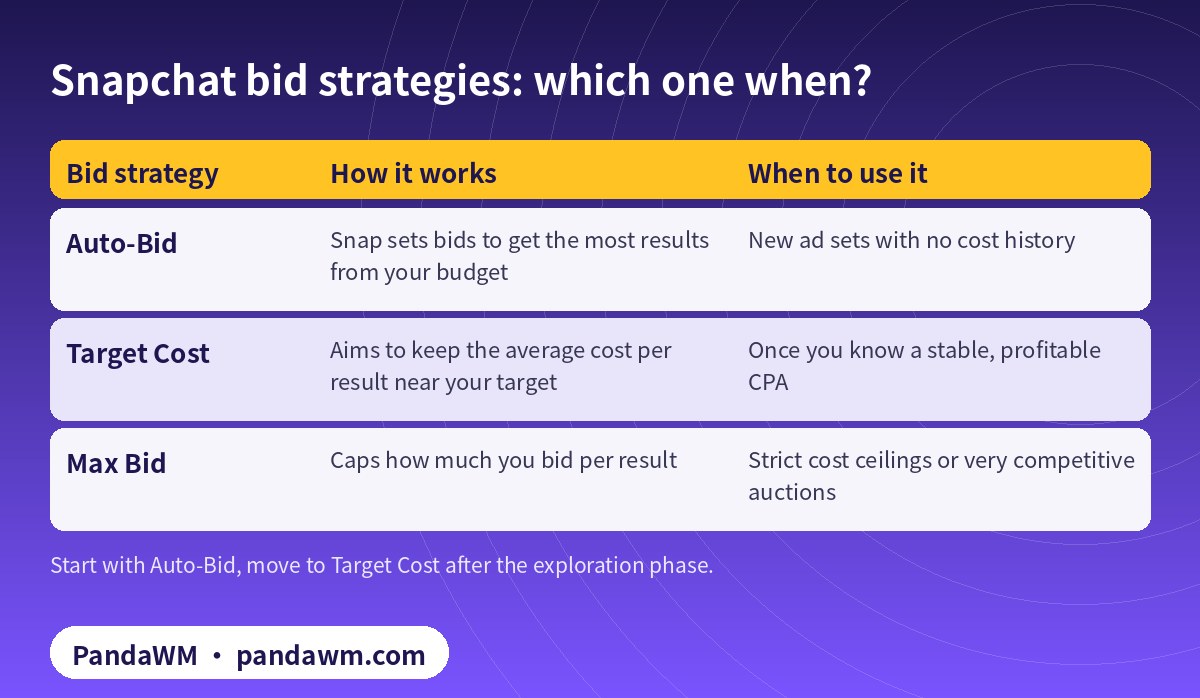
| Bid strategy | How it works | When to use it |
|---|---|---|
| Auto-Bid | Snap sets bids to get the most results from your budget | New ad sets with no cost history |
| Target Cost | Aims to keep the average cost per result near your target | Once you know a stable, profitable CPA |
| Max Bid | Caps how much you bid per result | Strict cost ceilings or very competitive auctions |
Practical rule: if your target CPA is, say, $20, a daily budget that allows several conversions per ad set per day will exit exploration faster than a $5 budget spread across many ad sets. Fewer, better-funded ad sets beat many starved ones.
5. Creative that works on Snapchat
- Format: full-screen 9:16, 1080×1920 recommended; video in MP4 or MOV (H.264) up to 1 GB; images up to 5 MB (
- Snap: Single Image or Video Specifications
- ).
- Copy limits: brand name up to 32 characters and headline up to 34 characters, and they cannot be identical.
- First two seconds: show the product, the problem or the offer immediately. Snapchatters swipe fast.
- Native style: phone-shot, person-to-camera and UGC-style videos usually look more at home than polished TV spots.
- Sound on: many users watch with sound, so use voice-over and captions together.
- More formats: test Collection ads for catalogues, Story ads for multiple products, and Sponsored Snaps, which deliver in the Chat feed (
- Snap: Sponsored Snaps
- ).
A simple creative testing loop
- Launch 3–5 concepts per ad set: different hooks, not just different colours.
- After the exploration phase, pause concepts with clearly worse cost per result.
- Make 2–3 variations of the winner: new hook, new first frame, new voice-over.
- Refresh creatives every few weeks or when frequency rises and results fall.
6. Scaling without breaking learning
- Raise budgets in steps of around 20% after several stable days, rather than doubling overnight.
- Duplicate winning ad sets into new audiences or new countries instead of over-editing the original.
- Avoid changing targeting, bid and creative at the same time during the first days.
- Watch cost per result and ROAS, not only CPM.
7. Market notes for overseas accounts
- United States: competitive; refresh creatives often; alcohol must target 21+ (
- Snap: Regulated Goods
- ).
- Saudi Arabia and the UAE: localise into Arabic; dating and alcohol ads cannot target these countries (
- Snap: Dating
- ).
- Europe: localise by country and make sure privacy and cookie notices on landing pages meet local rules.
- Restricted categories: gambling needs a licence and Snap pre-approval submitted by the advertiser itself; certain crypto products need prior approval (
- Snap: Gambling
- ;
- Snap: Financial Products
- ).
8. 30-day optimization checklist
- Days 1–3: confirm Pixel and CAPI events in Test Events; no edits unless something is broken.
- Days 4–7: check EQS and dedup; pause clearly failing creatives.
- Week 2: add variations of winners; test a second audience type.
- Week 3: move proven ad sets to Target Cost if CPA is stable.
- Week 4: scale budgets in steps; expand to a second country with localised creative.
9. Reading your Snapchat reports
Ads Manager reports a long list of columns. For conversion campaigns, a short set tells you most of what you need:
- Cost per result (purchase, install, lead) against your target. This is the main decision metric.
- ROAS for Sales campaigns, which needs purchase value and currency in your Pixel and CAPI events.
- Swipe-up or click rate: a low rate usually points to a weak hook or the wrong audience, not the bid.
- Conversion rate after the click: a high click rate with few conversions points to the landing page, its speed, language or checkout.
- Frequency: rising frequency with falling results means creative fatigue; refresh before you raise the budget.
- Event match and EQS: if reported conversions are far below your store’s orders, fix tracking before you judge the campaign.
Compare Snapchat results with your own backend or MMP data over the same attribution window. Platforms count conversions differently, so look for consistent trends rather than identical numbers.
10. Common mistakes on new overseas accounts
- Launching with Awareness when the goal is sales, then judging it on purchases.
- Turning on conversion optimisation before the Pixel has fired any events.
- Splitting a small budget across too many ad sets, so none exits exploration.
- Recycling horizontal or square creatives designed for other platforms.
- Sending traffic to a landing page in the wrong language or with slow mobile load times.
- Editing bids, audiences and creatives every day during the first week.
- Opening new accounts to keep running ads that were rejected. That is circumvention and puts every linked asset at risk.
Frequently asked questions
Do I need the Conversions API if I already have the Snap Pixel?
It is strongly recommended. Snap advises running CAPI alongside the Pixel for web, and the combination helps match more conversions. Deduplicate with client_dedup_id and event_id.
How long is the exploration phase?
Snap says it typically lasts 4 days or more depending on the objective. Avoid major edits during that time.
What daily budget should I start with?
The minimum is $5 per day, but Snap recommends at least $20–50 per day per ad set to exit exploration faster.
Which bid strategy should a new account use?
Start with Auto-Bid. Move to Target Cost once you have a stable cost per result, and use Max Bid only when you need a strict ceiling.
Are agency or overseas accounts optimised differently?
No. The account type does not change delivery or review. The same objectives, bidding and tracking apply.
Can PandaWM run the campaigns for us?
Yes. Choose managed campaigns and we handle setup, tracking checks, creative testing and optimisation; or choose account opening only and run it yourself.
Compliance note: PandaWM only helps eligible, licensed or certified businesses open accounts, apply for authorization or verification, and run ads through the platforms’ official processes. We do not sell, rent or transfer ad accounts, and we do not offer ways to bypass review, cloak landing pages or advertise prohibited products. No approval is guaranteed. Platform policies change; the official pages prevail. This article is not legal advice.
Related guides
- All-media ads agency: Snapchat, X, LinkedIn and 20+ platforms
- Snapchat Ads agency account opening: documents and process
- Snapchat Ads Guide 2026: Ads Manager, cost and formats
- Traditional Chinese: Snapchat 廣告開戶與投放指南
- Simplified Chinese: Snapchat海外户与投放优化
Talk to PandaWM about Snapchat Ads
Send us where your company is registered, what you sell, your target countries, your landing page or app link and your expected monthly budget. We pre-check eligibility and creatives first, then recommend an account route. You choose one of two models: account opening only (we open and structure the account and set up access; your team runs the ads) or managed campaigns (we also build, test and optimise). Accounts are opened through our agency channel, and the usage rights and all advertising data belong to you. We cannot guarantee any review outcome.
- WhatsApp: https://wa.me/85259048602
- Telegram: https://t.me/PANDA0134
- WeChat: szcwh99 (scan the QR code)
Official sources
- Available Ad Types by Objective
- Conversions API: Using the API
- Conversions API: Deduplication
- Test Signal Health
- Snapchat Ads Pricing
- Set an Ad Set Budget
- Single Image or Video Specifications
- Sponsored Snaps
- Regulated Goods
- Dating
- Gaming, Gambling and Lotteries
- Financial Products and Services
Snap pages checked on 2026-11-11. Platform rules change; the official pages prevail.
 微信扫一扫打赏
 支付宝扫一扫打赏