 熊猫出海编辑团队
Last updated: 2026-11-11
Snapchat reaches young, mobile-first audiences in markets such as the United States, the UK, France, Saudi Arabia and the UAE. For brands, app developers and game studios based in mainland China, Hong Kong, Taiwan and Southeast Asia, the first hurdle is usually not the campaign. It is getting a working Snapchat ad account: which entity to use, what documents to prepare, whether to self-serve or work with a Snapchat ads agency, and why the first ads get rejected.
This guide focuses only on account opening. For an overview of Snapchat Ads Manager, ad formats and cost, read Snapchat Ads Guide 2026: Ads Manager, cost and formats. Once your account is live, use Snapchat Ads campaign setup and optimization: objectives, Pixel, CAPI and bidding to build and optimise campaigns.
1. Before you open an account: entity, category and markets
1.1 Which company should be the advertiser
A company registered in mainland China can advertise on Snapchat, and so can a company registered in Hong Kong, Singapore, the US or elsewhere. What matters is that the entity, website, brand name and payer line up. Snap’s creative specifications say the brand name on an ad must reflect the paying advertiser whose products or services are being advertised (Snap: Single Image or Video Specifications). Running a brand you do not own under your company’s account is one of the most common reasons for rejection.
1.2 Can your category run on Snapchat?
- E-commerce, consumer brands, apps and mobile games: generally allowed. Creatives must be suitable for viewers aged 13+.
- Gambling, lotteries and real-money games: you need a valid licence for every target country and written pre-approval from Snap. Snap states that the application must be submitted directly by the advertiser; it does not accept submissions from agencies or other third parties (
- Snap: Gaming, Gambling and Lotteries
- ).
- Financial services and loans: material terms must be disclosed before an application is submitted; loan ads must show APR, repayment period and fees; payday loans are prohibited. Crypto wallets and trading platforms may require prior approval from Snap (
- Snap: Financial Products and Services
- ).
- Dating: 18+ targeting only, and not allowed in countries including Saudi Arabia, the UAE, Egypt and Qatar (
- Snap: Dating
- ).
- Alcohol: age-targeted to the legal drinking age (21+ in the US) and not allowed in countries such as Saudi Arabia, the UAE and Turkey (
- Snap: Regulated Goods
- ).
- Weapons and explosives: prohibited.
1.3 Markets shape the details
Decide your target countries first. They determine the landing page language, which categories you can run, age targeting and the currency that makes most sense for billing.
2. How a Snapchat ad account is structured
- Business (organization): your company. It holds payment methods, members and business details.
- Public Profile: your brand’s public identity on Snapchat. Snap says Public Profiles are required for advertising, and you cannot create a new ad account without selecting or creating one (
- Snap: How to Create an Ad Account
- ). They are free, and each needs a unique email (
- Snap: Set up a Public Profile
- ).
- Ad account: where the spend happens. You choose the account type, billing type, currency and time zone when you create it, and none of these four can be changed later.
- Campaign → ad set → ad: the campaign sets the objective; the ad set holds budget, bid, audience and placements; the ad holds the creative, brand name, headline and call to action.
Access is role-based. At organization level Snap offers Admin, Business Admin, Data Admin (reporting only), Agency Admin and Member roles. At ad account level there are Admin, General, Creative, Reports and Audience roles, among others. A person must be a member of the organization before they can receive an ad account role (Snap Marketing API: Roles; Snap: Add a Member to an Ad Account). In an agency setup this is how work is split: the agency manages the account and structure, and your team gets General or Reports access as needed.
3. Self-serve or a Snapchat ads agency?
| Topic | Self-serve account | Agency account (“overseas account”) |
|---|---|---|
| How it is opened | Advertiser signs up at ads.snapchat.com | Opened through an agency channel; the agency pre-checks and sets it up |
| Billing | Advertiser adds its own payment method | Follows the agency’s billing arrangement, usually in USD |
| Support | Advertiser files its own support tickets | Agency helps with rejections, billing and account issues |
| Access and data | Fully self-managed | Agency manages structure; usage rights and data belong to the advertiser |
| Ad review | Every ad is reviewed | Exactly the same review; no lighter or skipped review |
| Best for | Brands with an overseas entity and in-house team | Asia-based exporters, first-time Snapchat advertisers, teams wanting managed campaigns |
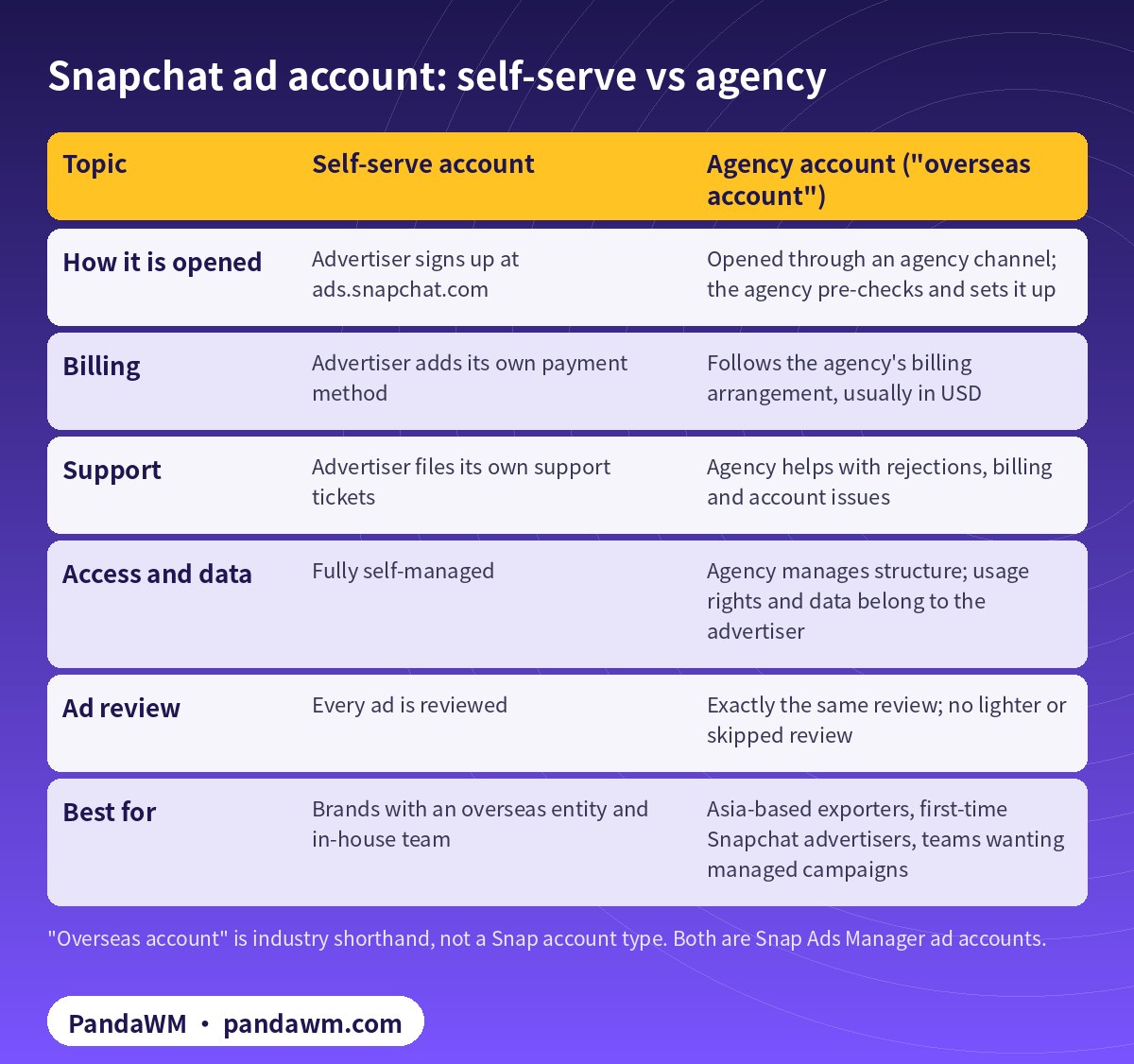
In the Chinese-speaking market you will hear the term “overseas account” (海外户). It is industry shorthand for an agency account opened through an overseas agency channel and billed in USD. It is not a special account type, and it does not change the rules. When you create an ad account, Snap itself asks whether you are an agency buying ads on behalf of an advertiser (Snap: How to Create an Ad Account). Agency accounts are a normal, platform-recognised way to advertise.
Be clear about what an agency account is not. It is not a bought or rented account. The advertiser is your own company, and the usage rights and advertising data belong to you. Offers of “no-review” or “any category” accounts describe ways around Snap’s review, which Snap does not allow. PandaWM does not offer them.
When an agency account makes sense
- You are a mainland China company and want USD billing for the US, Europe or the Middle East.
- You run Meta, TikTok and Google too and want one partner for account opening and reconciliation.
- You have no in-house Snapchat buyer and want managed campaigns, or you have buyers and only need the account.
- You are a licensed advertiser in a restricted category and want help preparing documents.
4. Documents checklist
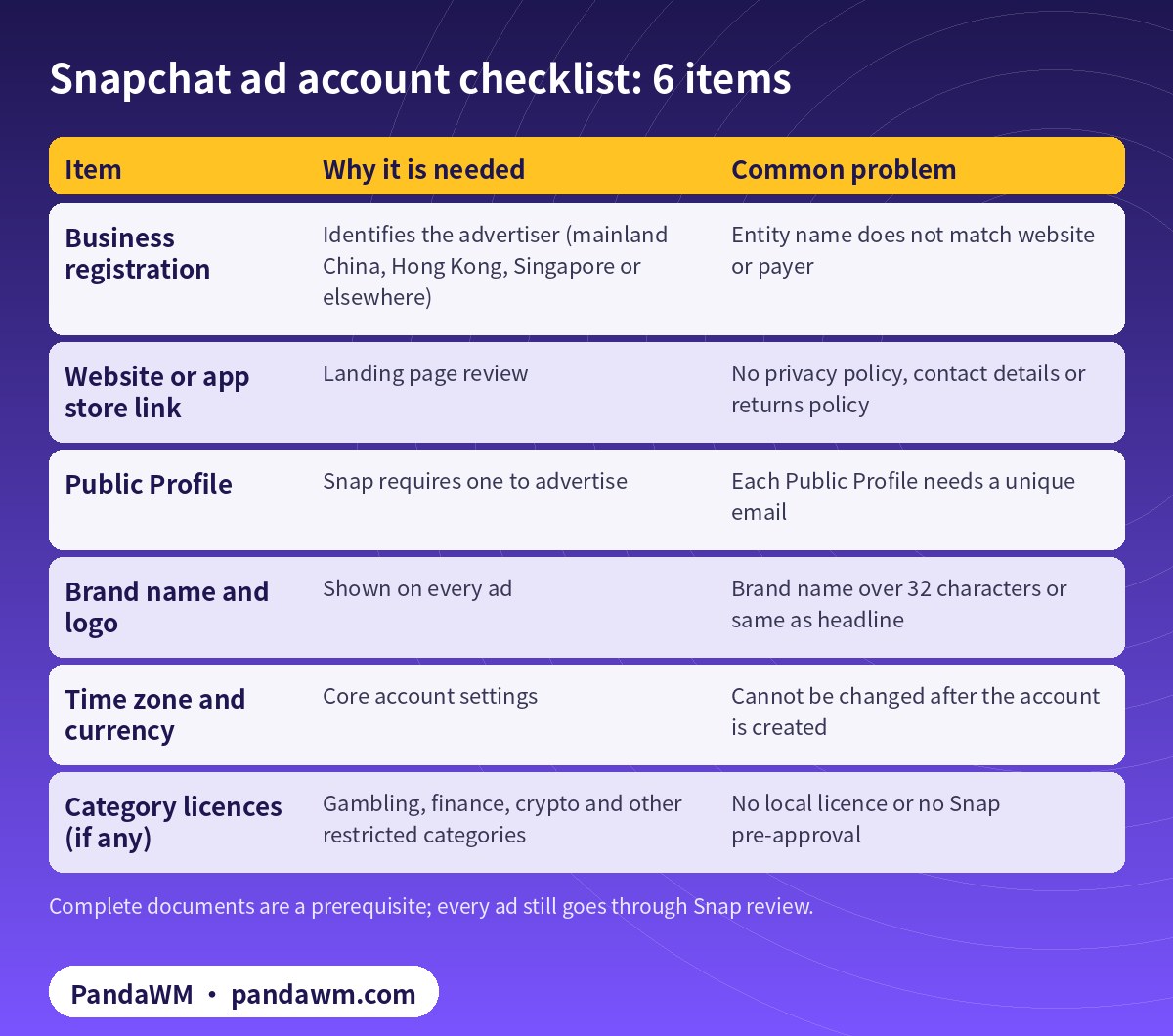
| Item | Why it is needed | Common problem |
|---|---|---|
| Business registration | Identifies the advertiser (mainland China, Hong Kong, Singapore or elsewhere) | Entity name does not match website or payer |
| Website or app store link | Landing page review | No privacy policy, contact details or returns policy |
| Public Profile | Snap requires one to advertise | Each Public Profile needs a unique email |
| Brand name and logo | Shown on every ad | Brand name over 32 characters or same as headline |
| Time zone and currency | Core account settings | Cannot be changed after the account is created |
| Category licences (if any) | Gambling, finance, crypto and other restricted categories | No local licence or no Snap pre-approval |
- Website: match the landing page language to the target market and show your company name, contact details, privacy policy and returns policy.
- Brand name and headline: up to 32 and 34 characters including spaces, and the brand name cannot be the same as the headline (
- Snap creative specs
- ).
- Payment: Snap Ads Manager supports payment methods such as credit cards, and qualified advertisers can apply for a line of credit (
- Snap: Billing & Payments
- ;
- Snap: Establish a Line of Credit
- ). With an agency account, billing follows the agency arrangement.
- Billing type: “Revolving” for ongoing campaigns, or “Insertion Order” for a one-time campaign with a spend cap (
- Snap: create an ad account
- ).
5. Agency account opening in 6 steps
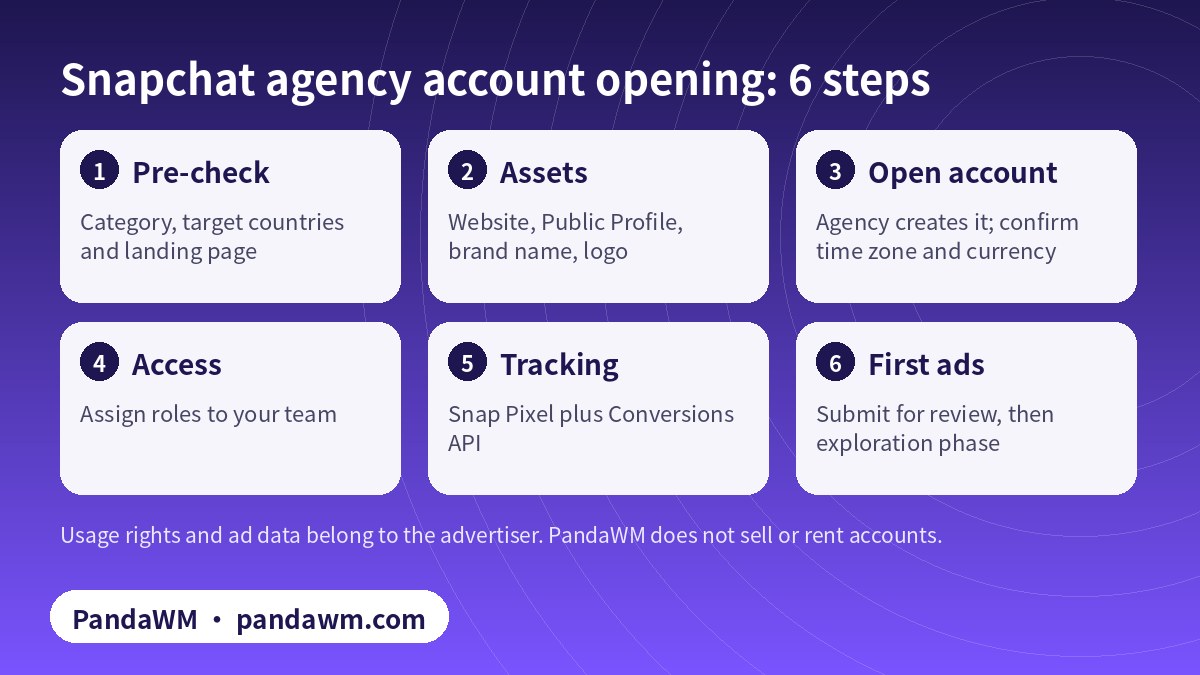
- Pre-check: send your category, target countries and landing page or app link to the agency.
- Prepare assets: website, Public Profile, brand name, logo and a first batch of 9:16 vertical creatives (1080×1920 recommended).
- Open the account: the agency creates it through its channel. Confirm time zone and currency before it is created, and answer the housing, credit and employment question accurately.
- Assign access: with “account opening only”, your media buyer usually gets the General role and builds campaigns directly.
- Install tracking: Snap Pixel on your site, ideally with the Conversions API as well. Apps use an MMP plus Conversions API.
- Submit the first ads: every ad is reviewed before it delivers, and editing an approved ad or ad set can send it back to review.
Snap does not publish a fixed review time. Submit ads at least one business day before your planned launch, and allow more time for restricted categories that need pre-approval.
6. Budget and cost
Creating a Public Profile is free. Snap’s minimum daily spend is $5, but it recommends at least $20–50 per day so ads can finish the exploration phase, which typically lasts 4 days or more depending on the objective (Snap: Snapchat Ads Pricing). Dayparting requires a lifetime budget (Snap: Set an Ad Set Budget). Agency service fees vary by category, market and spend; PandaWM quotes individually and does not publish discount or rebate rates.
7. Why new Snapchat ads get rejected
- The brand name does not match the paying advertiser, or uses someone else’s trademark.
- The landing page is broken, slow, does not match the ad, or lacks a privacy policy and contact details.
- The creative is not full-screen vertical, or text covers key content.
- Exaggerated claims such as guaranteed returns, guaranteed weight loss or “100% effective”.
- A restricted category without the required licence or Snap pre-approval.
- Targeting countries the category is not allowed in, such as dating ads in the Gulf.
- Content not suitable for viewers aged 13+.
- Cloaking or redirects that show reviewers a different page from users. This is circumvention and leads to account loss.
Frequently asked questions
Can a mainland China company open a Snapchat ad account?
Yes. A mainland China company can be the advertiser and open an account through an agency channel to reach overseas markets. Hong Kong and other overseas entities can too. The entity, website, brand name and payer should match.
Do I need a Public Profile?
Yes. Snap requires a Public Profile to advertise, and you cannot create a new ad account without selecting or creating one. It is free.
Is an agency or “overseas” account reviewed more lightly?
No. Every ad goes through the same Snap review regardless of how the account was opened.
What is the minimum spend on Snapchat?
$5 per day is the minimum; Snap recommends $20–50 per day to complete the exploration phase faster.
I picked the wrong currency or time zone. Can I change it?
No. Account type, billing type, currency and time zone are fixed at creation. You need a new ad account.
Can an agency submit my gambling pre-approval?
No. Snap requires gambling advertisers to submit the application themselves. An agency can help you prepare, but the licensed advertiser must apply directly.
Can I run the ads myself after the agency opens the account?
Yes. Choose “account opening only” and your team runs campaigns with the access we assign. Or choose managed campaigns and we handle setup, testing and optimisation.
Compliance note: PandaWM only helps eligible, licensed or certified businesses open accounts, apply for authorization or verification, and run ads through the platforms’ official processes. We do not sell, rent or transfer ad accounts, and we do not offer ways to bypass review, cloak landing pages or advertise prohibited products. No approval is guaranteed. Platform policies change; the official pages prevail. This article is not legal advice.
Related guides
- All-media ads agency: Snapchat, X, LinkedIn and 20+ platforms
- Snapchat Ads Guide 2026: Ads Manager, cost and formats
- Snapchat Ads campaign setup and optimization: objectives, Pixel, CAPI and bidding
- Traditional Chinese: Snapchat 廣告開戶與投放指南
- Simplified Chinese: Snapchat广告开户流程与资料清单
Talk to PandaWM about Snapchat Ads
Send us where your company is registered, what you sell, your target countries, your landing page or app link and your expected monthly budget. We pre-check eligibility and creatives first, then recommend an account route. You choose one of two models: account opening only (we open and structure the account and set up access; your team runs the ads) or managed campaigns (we also build, test and optimise). Accounts are opened through our agency channel, and the usage rights and all advertising data belong to you. We cannot guarantee any review outcome.
- WhatsApp: https://wa.me/85259048602
- Telegram: https://t.me/PANDA0134
- WeChat: szcwh99 (scan the QR code)
Official sources
- How to Create an Ad Account
- How to Set up a Public Profile for Your Business
- Snap Marketing API: Roles
- Add a Member to an Ad Account
- Single Image or Video Specifications
- Billing & Payments in Ads Manager
- How to Establish a Line of Credit
- Snapchat Ads Pricing
- Set an Ad Set Budget
- Gaming, Gambling and Lotteries
- Financial Products and Services
- Dating
- Regulated Goods
- Snap Advertising Policies
Snap pages checked on 2026-11-11. Platform rules change; the official pages prevail.
 微信扫一扫打赏
 支付宝扫一扫打赏