 熊猫出海编辑团队
Last updated: 16 November 2026. Google Ads API (v26.2), Anthropic and OpenAI documentation checked that day.
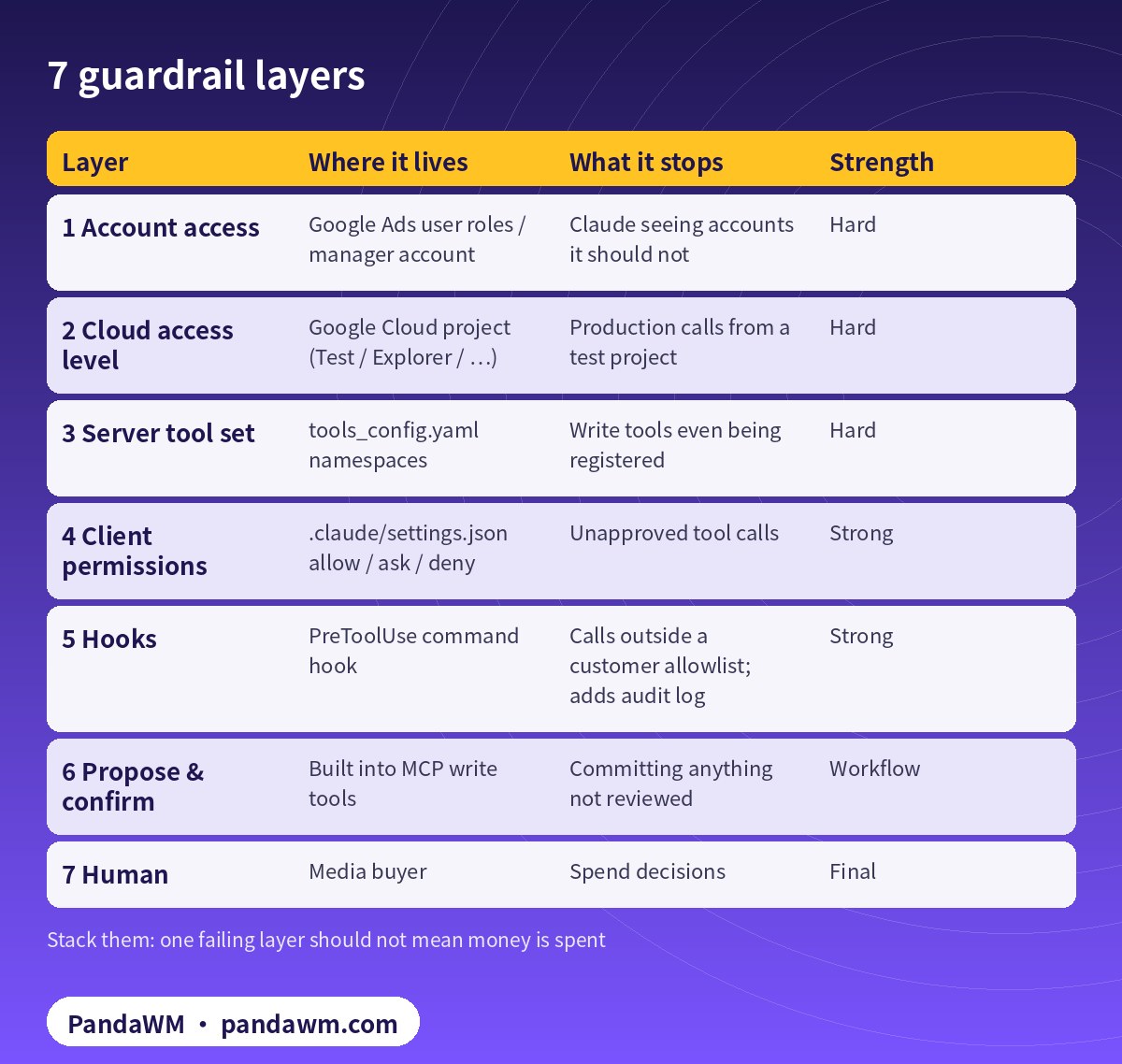
Letting an AI agent anywhere near an ad account with a credit line needs more than good prompts. The good news: Google’s open-source Google Ads MCP server was designed with safety in mind, and Claude Code adds its own permission system, hooks and an SDK approval callback. Stack them and you get an agent that is genuinely useful but cannot spend money on its own.
The seven layers
| Layer | Where it lives | What it stops | Strength |
|---|---|---|---|
| 1 Account access | Google Ads user roles / manager account | Claude seeing accounts it should not | Hard |
| 2 Cloud access level | Google Cloud project (Test / Explorer / …) | Production calls from a test project | Hard |
| 3 Server tool set | tools_config.yaml namespaces | Write tools even being registered | Hard |
| 4 Client permissions | .claude/settings.json allow / ask / deny | Unapproved tool calls | Strong |
| 5 Hooks | PreToolUse command hook | Calls outside a customer allowlist; adds audit log | Strong |
| 6 Propose & confirm | Built into MCP write tools | Committing anything not reviewed | Workflow |
| 7 Human | Media buyer | Spend decisions | Final |
Layer 2: the Cloud project decides production access
Developer tokens were sunset on 9 September 2026. API access levels now belong to the Google Cloud project that owns your OAuth client or service account (Google’s FAQ). Enabling the API grants Test access, which only works on test accounts. Production needs Explorer (up to 2,880 operations per day on production accounts) or higher (access levels). A useful pattern: keep a separate Test-level project for development, so a mis-configured dev agent physically cannot touch live accounts.
Layer 3: switch write tools off at the server
The server reads a tools_config.yaml. When namespaces is non-empty, any category you leave out is disabled, and Google documents a strictly read-only setup by setting labels and assets to false. Point GOOGLE_ADS_MCP_TOOLS_CONFIG at your file:
# tools_config.yaml - strictly read-only deployment
# (point GOOGLE_ADS_MCP_TOOLS_CONFIG at this file)
namespaces:
  customers: true
  search: true
  metadata: true
  labels: false
  assets: false
Layer 4: Claude Code permission rules
Since v0.0.6 tools carry namespace prefixes, so the Claude Code names look like mcp__google-ads__search_search. Allow reads, ask for writes, deny what you never want (Claude Code permissions):
// .claude/settings.json - reads allowed, asset/label writes always asked
{
  "permissions": {
    "allow": [
      "mcp__google-ads__customers_list_accessible_customers",
      "mcp__google-ads__search_search",
      "mcp__google-ads__metadata_get_resource_metadata"
    ],
    "ask": [
      "mcp__google-ads__assets_create_asset",
      "mcp__google-ads__labels_manage_labels",
      "mcp__google-ads__labels_manage_label_associations"
    ],
    "deny": [
      "mcp__google-ads__assets_upload_video_asset"
    ]
  }
}
Layer 5: a PreToolUse hook as allowlist and audit log
Hooks run your own script before a tool call and can deny it (hooks reference). This one logs every Google Ads call and blocks any customer ID that is not on your allowlist:
// .claude/settings.json (excerpt) - log every Google Ads MCP call
{
  "hooks": {
    "PreToolUse": [
      {
        "matcher": "mcp__google-ads__.*",
        "hooks": [{ "type": "command", "command": ".claude/hooks/ads-audit.py" }]
      }
    ]
  }
}
#!/usr/bin/env python3
# .claude/hooks/ads-audit.py - append an audit line; block commits outside the allowlist
import json, sys, time
ALLOW = set(open(".claude/customer_allowlist.txt").read().split())
ev = json.load(sys.stdin)
inp = ev.get("tool_input", {})
with open(".claude/ads-audit.log", "a") as f:
f.write(json.dumps({"t": time.time(), "tool": ev.get("tool_name"), "input": inp}) + "\n")
cid = str(inp.get("customer_id", ""))
if cid and cid not in ALLOW:
print(json.dumps({"hookSpecificOutput": {
"hookEventName": "PreToolUse",
"permissionDecision": "deny",
"permissionDecisionReason": f"customer {cid} is not on the allowlist"}}))
sys.exit(0)Layer 6: approvals in your own app with the Agent SDK
If you embed Claude in an internal tool, the Agent SDK’s can_use_tool callback is your approval gate (Agent SDK Python reference). The example below lets reads and propose-mode calls through, but asks a human before any commit. Do not also list gated tools in allowed_tools, because pre-approved tools skip the callback.
# agent.py - Claude Agent SDK: Google Ads MCP with a human approval gate
import asyncio, os
from claude_agent_sdk import ClaudeSDKClient, ClaudeAgentOptions
from claude_agent_sdk.types import PermissionResultAllow, PermissionResultDeny

READ = {"mcp__google-ads__customers_list_accessible_customers",
        "mcp__google-ads__search_search",
        "mcp__google-ads__metadata_get_resource_metadata"}

async def gate(tool_name, tool_input, context):
    if tool_name in READ:
        return PermissionResultAllow(updated_input=tool_input)
    if tool_name.startswith("mcp__google-ads__") and tool_input.get("validate_only", True):
        return PermissionResultAllow(updated_input=tool_input)      # propose step only
    if tool_name.startswith("mcp__google-ads__"):
        print("\nCommit requested:", tool_name, tool_input)
        if input("Approve commit? [y/N] ").strip().lower() == "y":
            return PermissionResultAllow(updated_input=tool_input)
    return PermissionResultDeny(message="Not approved")

options = ClaudeAgentOptions(
    mcp_servers={"google-ads": {"type": "stdio", "command": "pipx",
                 "args": ["run", "--spec", "google-ads-mcp==0.0.6", "google-ads-mcp"],
                 "env": {"GOOGLE_CLOUD_PROJECT": os.environ["GOOGLE_CLOUD_PROJECT"]}}},
    can_use_tool=gate,          # do not also list gated tools in allowed_tools
    strict_mcp_config=True,
)

async def main():
    async with ClaudeSDKClient(options=options) as client:
        await client.query("For customer 1234567890, propose 4 callout assets from "
                           "brief.md. Show change_items, then wait for approval.")
        async for msg in client.receive_response():
            print(msg)

asyncio.run(main())
Pick the narrowest mode per team
| Mode | Who uses it | Tools enabled | Typical prompt |
|---|---|---|---|
| Read-only | Analysts, daily reports | customers, search, metadata | “Why did CPC rise last week?” |
| Assets | Copywriters | + assets (ask), labels (ask) | “Propose 6 callouts for the UK campaign” |
| Builder (API scripts) | Engineers | No MCP writes; Claude writes code | “Write a validate_only script for paused campaigns” |
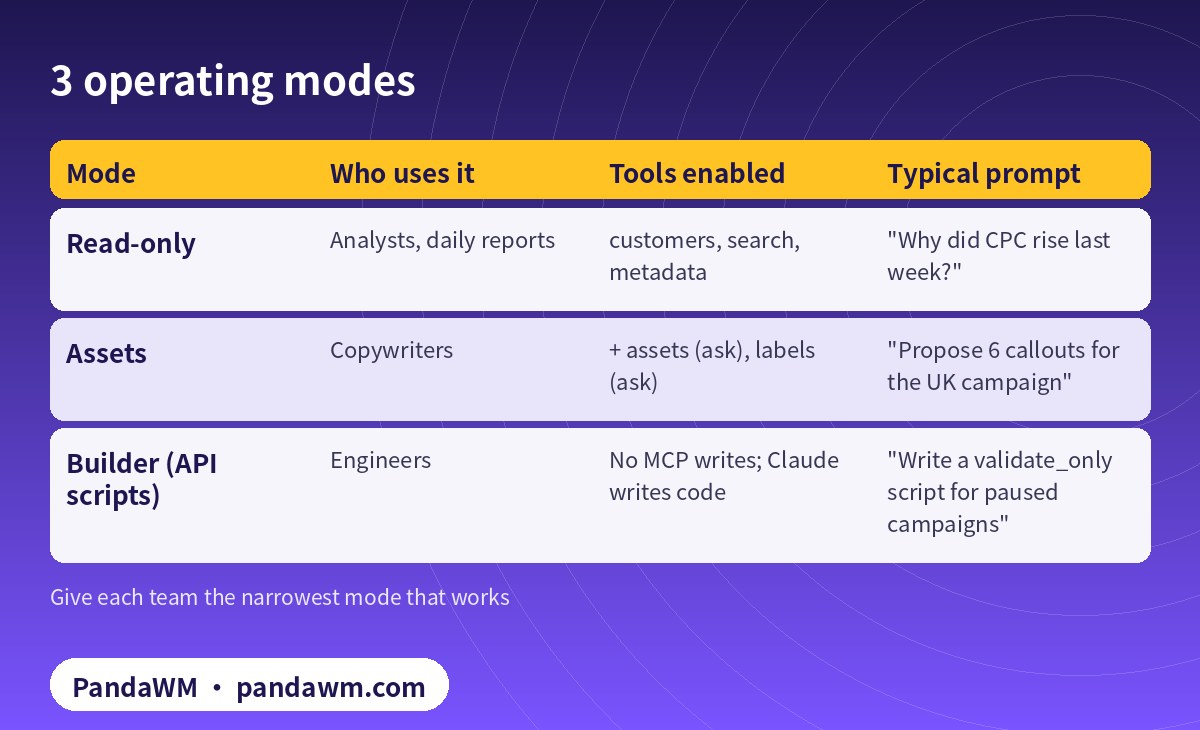
Analysts get read-only. Copywriters get assets with ask. Engineers get no MCP writes at all: Claude writes Google Ads API scripts that run validate_only first and create campaigns PAUSED (see Claude × Google Ads API 自動建立廣告活動(Python) and Codex + Google Ads API Python campaign pipeline).
Watch the quota
Requests rejected with a GoogleAdsFailure still count against the daily operation quota (quotas). Cap retries in your hooks or scripts, and prefer one well-formed GAQL query over many small ones.
How PandaWM uses Claude, Codex and Google Ads accounts to speed up client ad delivery
This guide focuses on Claude, but in day-to-day client work PandaWM combines Claude, Codex and Google Ads accounts to help companies going global move faster through the repetitive loop of account and conversion setup → campaign builds → ad copy and assets → reports and search terms → budget and negative-keyword changes, so media buyers spend their time on strategy, bidding judgement and creative.
- Ad accounts: the client’s own Google Ads account, or one opened compliantly through PandaWM’s account-opening service. The account belongs to the client and is never rented or shared; multi-account access goes through the client’s own manager account.
- Claude: natural-language reporting (GAQL) through Google’s open-source Google Ads MCP server, impression-share and search-term diagnosis, RSA headline/description and asset drafts, and asset or label creation in propose-and-confirm mode.
- Codex: writing and maintaining google-ads Python scripts (daily reports, search-term clean-up, paused campaign builds, validate_only pre-checks) that run in a sandbox, on a schedule or in CI.
- Human sign-off: a media buyer approves enabling campaigns, budget increases and bid-strategy changes, and a person makes the final call on Google Ads policy and landing-page compliance.
This describes a service capability only. There are no prices or rebates here, and PandaWM is not an official partner of Google, Anthropic or OpenAI. See Google Ads account opening & management (PandaWM service page) for account opening and management.
FAQ
Is the propose-and-confirm checksum enough on its own?
No. Google says it prevents accidental parameter drift but does not replace access control. Combine it with read-only namespaces and client permissions.
Can Claude enable or pause campaigns through MCP?
No. The server cannot create, modify, pause or enable campaigns, ad groups, ads, budgets or bids.
Where should credentials live?
In ADC files, a service account key held by your secret manager, or Cloud Run secrets, never in prompts, repos or chat. See our Claude API key guide for the Anthropic side.
What about prompt injection from landing pages or reports?
Treat fetched content as untrusted; read-only mode and hooks limit the blast radius. More in Prompt injection explained: enterprise defense.
Compliance note: Use every workflow in this guide only on Google Ads accounts (including client accounts under a manager account) that your company owns or is formally authorised to manage, through Google’s official Google Ads API, Google’s open-source Google Ads MCP server or official tools such as Google Ads Editor. Follow the Google Ads API Terms and Conditions, API quotas and Google Ads policies, and keep a human review step before anything that can spend money. PandaWM does not sell, rent, share or transfer ad accounts, manager accounts or API credentials, does not help anyone bypass ad review, regional restrictions, identity verification or payment controls, and is not an official partner of Google, Anthropic or OpenAI. Claude and OpenAI services are only offered in their supported countries and regions; the account holder should be an entity legitimately established and operating in a supported region.
Related guides
- Google Ads account opening & management (PandaWM service page)
- Overseas AI Token service: account setup + API access (PandaWM)
- Claude for Google Ads RSA and Performance Max asset creation
- How to connect Claude to Google Ads (step by step)
- Connect Claude.ai to Google Ads with a remote MCP server on Cloud Run
- Codex config.toml for the Google Ads MCP server
- Google Ads MCP server: let AI agents work on your ads
- Claude Agent SDK guardrails for Meta ads
- Prompt injection explained: enterprise defense
Talk to PandaWM: Google Ads accounts + AI-assisted delivery
Tell us where your company is registered, your industry, target countries, landing page and expected monthly budget, and which part you want to automate first (reporting, search terms, assets or campaign builds). We pre-check eligibility and landing pages, help you open your own Google Ads account compliantly, and wire Claude / Codex into your workflow.
WhatsApp: +852 5904 8602Telegram: @PANDA0134WeChat: szcwh99

Official sources
- Google: Google Ads MCP server – developer integration guide
- GitHub: googleads/google-ads-mcp
- Google: Developer token sunset (2026-09-09) and FAQ
- Google: Google Ads API access levels
- Google: API limits and quotas
- Anthropic: Claude Code permissions
- Anthropic: Claude Code hooks reference
- Anthropic: Agent SDK overview
- Anthropic: Agent SDK Python reference
All official pages checked on 2026-11-16. API versions, tool names and permission requirements change; the official pages prevail.
 微信扫一扫打赏
 支付宝扫一扫打赏