 熊猫出海编辑团队
Last updated: 16 November 2026. Google Ads API (v26.2), Anthropic and OpenAI documentation checked that day.
Copy and assets are where Claude saves media buyers the most time on Google Ads: dozens of headline variants, callouts and sitelinks per market, all on brand. Since Google open-sourced the Google Ads MCP server (googleads/google-ads-mcp), Claude can also create standalone assets in your account, with a built-in propose-and-confirm step. This guide shows the full loop and its limits.
What Claude can draft, and how each asset gets created
| Asset | What Claude drafts | Typical limit to check | Created via |
|---|---|---|---|
| RSA headlines | Variants by angle: benefit, proof, offer, brand | Up to 15, 30 characters each | Ad (API / UI) |
| RSA descriptions | Longer value statements and CTAs | Up to 4, 90 characters each | Ad (API / UI) |
| Callouts | Short trust signals | 25 characters | MCP assets_create_asset (CALLOUT) |
| Sitelinks | Deep links with link text and descriptions | Link text 25 characters | MCP assets_create_asset (SITELINK) |
| Structured snippets | Header + values | Header from Google’s list | MCP assets_create_asset (STRUCTURED_SNIPPET) |
| Images / YouTube | Brief and alt text; you supply the file | Google’s image specs | MCP (IMAGE, YOUTUBE_VIDEO) |
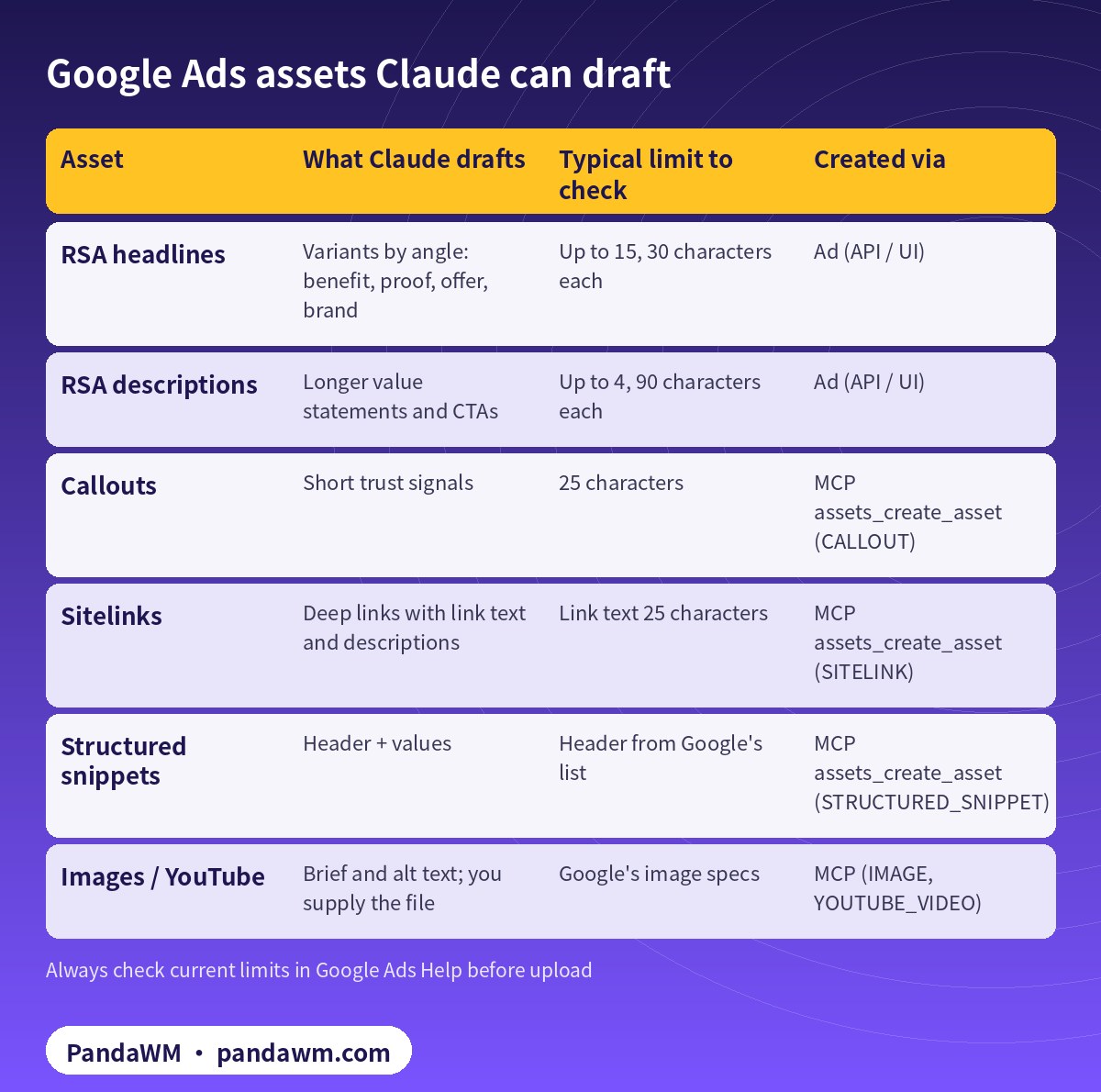
Character limits above are the common ones; Google changes formats over time, so treat Google Ads Help as the source of truth and have Claude count characters for every line. For Performance Max, the same text and image assets feed asset groups; a primer is in our Chinese guide PMax 广告是什么?Performance Max 入门, and the November 2026 AI Max / PMax changes are covered in Google Ads AI Max / PMax 2026 年 11 月更新.
What the MCP server can and cannot do with assets
assets_create_assetcreates TEXT, IMAGE, YOUTUBE_VIDEO, SITELINK, CALLOUT and STRUCTURED_SNIPPET assets, with other types throughextra_params.image_asset_path(a local file) works in local stdio mode only; remote HTTP deployments must send base64image_asset_data.assets_upload_video_assetuploads a local video to YouTube through the Google Ads API, stdio mode only.- It cannot link assets to campaigns, ad groups or asset groups, cannot configure ad-level asset automation settings, and cannot create or change campaigns, ads, budgets or bids (
- Google’s integration guide
- ).
So Claude can fill your asset library, but a person (or a reviewed API script) still decides where each asset runs.
The propose-and-confirm flow
| Step | Who | Tool call | Safety |
|---|---|---|---|
| 1 Draft | Claude | None (text only) | Brief + brand rules in CLAUDE.md |
| 2 Propose | Claude | assets_create_asset, validate_only=True | Returns change_items + checksum |
| 3 Review | Human | — | Policy, trademark and claims check |
| 4 Commit | Claude | Same params, validate_only=False + checksum | Mismatch is rejected |
| 5 Label | Claude | labels_manage_labels / associations | Tag as ai-draft for tracking |
| 6 Link to campaign | Human or API script | Not available in MCP | Google Ads UI, Editor or API |
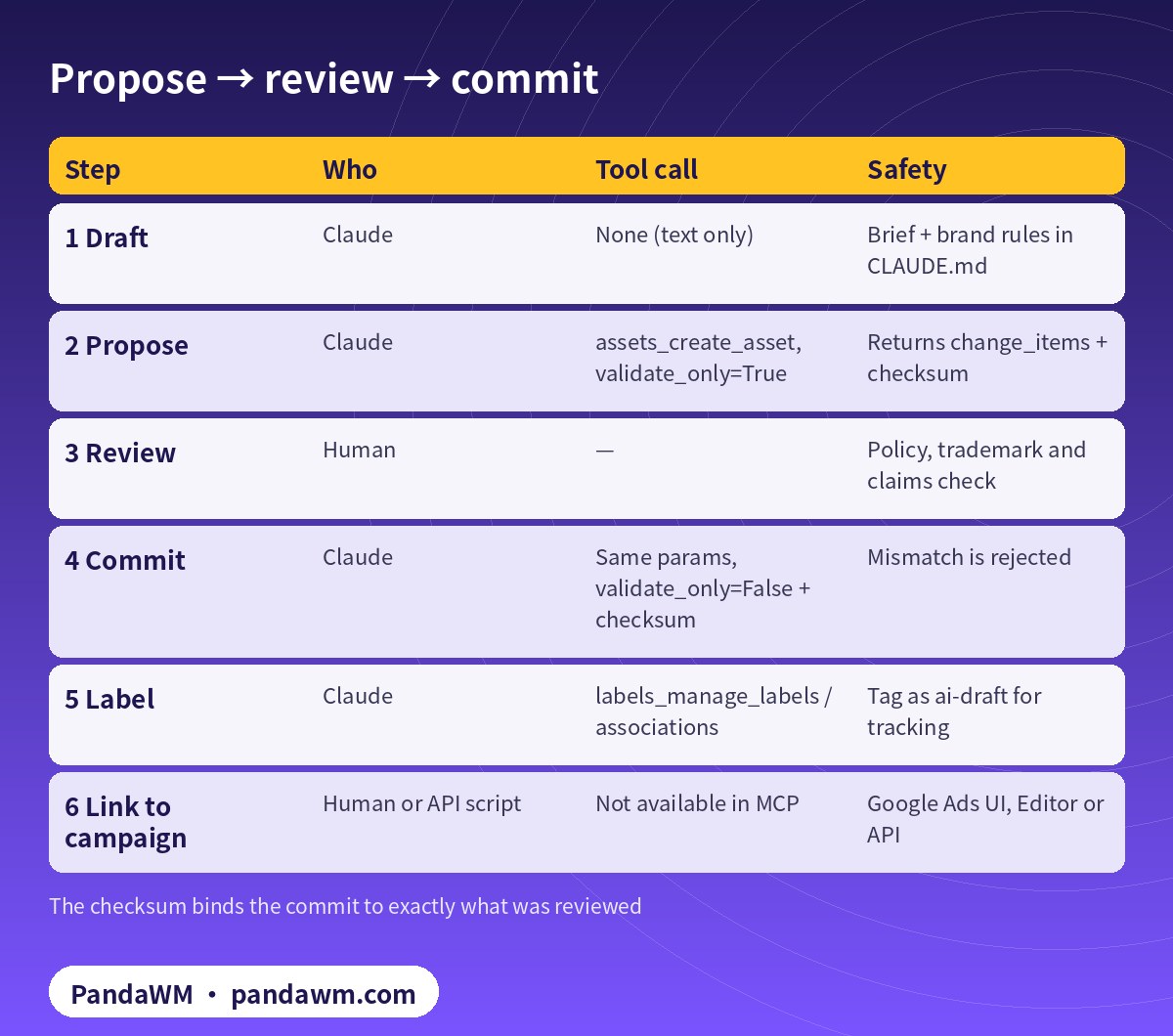
Every write tool runs in two steps. The first call uses validate_only=True (the default), validates the operation, including a Google Ads API validate_only dry run where supported, and returns human-readable change_items plus a SHA-256 checksum bound to the customer ID and parameters. Only after explicit approval does Claude call again with validate_only=False, the same parameters and that checksum. Google notes that the checksum prevents parameter drift between turns but does not replace access control, so keep permissions tight as well.
# Ask Claude/Codex (MCP) - propose first, commit after approval
1. "For customer 1234567890 create 4 CALLOUT assets from brief.md (max 25 chars each).
    Use validate_only=True and show me change_items + checksum."
2. Human reviews text against Google Ads policies.
3. "Approved. Commit the same parameters with validate_only=False and that checksum."
4. "Create label 'ai-draft-2026-11' and attach it to campaign 2233445566."   # labels tool
-- linking the assets to campaigns / ad groups is NOT supported by the MCP server:
-- do it in Google Ads UI, Editor, or with an API script you review.
Set up Claude Code for asset work
Connect the server (full steps in How to connect Claude to Google Ads (step by step)), then make asset and label tools always ask, and block video uploads unless you need them:
// .claude/settings.json - reads allowed, asset/label writes always asked
{
  "permissions": {
    "allow": [
      "mcp__google-ads__customers_list_accessible_customers",
      "mcp__google-ads__search_search",
      "mcp__google-ads__metadata_get_resource_metadata"
    ],
    "ask": [
      "mcp__google-ads__assets_create_asset",
      "mcp__google-ads__labels_manage_labels",
      "mcp__google-ads__labels_manage_label_associations"
    ],
    "deny": [
      "mcp__google-ads__assets_upload_video_asset"
    ]
  }
}
Put your brand rules in CLAUDE.md: banned claims, trademark terms, required disclaimers per market, and the character limits above. Claude follows project instructions on every run.
Prompt pattern that works
- Give Claude the landing page, three customer pain points and the market (for example “UK, English, B2B SaaS”).
- Ask for 15 headlines grouped by angle and 4 descriptions, each with a character count, and flag any claim that needs proof.
- Ask for 6 callouts and 4 sitelinks with URLs only from an allowlist you provide.
- Review, cut, then let Claude propose the callouts and sitelinks via MCP and commit after approval.
- Label everything
ai-draft-YYYY-MMso you can compare AI-drafted vs human-written assets in reports later.
Policy guardrails
Google Ads policies cover prohibited content, restricted content and editorial standards such as punctuation and capitalisation (Google Ads policies). Ask Claude to self-check each line, but keep the final policy call with a human, especially for health, finance, gambling and other restricted categories. Repeated violations can lead to account suspension (enforcement procedures).
How PandaWM uses Claude, Codex and Google Ads accounts to speed up client ad delivery
This guide focuses on Claude, but in day-to-day client work PandaWM combines Claude, Codex and Google Ads accounts to help companies going global move faster through the repetitive loop of account and conversion setup → campaign builds → ad copy and assets → reports and search terms → budget and negative-keyword changes, so media buyers spend their time on strategy, bidding judgement and creative.
- Ad accounts: the client’s own Google Ads account, or one opened compliantly through PandaWM’s account-opening service. The account belongs to the client and is never rented or shared; multi-account access goes through the client’s own manager account.
- Claude: natural-language reporting (GAQL) through Google’s open-source Google Ads MCP server, impression-share and search-term diagnosis, RSA headline/description and asset drafts, and asset or label creation in propose-and-confirm mode.
- Codex: writing and maintaining google-ads Python scripts (daily reports, search-term clean-up, paused campaign builds, validate_only pre-checks) that run in a sandbox, on a schedule or in CI.
- Human sign-off: a media buyer approves enabling campaigns, budget increases and bid-strategy changes, and a person makes the final call on Google Ads policy and landing-page compliance.
This describes a service capability only. There are no prices or rebates here, and PandaWM is not an official partner of Google, Anthropic or OpenAI. See Google Ads account opening & management (PandaWM service page) for account opening and management.
FAQ
Can Claude attach the new assets to my campaign?
Not through the MCP server. Link them in the Google Ads UI, Google Ads Editor, or with a Google Ads API script you have reviewed.
Does Claude need a developer token?
No. Developer tokens were sunset on 9 September 2026; access is tied to your Google Cloud project’s access level.
Can it upload images from my laptop?
Yes in local stdio mode via image_asset_path. Remote Cloud Run deployments need base64 image data instead.
Should AI-written copy go live without review?
No. Review for policy, trademarks and factual claims before committing, and label AI drafts so you can measure them.
Compliance note: Use every workflow in this guide only on Google Ads accounts (including client accounts under a manager account) that your company owns or is formally authorised to manage, through Google’s official Google Ads API, Google’s open-source Google Ads MCP server or official tools such as Google Ads Editor. Follow the Google Ads API Terms and Conditions, API quotas and Google Ads policies, and keep a human review step before anything that can spend money. PandaWM does not sell, rent, share or transfer ad accounts, manager accounts or API credentials, does not help anyone bypass ad review, regional restrictions, identity verification or payment controls, and is not an official partner of Google, Anthropic or OpenAI. Claude and OpenAI services are only offered in their supported countries and regions; the account holder should be an entity legitimately established and operating in a supported region.
Related guides
- Google Ads account opening & management (PandaWM service page)
- Overseas AI Token service: account setup + API access (PandaWM)
- Claude Code guardrails for Google Ads: read-only mode and approvals
- How to connect Claude to Google Ads (step by step)
- Codex + Google Ads API Python campaign pipeline
- Google Ads MCP server: let AI agents work on your ads
- Claude Facebook ads reporting and budget rules
- Prompt injection explained: enterprise defense
- How to get a Claude (Anthropic) API key
Talk to PandaWM: Google Ads accounts + AI-assisted delivery
Tell us where your company is registered, your industry, target countries, landing page and expected monthly budget, and which part you want to automate first (reporting, search terms, assets or campaign builds). We pre-check eligibility and landing pages, help you open your own Google Ads account compliantly, and wire Claude / Codex into your workflow.
WhatsApp: +852 5904 8602Telegram: @PANDA0134WeChat: szcwh99
Official sources
- Google: Google Ads MCP server – developer integration guide
- GitHub: googleads/google-ads-mcp
- Google Ads policies (Advertising Policies Help)
- Google: Enforcement procedures for repeat violations
- Google: Developer token sunset (2026-09-09) and FAQ
- Anthropic: Claude Code permissions
- Anthropic: Connect Claude Code to tools via MCP
All official pages checked on 2026-11-16. API versions, tool names and permission requirements change; the official pages prevail.
 微信扫一扫打赏
 支付宝扫一扫打赏