
 熊猫出海编辑团队
Last updated: 16 November 2026. TikTok API for Business (v1.3), the TikTok for Business MCP Server, Anthropic and OpenAI documentation checked that day.
TikTok is steering advertisers to Upgraded Smart+. TikTok’s documentation says that from 1 January 2027 the legacy create endpoints (/campaign/create/, /adgroup/create/, /ad/create/ and others) will no longer create or copy non-Search Legacy Manual campaigns for Sales, App Promotion and Lead Generation objectives, and asks developers to migrate to the Upgraded Smart+ APIs (TikTok notice). This guide shows how Claude can plan and build Smart+ campaigns through TikTok’s official MCP server without ever switching delivery on by itself.
What Claude can reach
The TikTok for Business MCP Server exposes about 400 TikTok API for Business endpoints as tools, including an Upgraded Smart+ group: smart_plus_campaign_create, smart_plus_adgroup_create, smart_plus_ad_create, the matching _get, _update and _status_update tools, smart_plus_adgroup_budget_update, smart_plus_ad_preview and Smart+ material reports (tool list). No developer app is needed to connect Claude; see How to connect Claude to TikTok Ads (step by step).
The campaign fields that matter
| Field | What it does | Watch out for |
|---|---|---|
| advertiser_id | The ad account | Only accounts assigned to your authorised user |
| request_id | Idempotency key (string of a 64-bit int) | Reuse the same value when retrying |
| objective_type | APP_PROMOTION, WEB_CONVERSIONS or LEAD_GENERATION | Pick before anything else |
| sales_destination | WEBSITE, APP or WEB_AND_APP | Required for WEB_CONVERSIONS |
| operation_status | ENABLE or DISABLE | Defaults to ENABLE: always send DISABLE |
| budget_mode / budget | Daily or lifetime budget, float in account currency | Dynamic daily budget can spend up to 125% on a day |
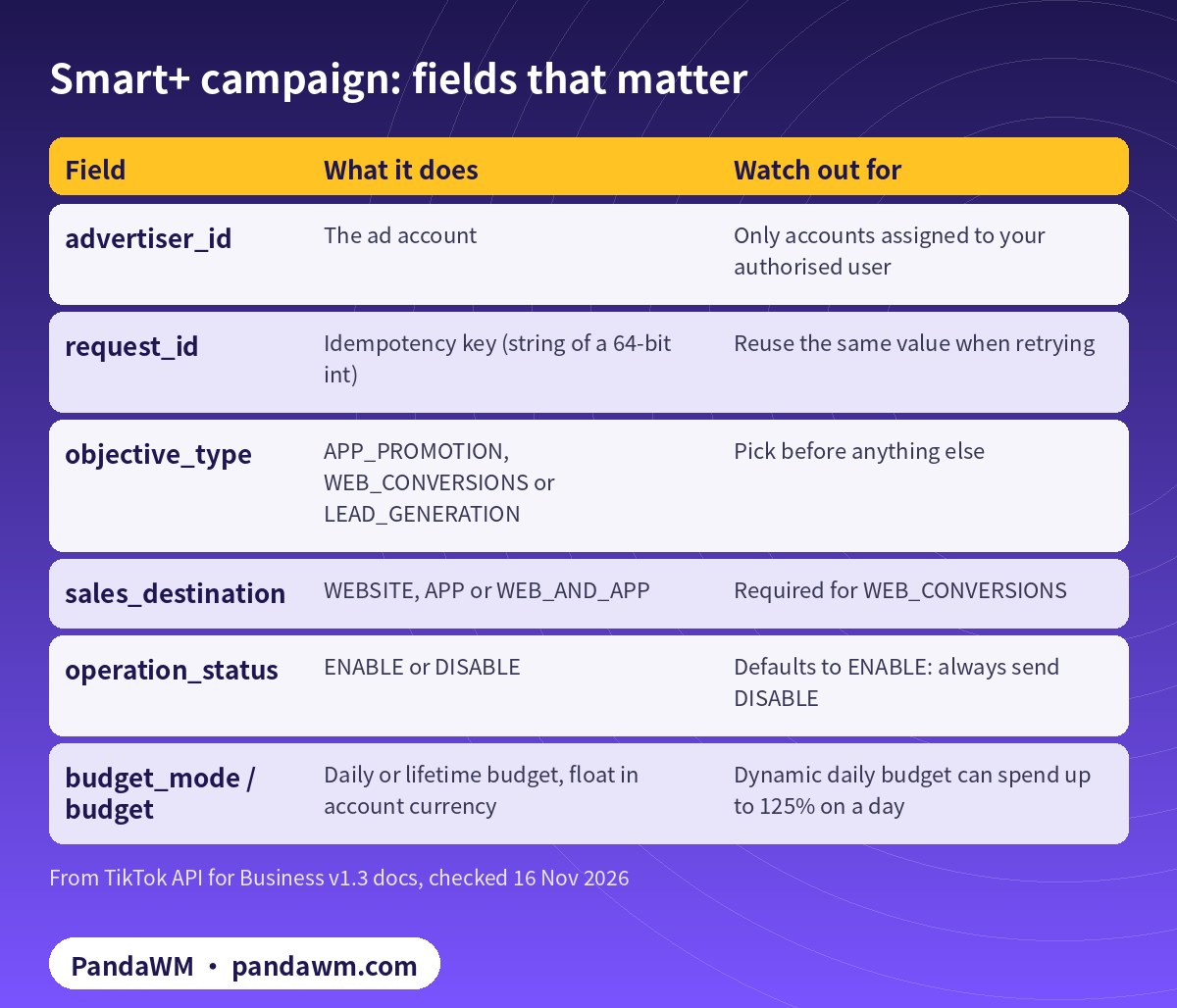
Two defaults deserve attention. operation_status defaults to ENABLE, so a campaign created without it can start spending as soon as its ads pass review. And budget_optimize_on defaults to true with BUDGET_MODE_DYNAMIC_DAILY_BUDGET, where daily spend can reach 125% of the average daily budget while weekly spend stays within seven times it (Create an Upgraded Smart+ campaign). Special ad categories (housing, employment, credit) are only available to advertisers registered in the US or Canada.
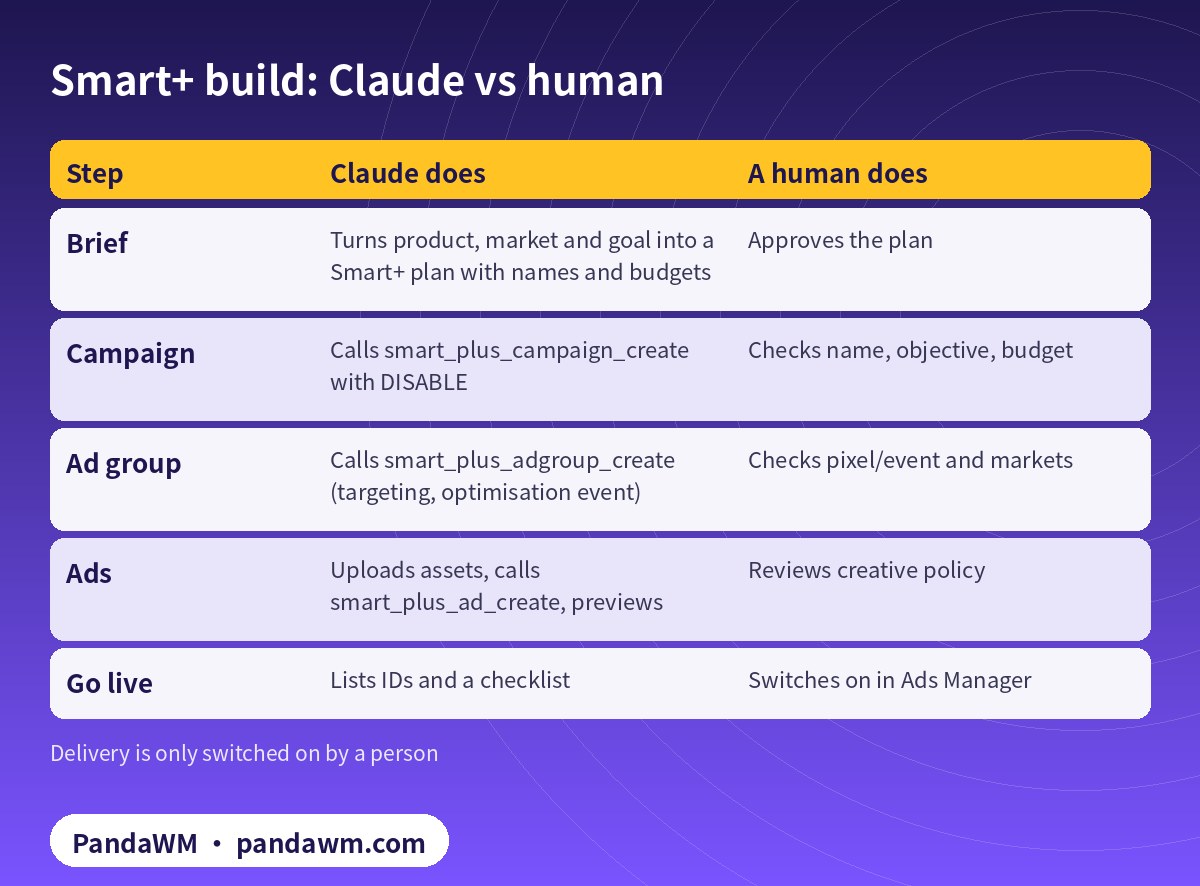
Claude vs human, step by step
| Step | Claude does | A human does |
|---|---|---|
| Brief | Turns product, market and goal into a Smart+ plan with names and budgets | Approves the plan |
| Campaign | Calls smart_plus_campaign_create with DISABLE | Checks name, objective, budget |
| Ad group | Calls smart_plus_adgroup_create (targeting, optimisation event) | Checks pixel/event and markets |
| Ads | Uploads assets, calls smart_plus_ad_create, previews | Reviews creative policy |
| Go live | Lists IDs and a checklist | Switches on in Ads Manager |
A prompt that keeps Claude honest
Plan an Upgraded Smart+ WEB_CONVERSIONS campaign for advertiser <ADVERTISER_ID>:
product <URL>, markets US and CA, optimisation event Purchase, daily budget 50.
1. Show the plan (names, budget, ad group settings, creative list). Wait for "approved".
2. Create campaign, ad group and ads with operation_status DISABLE only.
3. Wait at least 5 seconds between calls that touch the same Smart+ ad.
4. Return all IDs and a go-live checklist. Do NOT enable anything.
Guardrails in Claude Code
Put Smart+ create tools under ask, and add a PreToolUse hook that denies any call carrying ENABLE or a budget above your ceiling. TikTok budgets are floats in account currency, not cents (Claude Code hooks). Full settings are in Claude Code guardrails for the TikTok Ads MCP server.
#!/usr/bin/env python3
# .claude/hooks/tiktok-guard.py - block "go live" and budgets above a ceiling
import json, sys
CEILING = 200.0          # account currency units (TikTok budgets are floats, not cents)

def walk(obj):
    if isinstance(obj, dict):
        for k, v in obj.items():
            yield k, v
            yield from walk(v)
    elif isinstance(obj, list):
        for v in obj:
            yield from walk(v)

event = json.load(sys.stdin)
reason = None
for k, v in walk(event.get("tool_input", {})):
    if k in ("operation_status", "opt_status") and str(v).upper() == "ENABLE":
        reason = "Turning delivery on is done by a media buyer in Ads Manager"
    if "budget" in k and isinstance(v, (int, float)) and v > CEILING:
        reason = f"Budget {v} above ceiling {CEILING}: needs a media buyer"
if reason:
    print(json.dumps({"hookSpecificOutput": {
        "hookEventName": "PreToolUse",
        "permissionDecision": "deny",
        "permissionDecisionReason": reason}}))
sys.exit(0)
Throttling and retries
- Per TikTok, each MCP tool is limited to 6 QPS per TikTok for Business user (
- MCP overview
- ).
- For a single Upgraded Smart+ ad, keep
smart_plus_ad_create,smart_plus_ad_updateandsmart_plus_ad_status_updateto one call every 5 seconds, or you may hit a concurrency error. - If a create call times out, retry with the same
request_idso TikTok treats it as the same request instead of creating a duplicate.
If you prefer a script to an agent, the same build in Python is in Codex + TikTok Marketing API: Python Smart+ pipeline.
How PandaWM uses Claude, Codex and TikTok ad accounts to speed up client ad delivery
This guide focuses on Claude, but in day-to-day client work PandaWM combines Claude, Codex and TikTok ad accounts to help companies going global move faster through the repetitive loop of account and pixel/event setup → Smart+ campaign builds → creative upload and pre-review → reports and diagnosis → budget and rule changes, so media buyers spend their time on creative strategy, bidding judgement and scaling.
- Ad accounts: the client’s own TikTok ad account opened under its real business entity; accounts that need industry entry approval (games, finance and similar) go through TikTok’s industry entry process; accounts can also be opened through an authorised agency. Every account belongs to the client, is never rented or shared, and is managed in the client’s own Business Center.
- Claude: natural-language reporting, TikTok’s official diagnosis agent, creative organisation and Smart+ build plans through the official TikTok for Business MCP Server, with every write tool confirmed before it runs.
- Codex: Python scripts on Marketing API v1.3 (report pulls, rate-limit retries, Smart+ builds created as DISABLE with idempotent request_id) that run in a sandbox or on a schedule.
- Human sign-off: a media buyer approves turning delivery on, budget increases and bid changes, and a person makes the final call on TikTok advertising policy for creatives and landing pages.
This describes a service capability only. There are no prices or rebates here, and PandaWM is not an official partner of TikTok, Anthropic or OpenAI. See TikTok Ads account opening & management (PandaWM service page) for account opening and management.
FAQ
Can Claude launch my TikTok campaign?
Technically yes, which is why we recommend creating everything as DISABLE and letting a media buyer switch delivery on in Ads Manager.
Does this work for GMV Max?
GMV Max has its own tools (campaign_gmv_max_create and others) and its own report; the flow is similar but the settings differ. See GMV Max 投放实操:授权、建计划与 ROI 目标.
Do I need a developer app?
Not for Claude or Claude Code on the hosted MCP server. You need one only if you call the Marketing API directly.
Which accounts can I automate?
Only ad accounts your company owns or is authorised to manage in its own Business Center.
Compliance note: Use every workflow in this guide only on TikTok ad accounts (including accounts assigned to you in a Business Center) that your company owns or is formally authorised to manage, through TikTok’s official TikTok API for Business, the TikTok for Business MCP Server or TikTok Ads Manager. Follow TikTok’s advertising policies, industry entry requirements and API rate limits, and keep a human review step before anything that can spend money. PandaWM does not sell, rent, share or transfer ad accounts, Business Centers or API credentials, does not help anyone bypass ad review, industry entry, regional restrictions or identity verification, and is not an official partner of TikTok, Anthropic or OpenAI. Claude and OpenAI services are only offered in their supported countries and regions; the account holder should be an entity legitimately established and operating in a supported region.
Related guides
- TikTok Ads account opening & management (PandaWM service page)
- Overseas AI Token service: account setup + API access (PandaWM)
- Claude Code guardrails for the TikTok Ads MCP server
- How to connect Claude to TikTok Ads (step by step)
- Codex + TikTok Marketing API: Python Smart+ pipeline
- TikTok Ads MCP server: let AI agents run your ads
- Claude for Google Ads asset creation (Google)
- Claude Facebook ads reporting and budget-rule automation
- How to get a Claude (Anthropic) API key
- Prompt injection explained: enterprise defense
Talk to PandaWM: TikTok Ads accounts + AI-assisted delivery
Tell us where your company is registered, your industry (and whether it needs industry entry approval), target countries, landing page, app or TikTok Shop, and expected monthly budget, plus which part you want to automate first (reporting, creatives, Smart+ builds or rules). We pre-check eligibility and creatives, help you open your own TikTok ad account compliantly, and wire Claude / Codex into your workflow.
WhatsApp: +852 5904 8602Telegram: @PANDA0134WeChat: szcwh99

Official sources
- TikTok: How to connect a ready-made agent to TikTok for Business MCP Server
- TikTok API for Business: TikTok for Business MCP Server overview
- TikTok: Available tools in TikTok for Business MCP Server
- TikTok: Create an Upgraded Smart+ campaign
- Anthropic: Claude Code hooks reference
- Anthropic: Claude Code permissions
- Anthropic: Supported regions
All official pages checked on 2026-11-16. API versions, tool names and permission requirements change; the official pages prevail.
 微信扫一扫打赏
 支付宝扫一扫打赏