 熊猫出海编辑团队
Last updated: 16 November 2026. Meta, Anthropic and OpenAI documentation checked that day.
Most Facebook ad accounts don’t need an AI that clicks buttons. They need someone who reads the numbers every morning, spots what changed, and suggests the next move. This guide shows how to give that job to Claude: a script pulls Insights, Claude writes the summary and flags anomalies, a media buyer approves, and Meta’s own ad rules engine enforces the approved limits around the clock. For the full pipeline, see the Claude Facebook ads automation pipeline (Chinese).
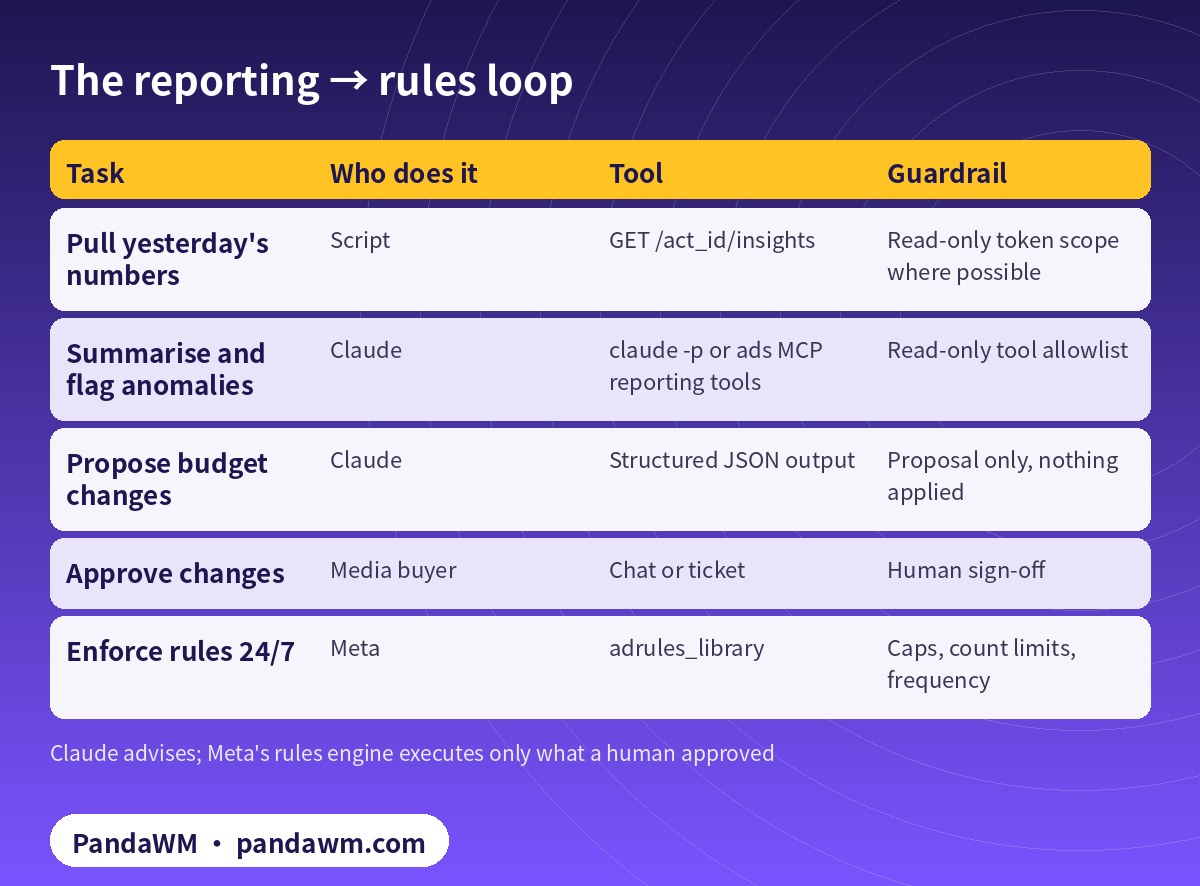
The loop at a glance
| Task | Who does it | Tool | Guardrail |
|---|---|---|---|
| Pull yesterday’s numbers | Script | GET /act_id/insights | Read-only token scope where possible |
| Summarise and flag anomalies | Claude | claude -p or ads MCP reporting tools | Read-only tool allowlist |
| Propose budget changes | Claude | Structured JSON output | Proposal only, nothing applied |
| Approve changes | Media buyer | Chat or ticket | Human sign-off |
| Enforce rules 24/7 | Meta | adrules_library | Caps, count limits, frequency |
Step 1: pull Insights with a small script
The Insights API returns spend, impressions, clicks, CTR, CPC, actions and cost per action at account, campaign, ad set or ad level (Insights API). Meta recommends asynchronous jobs for large requests and watching the X-FB-Ads-Insights-Throttle header (Insights best practices). A minimal client and daily export:
# .env  (add .env to .gitignore; never commit or paste tokens into a prompt)
META_API_VERSION=v27.0
META_AD_ACCOUNT_ID=act_<AD_ACCOUNT_ID>
META_PAGE_ID=<PAGE_ID>
META_SYSTEM_USER_TOKEN=<SYSTEM_USER_ACCESS_TOKEN>
# meta_api.py - minimal Marketing API client (Python 3.10+, pip install requests)
import os, time, json, uuid, requests
API = "https://graph.facebook.com/" + os.environ.get("META_API_VERSION", "v27.0")
TOKEN = os.environ["META_SYSTEM_USER_TOKEN"] # from env / secret manager only
ACT = os.environ["META_AD_ACCOUNT_ID"] # e.g. act_1234567890
THROTTLE = {4, 17, 613, 80000, 80003, 80004, 80014} # rate-limit codes in Meta's docs
def call(method, path, params=None, data=None, idem_key=None, tries=5):
headers = {"X-Client-Idempotent-Key": idem_key} if idem_key else {}
for attempt in range(tries):
r = requests.request(method, f"{API}/{path}", headers=headers, timeout=60,
params={**(params or {}), "access_token": TOKEN} if method == "GET" else None,
data={**(data or {}), "access_token": TOKEN} if method != "GET" else None)
for h in ("X-Business-Use-Case-Usage", "X-Ad-Account-Usage", "X-FB-Ads-Insights-Throttle"):
if h in r.headers:
print(h, r.headers[h]) # log usage, back off early
body = r.json()
err = body.get("error")
if not err:
return body
if err.get("code") in THROTTLE or r.status_code >= 500:
time.sleep(min(60 * 2 ** attempt, 900)) # exponential backoff
continue # same idem_key -> no duplicates
raise RuntimeError(json.dumps(err))
raise RuntimeError("rate limited: giving up, try later")
def key(run_id, name):
"""Stable idempotency key per object, so a retry never creates a duplicate."""
return str(uuid.uuid5(uuid.NAMESPACE_URL, f"{ACT}/{run_id}/{name}"))# daily_report.py - yesterday by campaign, saved as CSV for the AI summary step
import csv
from meta_api import call, ACT
FIELDS = "campaign_id,campaign_name,spend,impressions,clicks,ctr,cpc,cpm,actions,cost_per_action_type"
rows, after = [], None
while True:
params = {"level": "campaign", "date_preset": "yesterday", "fields": FIELDS, "limit": 200}
if after:
params["after"] = after
page = call("GET", f"{ACT}/insights", params=params)
rows += page.get("data", [])
after = page.get("paging", {}).get("cursors", {}).get("after")
if not page.get("paging", {}).get("next"):
break
with open("report_yesterday.csv", "w", newline="") as f:
w = csv.DictWriter(f, fieldnames=FIELDS.split(","), extrasaction="ignore")
w.writeheader(); w.writerows(rows)
print(len(rows), "campaign rows")Step 2: let Claude summarise, read-only
Option A is to hand Claude the CSV. Option B is to connect Claude Code to Meta’s ads MCP server, which includes reporting tools such as performance trends, anomaly signals and breakdowns (ads MCP reporting tools). Either way, run it headless with only read tools allowed (Claude Code headless mode):
# read-only daily summary, no write tools allowed
claude -p "Use meta-ads to summarise yesterday's spend, CTR, CPC and results by campaign \
for ad account act_<AD_ACCOUNT_ID>. Flag anomalies. Do not change anything." \
  --allowedTools "mcp__meta-ads__ads_get_ad_entities,mcp__meta-ads__ads_insights_anomaly_signal" \
  --output-format json > summary.json
If you prefer your own code over MCP, Claude’s tool use lets you expose a single read-only function that wraps the Insights call:
# Claude tool use with your own Marketing API function (no MCP). pip install anthropic requests
import os, json, anthropic
from meta_api import call, ACT

tools = [{
  "name": "get_campaign_insights",
  "description": "Read-only. Campaign-level spend, clicks, CTR, CPC and actions for a date preset.",
  "input_schema": {"type": "object",
                   "properties": {"date_preset": {"type": "string",
                                  "enum": ["yesterday", "last_7d", "last_30d"]}},
                   "required": ["date_preset"]}}]

client = anthropic.Anthropic()
msgs = [{"role": "user", "content": "Compare yesterday with the last 7 days and list 3 issues."}]
while True:
    r = client.messages.create(model=os.environ.get("CLAUDE_MODEL", "claude-sonnet-5-5"),
                               max_tokens=1500, tools=tools, messages=msgs)
    msgs.append({"role": "assistant", "content": r.content})
    if r.stop_reason != "tool_use":
        print(r.content[-1].text); break
    results = []
    for block in r.content:
        if block.type == "tool_use":
            data = call("GET", f"{ACT}/insights", params={
                "level": "campaign", "date_preset": block.input["date_preset"],
                "fields": "campaign_name,spend,clicks,ctr,cpc,actions"})
            results.append({"type": "tool_result", "tool_use_id": block.id,
                            "content": json.dumps(data.get("data", []))[:20000]})
    msgs.append({"role": "user", "content": results})
Model IDs change; keep the model in an environment variable and check Anthropic’s models page (Claude models).
What a useful daily summary contains
- Spend, results and cost per result vs the 7-day average, per campaign.
- Anomalies: CPC or CPM jumps, CTR drops, spend with zero results, frequency creeping up.
- Three proposed actions, each with the data behind it and the expected risk.
- What not to touch (ad sets still in learning, recent edits).
Step 3: turn approved advice into Meta ad rules
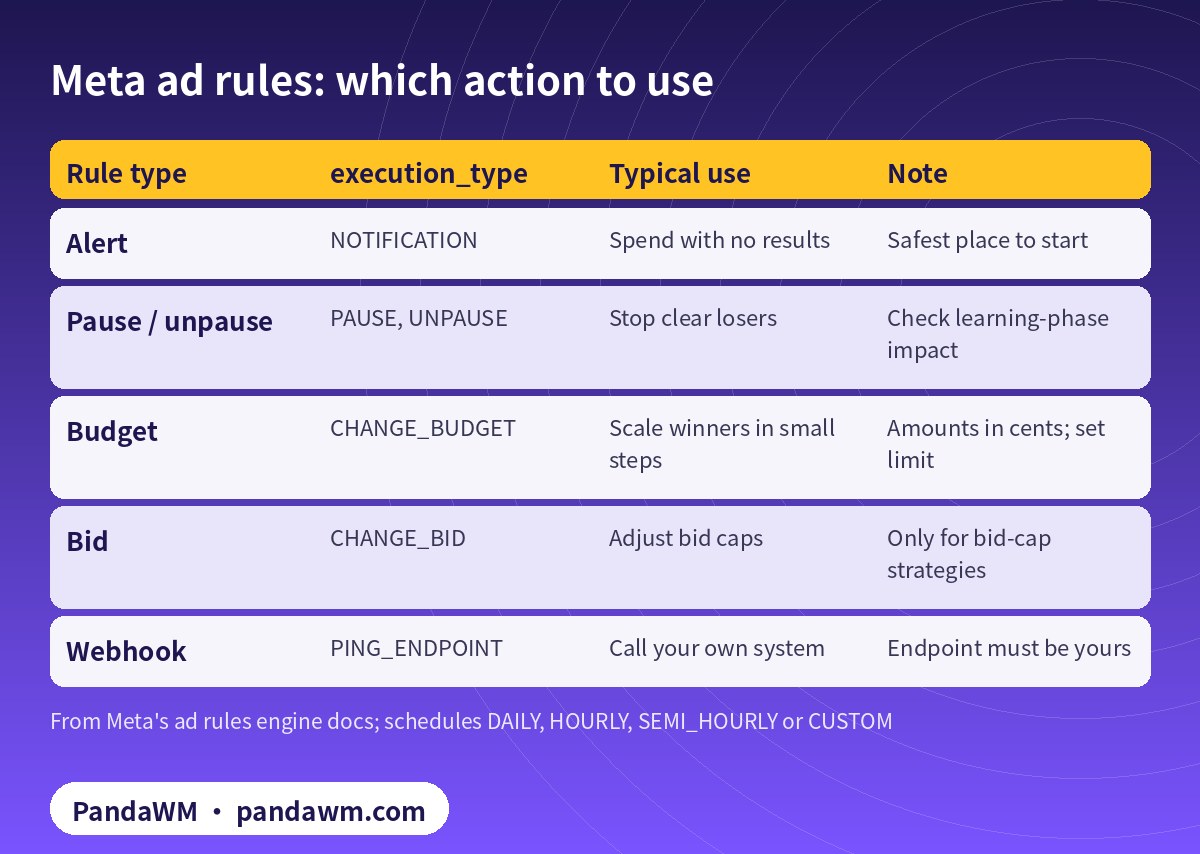
Meta’s ad rules engine evaluates conditions on a schedule (DAILY, HOURLY, SEMI_HOURLY or CUSTOM) and runs an action. Trigger-based rules, which fire on metric changes in real time, are API only (Ad rules engine, trigger-based rules).
| Rule type | execution_type | Typical use | Note |
|---|---|---|---|
| Alert | NOTIFICATION | Spend with no results | Safest place to start |
| Pause / unpause | PAUSE, UNPAUSE | Stop clear losers | Check learning-phase impact |
| Budget | CHANGE_BUDGET | Scale winners in small steps | Amounts in cents; set limit |
| Bid | CHANGE_BID | Adjust bid caps | Only for bid-cap strategies |
| Webhook | PING_ENDPOINT | Call your own system | Endpoint must be yours |
Start with a notification rule. This one flags any active ad set that spent more than 50.00 (5000 in cents) in the last 7 days with no results (schedule-based rules):
curl -X POST "https://graph.facebook.com/v27.0/$META_AD_ACCOUNT_ID/adrules_library" \
  -F 'name=Alert: ad set spent > 50 with 0 results (7d)' \
  -F 'schedule_spec={"schedule_type": "DAILY"}' \
  -F 'evaluation_spec={
        "evaluation_type": "SCHEDULE",
        "filters": [
          {"field": "entity_type",      "value": "ADSET",       "operator": "EQUAL"},
          {"field": "time_preset",      "value": "LAST_7_DAYS", "operator": "EQUAL"},
          {"field": "effective_status", "value": ["ACTIVE"],    "operator": "IN"},
          {"field": "spent",            "value": 5000,          "operator": "GREATER_THAN"},
          {"field": "results",          "value": 1,             "operator": "LESS_THAN"}
        ]}' \
  -F 'execution_spec={"execution_type": "NOTIFICATION"}' \
  -F "access_token=$META_SYSTEM_USER_TOKEN"
When a buyer approves scaling, a budget rule with a hard limit, a cap on how many times it runs, and a minimum gap between runs looks like this:
-F 'execution_spec={
      "execution_type": "CHANGE_BUDGET",
      "execution_options": [
        {"field": "change_spec", "operator": "EQUAL",
         "value": {"amount": 10, "unit": "PERCENTAGE", "limit": 20000}},
        {"field": "execution_count_limit", "operator": "EQUAL", "value": 3},
        {"field": "action_frequency",      "operator": "EQUAL", "value": 1440}
      ]}'
Here the rule raises budget by 10% at most once a day (1440 minutes), at most 3 times, never above 200.00. Mind the API limits too: an ad set budget can change at most 4 times per hour, and an account spending limit at most 10 times per day (rate limiting).
Why not let Claude change budgets directly?
It can, through MCP write tools or the API, but you lose the audit trail and the cap. Keep Claude on the advice side and let rules execute. If you do let an agent write, add guardrails like the permission rules and hooks in our Agent SDK guardrails guide, and see how to connect Claude to Facebook Ads step by step.
How PandaWM uses Claude, Codex and Facebook ad accounts to speed up client ad delivery
This guide focuses on Claude, but in day-to-day client work PandaWM combines Claude, Codex and Facebook business ad accounts to help companies going global move faster through the repetitive loop of account setup → campaign structure → creatives → reporting → budget changes, so media buyers spend their time on strategy and creative judgement.
- Ad accounts: the client’s own Facebook ad account, or a business ad account opened compliantly through PandaWM’s account-opening service. The account belongs to the client and is never rented or shared.
- Claude: reading long docs and reports, drafting media plans and ad copy, drafting campaign structures in a paused state through Meta’s ads MCP server, and rule-based anomaly checks.
- Codex: writing and maintaining automation scripts (Marketing API, Insights reports, bulk uploads, budget rules) that run in a sandbox, on a schedule or in CI.
- Human sign-off: anything that spends money (activating ads, raising budgets) is approved by a media buyer, and a person makes the final call on Meta policy and creative compliance.
This describes a service capability only. There are no prices or rebates here, and PandaWM is not an official partner of Meta, Anthropic or OpenAI. See Facebook ads account opening & management (PandaWM service page) for account opening and management.
FAQ
Can Claude read my Facebook ads data without write access?
Yes. Use a token with ads_read, or allow only read tools in Claude Code or your MCP client.
How often should reports run?
Daily is enough for most accounts. Insights data can be revised for a while after the fact, so compare full days.
Are rule amounts in dollars?
No. Budget amounts and limits are in the smallest currency unit, such as cents.
Can a rule call my own system?
Yes, PING_ENDPOINT sends a request to an endpoint you control.
Will rules reset the learning phase?
Large budget or bid changes can affect delivery. Small, capped steps are safer.
Compliance note: Use every workflow in this guide only on ad accounts, Pages and pixels that your company owns or is formally authorised to manage, through Meta’s official Marketing API, the ads MCP server or Ads CLI, with Business Manager system users and least-privilege permissions. Respect Meta’s rate limits and Advertising Standards, and keep a human review step before anything that can spend money. PandaWM does not sell, rent, share or transfer ad accounts, Business Managers or API keys, does not help anyone bypass ad review, regional restrictions, KYC, business verification or payment controls, and is not an official partner of Meta, Anthropic or OpenAI. Claude and OpenAI services are only offered to customers in their supported countries and regions; the account holder should be an entity legitimately established and operating in a supported region.
Related guides
- Facebook ads account opening & management (PandaWM service page)
- Overseas AI Token service: account setup + API access (PandaWM)
- Claude Agent SDK guardrails for Meta ads automation
- Claude pipeline overview (Chinese)
- Codex daily report scripts (Chinese)
- Meta ads MCP server: let AI agents manage your ads
- Facebook ad account setup checklist
- New Facebook business ad account: 30-day plan
Talk to PandaWM: Facebook ad accounts + AI-assisted delivery
Tell us where your company is registered, your industry, target countries, landing page and expected monthly budget, and which part you want to automate first (account structure, creatives, reporting or budget rules). We pre-check eligibility and creatives, help you open a compliant Facebook business ad account, and build Claude or Codex workflows that run on your own accounts. We never sell, rent or share ad accounts.
WhatsApp: +852 5904 8602Telegram: @PANDA0134WeChat: szcwh99

Official sources
- Meta: Ads Insights API
- Meta: Insights API limits and best practices
- Meta: Ads MCP server – comprehensive reporting tools
- Anthropic: Run Claude Code programmatically (claude -p)
- Anthropic: Tool use with Claude
- Anthropic: Models overview
- Meta: Ad rules engine
- Meta: Schedule-based ad rules
- Meta: Trigger-based ad rules
- Meta: Marketing API rate limiting
All official pages checked on 2026-11-16. API versions, tool names and permission requirements change; the official pages prevail.
 微信扫一扫打赏
 支付宝扫一扫打赏