 熊猫出海编辑团队
Last updated: 16 November 2026. Meta, Anthropic and OpenAI documentation checked that day.
Codex can talk to Meta’s hosted ads MCP server directly, which means it can read reports and draft campaigns from your terminal or IDE. That’s useful, and it’s also a write path into an account that spends money. This guide covers the configuration that keeps it safe: config.toml tool lists and approval modes, sandbox and approval policy, and Meta’s own ads MCP server rules. For the script-based approach, see the Codex campaign creation pipeline.
Before you start
- A Meta app with the use case “Create & manage ads with ads MCP server” added (
- Meta developer blog
- ).
- Agencies managing other businesses’ data must request Advanced Access on
ads_mcp_managementthrough app review. - For token auth: an Employee-role system user token with
ads_mcp_managementplusads_readorads_management. Admin-role system user tokens are not supported ( - get started
- ).
Option A: OAuth
Meta’s “Connect an MCP client” guide lists Codex CLI and the Codex app among the clients it has validated, and shows codex mcp add … --oauth-client-id <META_APP_ID> for servers that need your own app ID. If sign-in doesn’t start on its own, run codex mcp login (connect an MCP client, Codex MCP):
# Codex CLI: install (pick one), then add Meta's ads MCP server
npm install -g @openai/codex
codex mcp add meta-ads --url https://mcp.facebook.com/ads --oauth-client-id <META_APP_ID>
codex mcp login meta-ads          # OAuth sign-in; register the printed callback URL in your Meta app
codex mcp list
OpenAI’s instruction is to register the exact callback URL that codex mcp add shows; add it to the valid OAuth redirect URIs in your Meta app’s Facebook Login for Business settings.
Option B: bearer token from an environment variable
# ~/.codex/config.toml  (or a trusted project's .codex/config.toml)
[mcp_servers.meta-ads]
url = "https://mcp.facebook.com/ads"
bearer_token_env_var = "META_ADS_MCP_TOKEN"     # Employee-role system user token, from env
tool_timeout_sec = 120
enabled_tools = [
  "ads_get_ad_accounts", "ads_get_ad_entities", "ads_get_ad_preview",
  "ads_get_creatives", "ads_create_campaign", "ads_create_ad_set",
  "ads_create_ad", "ads_create_creative", "ads_update_entity",
]
disabled_tools = ["ads_activate_entity", "ads_delete_custom_audience"]
default_tools_approval_mode = "writes"          # prompt for tools not marked read-only

[mcp_servers.meta-ads.tools.ads_update_entity]
approval_mode = "prompt" # always ask before edits| config.toml key | What it does | Our setting for Meta ads |
|---|---|---|
| url | Streamable HTTP server address | https://mcp.facebook.com/ads |
| bearer_token_env_var | Reads a bearer token from an env var | META_ADS_MCP_TOKEN (Employee system user) |
| enabled_tools | Tool allow list | Reads + create/update drafts only |
| disabled_tools | Deny list, applied after enabled_tools | ads_activate_entity, delete tools |
| default_tools_approval_mode | auto / prompt / writes / approve | writes |
| tools. | Per-tool override | prompt for ads_update_entity |
| tool_timeout_sec | Per-tool timeout (default 60) | 120 for large reports |
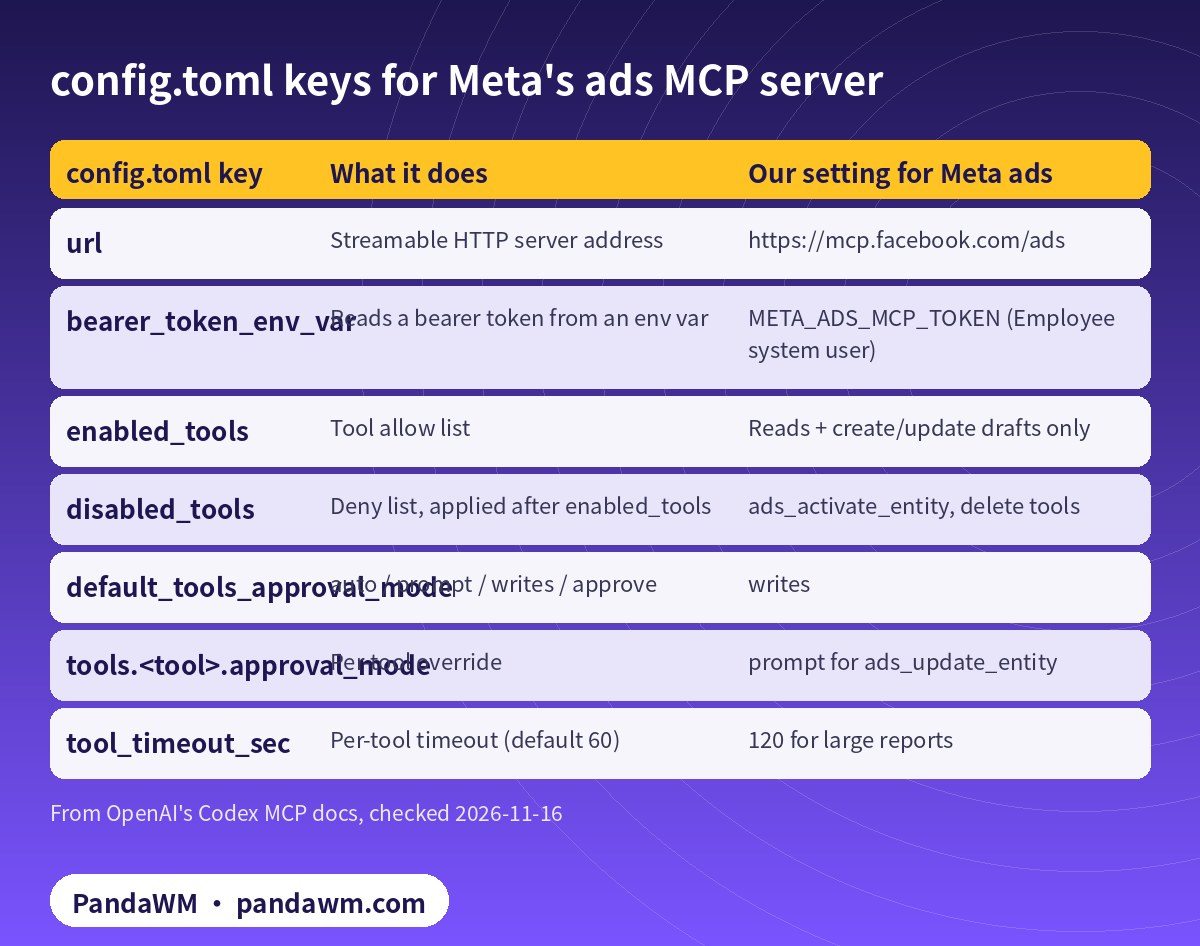
The writes mode prompts for any tool that isn’t marked read-only. Disabled tools win over enabled ones, so a tool listed in both is off.
Sandbox and approval policy
Codex’s sandbox_mode can be read-only, workspace-write or danger-full-access; approval_policy can be on-request, never or a granular policy (config reference, approvals and security). For ad work we use:
# ~/.codex/config.toml (top level)
sandbox_mode = "workspace-write"     # never danger-full-access on a laptop
approval_policy = "on-request"
For scheduled jobs, codex exec starts in a read-only sandbox by default (codex exec), which suits reports. See Codex daily reports (Chinese).
Meta-side guardrails: ads MCP server rules
Each rule denies one agent action on one ad account or catalog, whichever AI client connects. They are the same controls as the ads MCP server page in Meta Business Suite settings, and a Marketing API endpoint manages them in bulk. Ad account actions: create_campaign, create_ad_set, create_ad, edit_budget (above a percentage, above an amount, or above a ceiling), edit_targeting, edit_creative, edit_status (pausing or activating) and all (ads MCP server rules). Denying edit_status is a server-side way to keep activation with people. Rules are in limited availability; if your business isn’t enrolled, the ad account endpoint returns error code 10. This example denies budget increases above 20%:
curl -sS -X POST \
  "https://ads-api.facebook.com/v25.0/marketing-api/businesses/<BUSINESS_ID>/accounts/act_<AD_ACCOUNT_ID>/ads_mcp_rules" \
  -d "action=edit_budget" \
  -d "trigger_type=percentage_change" \
  -d "status=active" \
  -d 'metadata={"max_percentage":20,"budget_dimension":"both"}' \
  -d "access_token=$META_SYSTEM_USER_TOKEN"
Posting the same action and trigger again updates the existing rule. There’s no DELETE; to turn a rule off, post it again with status=paused.
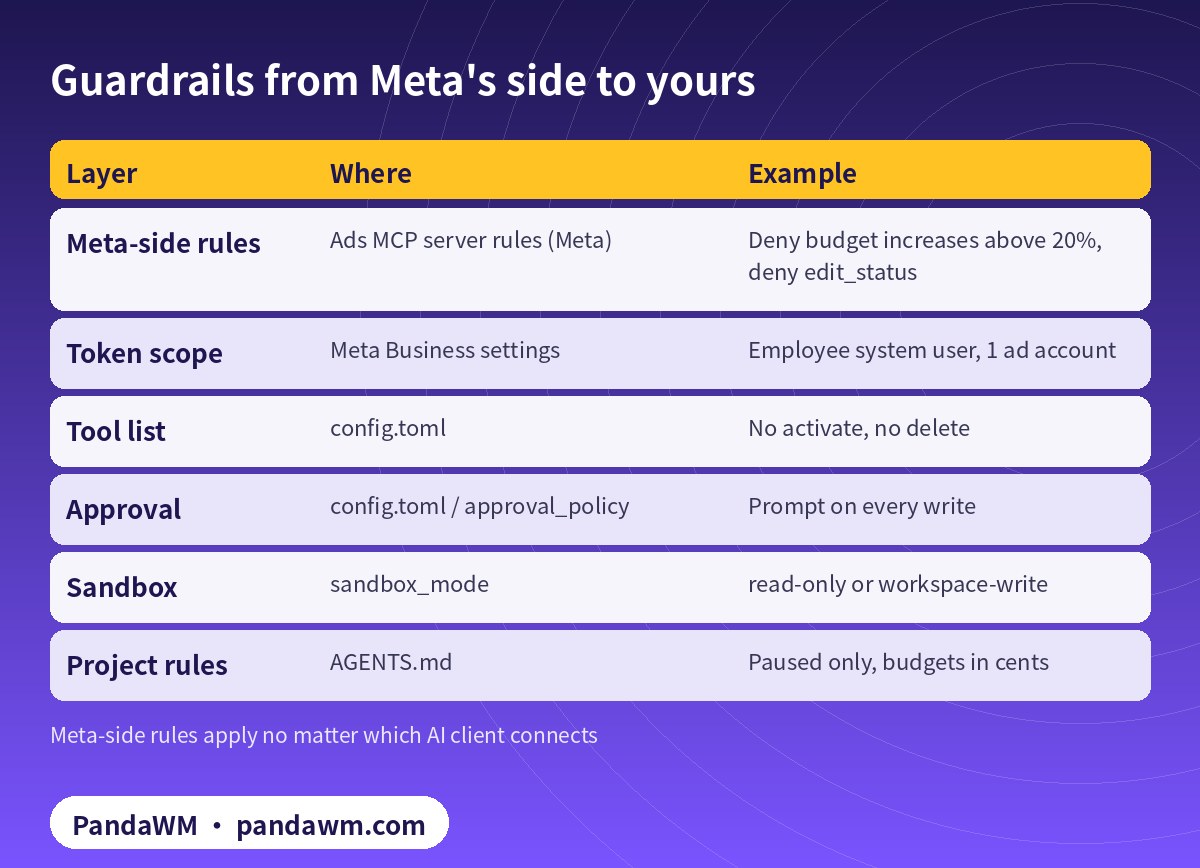
| Layer | Where | Example |
|---|---|---|
| Meta-side rules | Ads MCP server rules (Meta) | Deny budget increases above 20%, deny edit_status |
| Token scope | Meta Business settings | Employee system user, 1 ad account |
| Tool list | config.toml | No activate, no delete |
| Approval | config.toml / approval_policy | Prompt on every write |
| Sandbox | sandbox_mode | read-only or workspace-write |
| Project rules | AGENTS.md | Paused only, budgets in cents |
A first session
codex
> List the ad accounts I can access, then show yesterday's spend and CTR by campaign
  for act_<AD_ACCOUNT_ID>. Don't change anything.
Once reads look right, try a paused draft and approve each write. Write tools on Meta’s server create objects as PAUSED (tools).
How PandaWM uses Claude, Codex and Facebook ad accounts to speed up client ad delivery
This guide focuses on Codex, but in day-to-day client work PandaWM combines Claude, Codex and Facebook business ad accounts to help companies going global move faster through the repetitive loop of account setup → campaign structure → creatives → reporting → budget changes, so media buyers spend their time on strategy and creative judgement.
- Ad accounts: the client’s own Facebook ad account, or a business ad account opened compliantly through PandaWM’s account-opening service. The account belongs to the client and is never rented or shared.
- Claude: reading long docs and reports, drafting media plans and ad copy, drafting campaign structures in a paused state through Meta’s ads MCP server, and rule-based anomaly checks.
- Codex: writing and maintaining automation scripts (Marketing API, Insights reports, bulk uploads, budget rules) that run in a sandbox, on a schedule or in CI.
- Human sign-off: anything that spends money (activating ads, raising budgets) is approved by a media buyer, and a person makes the final call on Meta policy and creative compliance.
This describes a service capability only. There are no prices or rebates here, and PandaWM is not an official partner of Meta, Anthropic or OpenAI. See Facebook ads account opening & management (PandaWM service page) for account opening and management.
FAQ
Does Meta officially support Codex?
Meta’s MCP client guide lists Codex CLI and the Codex app as validated clients. The ads MCP page itself shows Claude Code and ChatGPT steps, and a server page can support fewer clients, so check it.
Can I use my personal user token?
Token auth accepts user or system user tokens. For automation, use an Employee-role system user token.
Why disable ads_activate_entity entirely?
Activation is when money starts moving. We keep it in Ads Manager with a person.
What does approval mode writes cover?
It prompts for tools that aren’t marked read-only by the server.
Can ads MCP rules be deleted?
No DELETE is available; pause a rule instead.
Compliance note: Use every workflow in this guide only on ad accounts, Pages and pixels that your company owns or is formally authorised to manage, through Meta’s official Marketing API, the ads MCP server or Ads CLI, with Business Manager system users and least-privilege permissions. Respect Meta’s rate limits and Advertising Standards, and keep a human review step before anything that can spend money. PandaWM does not sell, rent, share or transfer ad accounts, Business Managers or API keys, does not help anyone bypass ad review, regional restrictions, KYC, business verification or payment controls, and is not an official partner of Meta, Anthropic or OpenAI. Claude and OpenAI services are only offered to customers in their supported countries and regions; the account holder should be an entity legitimately established and operating in a supported region.
Related guides
- Facebook ads account opening & management (PandaWM service page)
- Overseas AI Token service: account setup + API access (PandaWM)
- Codex + Facebook Marketing API campaign creation pipeline
- Claude Agent SDK guardrails for Meta ads automation
- How to connect Claude to Facebook Ads (step by step)
- Meta ads MCP server: let AI agents manage your ads
- How to get an OpenAI API key
- Prompt injection explained: enterprise defense
Talk to PandaWM: Facebook ad accounts + AI-assisted delivery
Tell us where your company is registered, your industry, target countries, landing page and expected monthly budget, and which part you want to automate first (account structure, creatives, reporting or budget rules). We pre-check eligibility and creatives, help you open a compliant Facebook business ad account, and build Claude or Codex workflows that run on your own accounts. We never sell, rent or share ad accounts.
WhatsApp: +852 5904 8602Telegram: @PANDA0134WeChat: szcwh99

Official sources
- Meta: Connect an MCP client to Meta
- Meta for Developers blog: ads MCP server available for developers (2026-07-16)
- Meta: Ads MCP server – get started
- Meta: Ads MCP server – ad creation and management tools
- Meta: Ads MCP server rules best practices
- OpenAI: Codex and MCP
- OpenAI: Codex configuration reference
- OpenAI: Codex agent approvals & security
- OpenAI: Codex non-interactive mode (codex exec)
All official pages checked on 2026-11-16. API versions, tool names and permission requirements change; the official pages prevail.
 微信扫一扫打赏
 支付宝扫一扫打赏