 熊猫出海编辑团队
Last updated: 16 November 2026. Meta, Anthropic and OpenAI documentation checked that day.
Meta now runs an official, hosted ads MCP server at https://mcp.facebook.com/ads that lets an AI agent manage Meta ads directly (ads MCP server overview). On July 16, 2026 Meta opened it to any developer with their own Meta app, with an update on September 22 (Meta developer blog). Here’s what it does, which AI clients work with it, how access works, and the guardrails that matter when an agent can spend your budget.
What it is
- MCP (Model Context Protocol) is an open protocol for AI tools. An agent connects to a server, discovers its tools at runtime and calls them.
- The ads MCP server is one of Meta’s “ads AI connectors”, exposing ads capabilities as structured, permission-scoped tools.
- Meta runs two other official MCP servers: Meta Social Technologies MCP for developer apps and WhatsApp Business Tools MCP (
- Meta MCP overview
- ).
What an agent can do
| Category | What an agent can do | Example tools |
|---|---|---|
| Comprehensive reporting | Spend, impressions, CTR, ROAS with breakdowns; trends and anomalies | ads_get_ad_entities, ads_insights_performance_trend, ads_insights_anomaly_signal |
| Ad creation and management | Create and edit campaigns, ad sets, ads, creatives; previews; boost IG posts | ads_create_campaign, ads_create_ad, ads_get_ad_preview, ads_boost_ig_post |
| Catalog creation and management | Create catalogs, add products, fix item visibility | Catalog tools |
| Signals and datasets | Signal health and quality | Signal diagnostic tools |
| Help and troubleshooting | Search Meta Business Help Center | Help tools |
| A/B tests and lift studies | Create and manage tests and studies | Testing tools |
| Activity logs | Read account change history | ads_account_get_activity_logs |
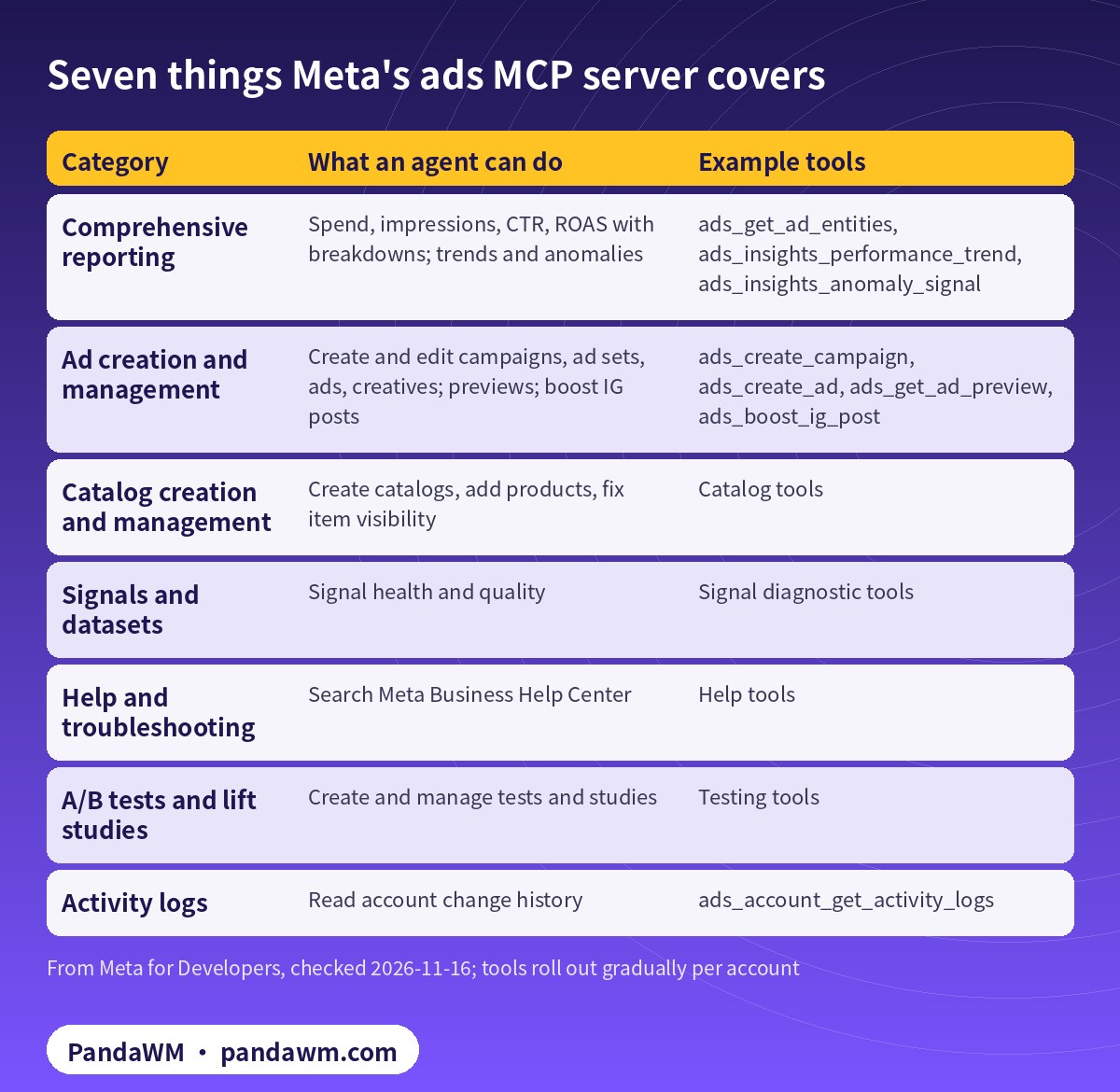
Write tools create entities paused, and the AI client asks for confirmation before activation; ads_activate_entity is described as the tool that “starts spending budget” (creation and management tools, reporting tools). Meta quotes partner AdManage finding every ad in a 270-ad account in 2.4 seconds and getting five recommendations in under five seconds; that’s a partner’s test, not a guarantee.
Which AI clients work
Meta lists Claude Desktop, Claude Code, ChatGPT, Codex app, Codex CLI, Cursor app and Cursor CLI as validated MCP clients. A client counts as supported on a server only if that server’s page lists it (Meta MCP overview, connect an MCP client). The ads MCP page gives Claude Code and ChatGPT steps:
# Claude Code: add Meta's hosted ads MCP server with your own Meta app ID (OAuth, PKCE)
# Fix the callback port and register http://localhost:8080/callback in your Meta app.
claude mcp add --transport http --client-id <META_APP_ID> --callback-port 8080 \
  meta-ads https://mcp.facebook.com/ads          # never pass --client-secret

claude mcp login meta-ads    # or run /mcp inside Claude Code to sign in
claude mcp list              # should show: Connected
Walkthroughs: connect Claude to Facebook Ads and connect Codex safely.
Access requirements
- Your Meta app adds the “Create & manage ads with ads MCP server” use case; agencies request Advanced Access on
ads_mcp_managementthrough app review. Meta also documents a path without your own app ( - Meta Business Help Center
- ).
- Auth via OAuth (Facebook Login for Business), a user token, or a system user token. Only Employee-role system user tokens work.
- Minimum permissions:
ads_mcp_managementplusads_readorads_management( - get started
- ).
Guardrails
| Guardrail | Where it lives | What it does |
|---|---|---|
| Paused by default | Meta’s write tools | New campaigns, ad sets and ads start paused |
| Activation confirmation | Your AI client | Asks before ads_activate_entity |
| Permissions | Token / OAuth grant | ads_read for read-only agents |
| Ads MCP server rules | Business Suite settings or API | Deny actions such as edit_status or big budget increases |
| Business Integrations review | Facebook settings | See and revoke connected MCP servers |
| Client-side approvals | Claude Code, Codex, SDKs | Allow / ask / deny per tool |
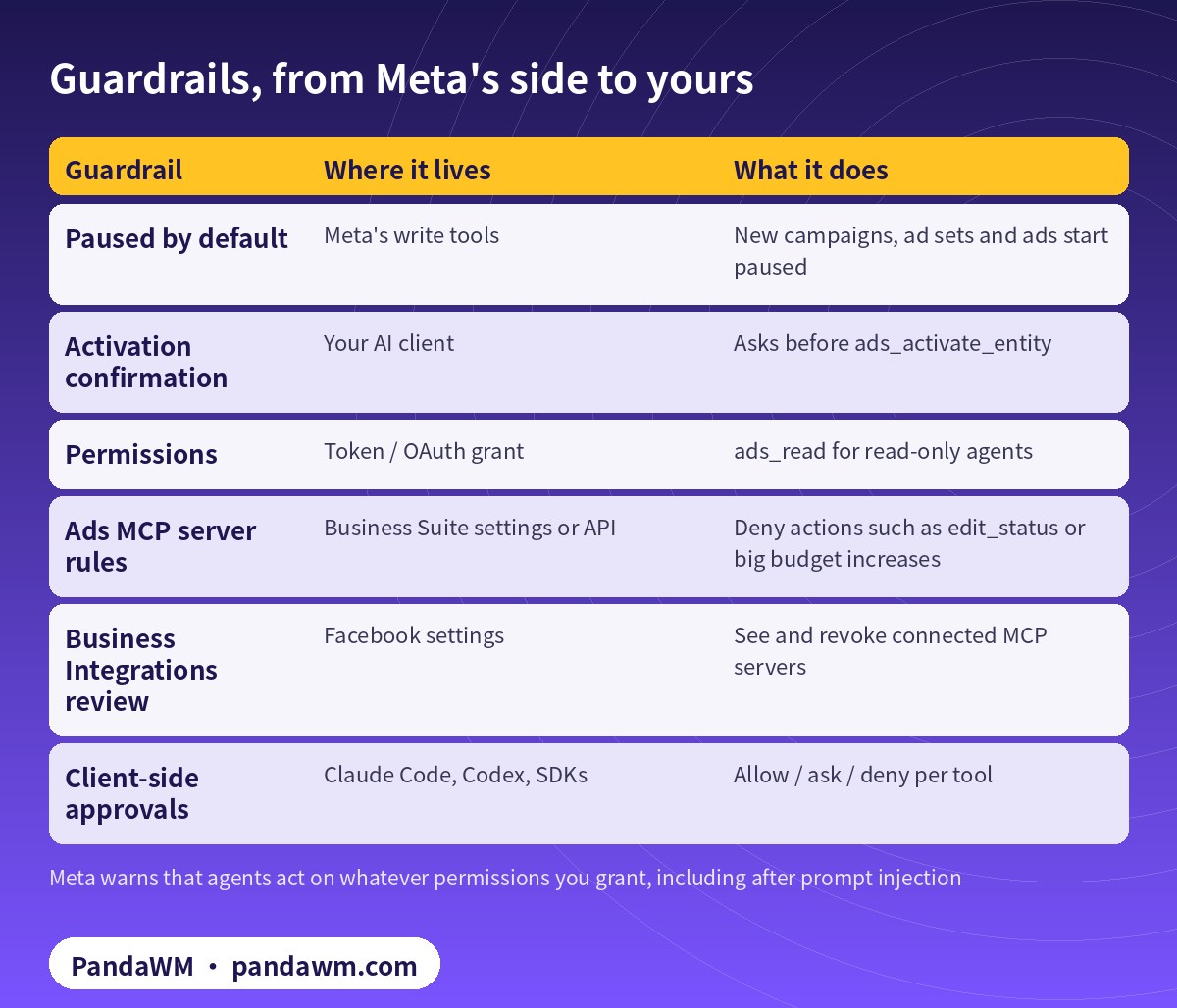
Meta is blunt about the risk. An agent can call anything your permissions allow without asking, including in response to instructions hidden in web pages, documents or webhook payloads. Meta recommends least privilege, separate dev and prod apps, and reviewing connected servers under Settings › Your Activity › Business Integrations (Meta MCP overview).
Ads MCP server rules each deny one agent action on an ad account or catalog, for example creating campaigns, budget increases above a percentage, or status changes. You set them in Business Suite settings or in bulk through the Marketing API. They’re in limited availability (ads MCP server rules):
curl -sS -X POST \
  "https://ads-api.facebook.com/v25.0/marketing-api/businesses/<BUSINESS_ID>/accounts/act_<AD_ACCOUNT_ID>/ads_mcp_rules" \
  -d "action=edit_budget" \
  -d "trigger_type=percentage_change" \
  -d "status=active" \
  -d 'metadata={"max_percentage":20,"budget_dimension":"both"}' \
  -d "access_token=$META_SYSTEM_USER_TOKEN"
MCP, Ads CLI or Marketing API?
- Ads MCP server: conversational, for buyers working in Claude, ChatGPT or Codex.
- Ads CLI: Meta’s
metacommand, for scripts, CI and agents that run shell commands ( - Ads CLI overview
- ).
- Marketing API: the underlying REST API for custom systems. See
- a Codex-built campaign pipeline
- .
brew tap facebook/fb && brew trust facebook/fb && brew install facebook/fb/meta-ads
#   or: pip install meta-ads   (Python 3.12+)
meta auth status                      # reads ACCESS_TOKEN / AD_ACCOUNT_ID from env or .env
meta --output json ads campaign list  # table (default), json or plain
meta ads insights get --fields spend,impressions,ctr,cpc
What changes for advertisers
- Reporting and diagnosis move to chat first: low risk, high return.
- Campaign drafting gets faster: paused creation plus human activation.
- Spending decisions stay human, locked with permissions and rules.
- Account quality matters more: AI amplifies speed, and it amplifies policy mistakes too.
PandaWM’s full solution: Claude + Codex + Facebook ad accounts for faster delivery
Meta’s ads MCP server is an interface. What actually speeds up ad delivery is getting accounts, AI and human process right together. PandaWM’s end-to-end service for companies going global covers:
- Compliant account opening and asset setup: we help you open your own Facebook business ad account (or tidy up the ones you have) and set up Business Manager, Page, pixel / Conversions API and domain verification. The account is yours; nothing is rented or shared.
- System users and permissions: least-privilege Employee-role system users, with tokens kept in your own secret manager.
- Claude on Meta’s ads MCP server: daily reporting, media plans and copy drafts, paused campaign drafts and anomaly checks.
- Codex for automation code: Marketing API scripts for bulk structures, creative uploads, Insights reports and budget rules, run in a sandbox on a schedule.
- Human review and retros: media buyers approve activation, budget increases and sensitive-industry creatives, and we review time saved and performance weekly.
This describes a service capability only, with no prices or rebates. PandaWM is not an official partner of Meta, Anthropic or OpenAI. See Facebook ads account opening & management (PandaWM service page).
FAQ
Is the Meta ads MCP server official?
Yes. Meta hosts it and documents it on Meta for Developers.
Does it cost anything?
Meta’s docs don’t list a separate fee. Your AI client is billed under its own plan.
Can an agent launch ads on its own?
New objects are paused and activation needs confirmation. You can also deny status changes with ads MCP rules.
Can I use it from ChatGPT?
Yes. Meta documents ChatGPT setup with OAuth and your Meta app ID.
What about third-party “Facebook ads MCP” servers?
This guide covers Meta’s hosted server. Evaluate third-party servers’ security yourself.
Compliance note: Use every workflow in this guide only on ad accounts, Pages and pixels that your company owns or is formally authorised to manage, through Meta’s official Marketing API, the ads MCP server or Ads CLI, with Business Manager system users and least-privilege permissions. Respect Meta’s rate limits and Advertising Standards, and keep a human review step before anything that can spend money. PandaWM does not sell, rent, share or transfer ad accounts, Business Managers or API keys, does not help anyone bypass ad review, regional restrictions, KYC, business verification or payment controls, and is not an official partner of Meta, Anthropic or OpenAI. Claude and OpenAI services are only offered to customers in their supported countries and regions; the account holder should be an entity legitimately established and operating in a supported region.
Related guides
- Facebook ads account opening & management (PandaWM service page)
- Overseas AI Token service: account setup + API access (PandaWM)
- How to connect Claude to Facebook Ads (step by step)
- Claude Agent SDK guardrails for Meta ads automation
- Codex config.toml for Meta ads MCP: approvals and guardrails
- Claude Facebook ads reporting and budget-rule automation
- Meta 广告 MCP 解读(中文)
- Facebook ad account setup checklist
- Prompt injection explained: enterprise defense
Talk to PandaWM: Facebook ad accounts + AI-assisted delivery
Tell us where your company is registered, your industry, target countries, landing page and expected monthly budget, and which part you want to automate first (account structure, creatives, reporting or budget rules). We pre-check eligibility and creatives, help you open a compliant Facebook business ad account, and build Claude or Codex workflows that run on your own accounts. We never sell, rent or share ad accounts.
WhatsApp: +852 5904 8602Telegram: @PANDA0134WeChat: szcwh99

Official sources
- Meta: Ads MCP server overview
- Meta for Developers blog: ads MCP server available for developers (2026-07-16)
- Meta: Connect AI agents to Meta with MCP
- Meta: Connect an MCP client to Meta
- Meta: Ads MCP server – get started
- Meta: Ads MCP server – ad creation and management tools
- Meta: Ads MCP server – comprehensive reporting tools
- Meta: Ads MCP server rules best practices
- Meta Business Help Center: Meta ads AI connectors
- Meta: Ads CLI overview
All official pages checked on 2026-11-16. API versions, tool names and permission requirements change; the official pages prevail.
Further reading: Google Ads MCP server: let AI agents work on your ads; How to connect Claude to Google Ads (step by step).
 微信扫一扫打赏
 支付宝扫一扫打赏