
 熊猫出海编辑团队
Last updated: 23 November 2026 · PandaWM (pandawm.com)
Short answer: there is only one legitimate way to appeal a disabled or restricted Facebook ad account — find the restricted asset in Meta’s Business Support Home and follow “What you can do”: confirm identity, complete verification or request a review. Only an account admin can request review. Meta says reviews are usually completed within 48 hours, sometimes longer; the number of reviews is limited and the decision after review is final; and ads do not restart automatically after the account is restored. Fix the cause first, then request review.
Also available in: 简体中文 | 繁體中文
If individual ads are being rejected rather than the account being disabled, see Facebook ad not approved? Why ads get rejected and how to fix them. If verification is what blocks you, see Meta business verification for overseas advertisers. This guide covers which layer is restricted and who submits the review for own vs agency accounts. Service page: Facebook ad account opening & management (PandaWM service page).
1. First, work out which layer is restricted
| Restricted asset | What you see | Check first |
|---|---|---|
| Business Portfolio | The whole portfolio cannot advertise | Portfolio security, admins, business verification, policy notices |
| Ad account | The account, its ads and some ad assets are disabled | Payment history, rejected ads, landing pages, policy notices |
| Facebook Page | The Page cannot be used for ads | Page content, feedback, policy notices |
| Personal profile | That person cannot run or create ads; ad accounts only they manage may also be disabled | Profile security, identity confirmation, two-factor authentication |
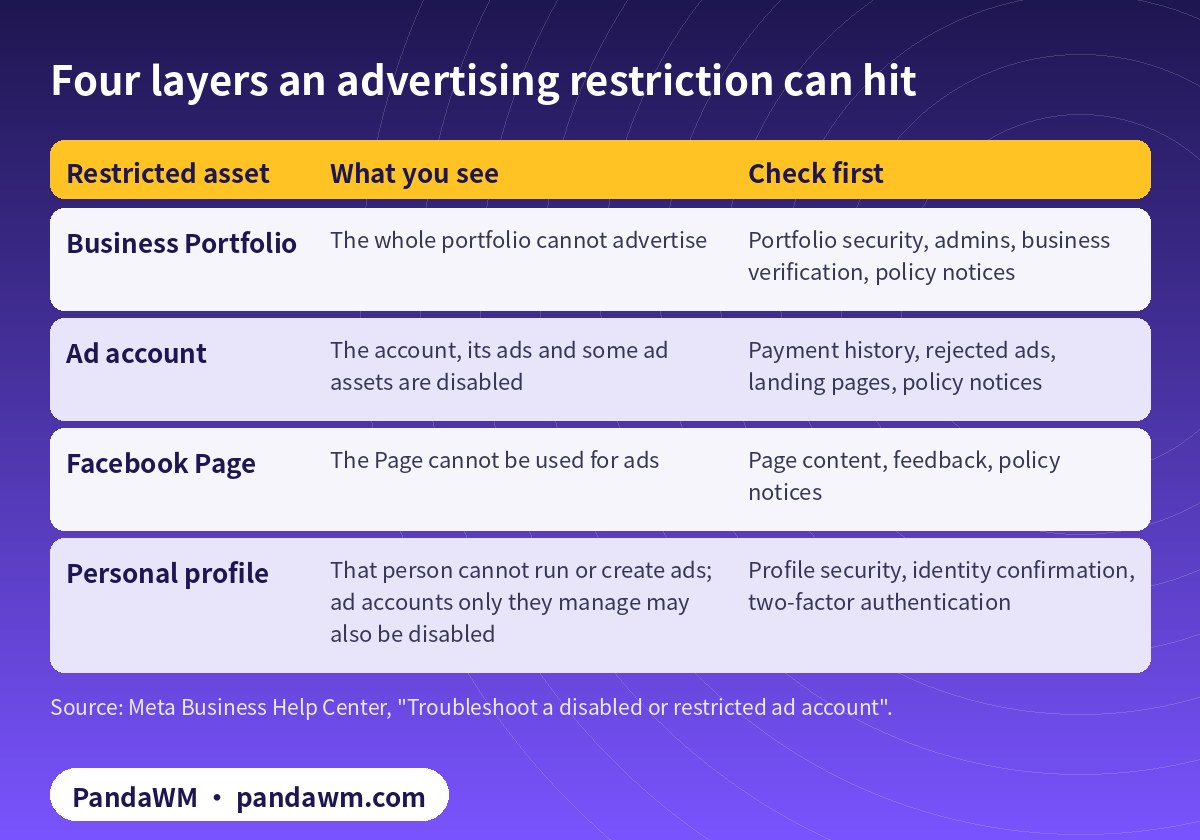
How to check: on a computer open Business Support Home (Account Quality) → Account status overview, and screenshot every restricted asset with its reason and date. Source: Meta: Troubleshoot a disabled or restricted ad account.
2. Official disabled ad account appeal steps
- On a computer, open Business Support Home and choose “Account status overview” on the left.
- Click the restricted asset and read every prompt under “What you can do”.
- Complete what is asked first — identity confirmation, verification or account security (for example two-factor authentication for every member).
- Click “Request review” and submit your explanation and documents as prompted.
- Watch notifications and asset status; after restoration, turn your ads back on manually in Ads Manager.
Sources: Meta: Request a review when restricted from advertising, Meta: Ads review policy.
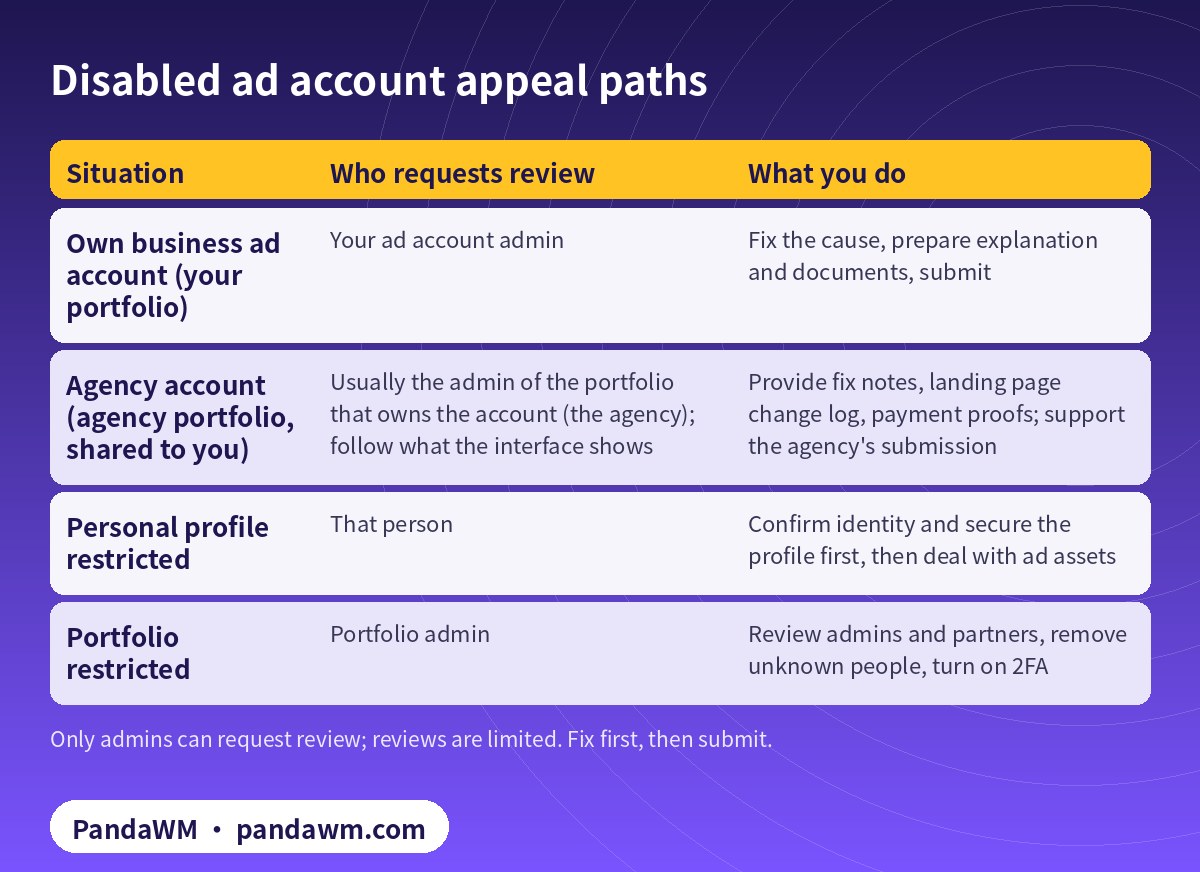
3. Own account vs agency account: who submits?
| Situation | Who requests review | What you do |
|---|---|---|
| Own business ad account (your portfolio) | Your ad account admin | Fix the cause, prepare explanation and documents, submit |
| Agency account (agency portfolio, shared to you) | Usually the admin of the portfolio that owns the account (the agency); follow what the interface shows | Provide fix notes, landing page change log, payment proofs; support the agency’s submission |
| Personal profile restricted | That person | Confirm identity and secure the profile first, then deal with ad assets |
| Portfolio restricted | Portfolio admin | Review admins and partners, remove unknown people, turn on 2FA |
4. Fix in this order, then appeal
- Policy: remove or edit ads that may violate policy; make the landing page match what the ad promises.
- Payment: clear outstanding balances and fix failed payment methods.
- Security: remove unknown admins and partners; everyone turns on two-factor authentication.
- Explanation: who the business is, what it sells, what happened before the restriction and what has been fixed.
5. What not to do
- Do not use a new ad account or new portfolio to get around a restriction — that is itself a violation.
- Do not buy “appeal links”, “internal channels” or “unban services”; the official entry point is Business Support Home.
- Do not keep switching devices, IPs or payment methods to look like a new user.
- Do not resubmit repeatedly without fixing anything; reviews are limited.
FAQ
How long until a disabled ad account is restored?
Meta says reviews usually finish within 48 hours, sometimes longer. Whether it is restored depends on the outcome.
I do not see a “Request review” button. Why?
Common reasons: you are not an admin; Meta wants identity confirmation or another step first; or the review limit is used up. Follow “What you can do”.
My review was rejected. Can I appeal again?
Meta says the decision after review is final. Stop using that asset, bring the business in line with policy, and do not open new accounts to get around it.
My agency account was disabled. What happens to the balance?
It is handled per the written agreement and Meta’s billing rules and policies. Agree how balance and reports are handled after a restriction when you sign.
Will my ads restart automatically after restoration?
No. Meta says you need to turn them back on manually in Ads Manager.
More in this series: Facebook ad account review time and rejection reasons; How to increase your Facebook spending limit; “Unlimited” Facebook ad account myths.
Related guides
- Facebook ad account opening & management (PandaWM service page)
- Facebook ad not approved? Why ads get rejected and how to fix them
- Meta business verification for overseas advertisers
- Facebook business ad account vs personal ad account
- Facebook Ads Account Opening Guide 2026: self-serve vs agency accounts
Sources
- Meta Business Help Center: Troubleshoot a disabled or restricted ad account
- Meta Business Help Center: Request a review when restricted from advertising
- Meta for Business: Ads review policy
- Meta Business Support Home (Account Quality)
Public pages checked on 23 November 2026. Meta updates its rules; the official pages always take precedence.
Compliance note: PandaWM helps legitimate, eligible businesses open, verify and run Facebook ad accounts through Meta’s official processes and agency channels. Agency ad accounts are opened in the agency’s name, but the client keeps the right to use the account and owns its ad data; we do not buy, sell, rent or share ad accounts, and we do not offer ways to bypass ad review, KYC, business verification, regional restrictions or cloaking. We do not promise that an account will never be restricted. Fees, timing and eligible markets are assessed case by case; Meta’s official pages take precedence. This article is not legal advice.
Talk to PandaWM
Account disabled and not sure which layer is affected? PandaWM can help you read the restriction, organise fix notes and plan compliant accounts going forward. We do not sell “unban” services or promise review outcomes; reviews go through Meta’s official process.
WhatsApp +852 5904 8602Telegram @PANDA0134Facebook account opening service
WeChat: szcwh99 (scan the QR code below). Tell us your industry, target countries and budget range. Never send passwords, verification codes or card details in chat.

 微信扫一扫打赏
 支付宝扫一扫打赏