 熊猫出海编辑团队
Last updated: 23 November 2026 · PandaWM (pandawm.com)
Short answer: there is no single number for “how long a Facebook ad account review takes”, because it is really five separate reviews. Meta only publishes timing for some of them: business verification gets a decision within up to 14 working days after submission; most ads are reviewed within 24 hours, sometimes longer; and a review after a restriction is usually completed within 48 hours, sometimes longer. Meta does not publish a standard timeframe for agency account applications or restricted-category authorization — those depend mainly on whether your documents are complete and consistent.
Also available in: 简体中文 | 繁體中文
Document requirements and name matching for China and Hong Kong companies are covered in Meta business verification for overseas advertisers; fixing individual rejected ads is covered in Facebook ad not approved? Why ads get rejected and how to fix them. This guide puts the timing and the rejection reasons of each stage side by side. Agency account opening: Facebook ad account opening & management (PandaWM service page).
1. Five review stages and Meta’s published timing
| Stage | When it happens | What Meta says about timing | What drives it |
|---|---|---|---|
| 1. Agency account application | After submitting entity, website, Page and Portfolio ID | No single published timeframe | Complete documents; entity, site and Page match; restricted industry or not |
| 2. Business verification | When a feature or permission requires it | A decision within up to 14 working days after submission | Legal name, address or phone match the documents; site loads over HTTPS |
| 3. Ad review | Each time an ad is submitted or edited | Most ads within 24 hours, sometimes longer | Creative and landing page vs Advertising Standards |
| 4. Restricted-category authorization | Gambling, crypto, prescription drugs, dating and similar | No single timeframe; depends on the category process | Valid licence or certification; target countries allowed |
| 5. Review after a restriction | After an account, Page or portfolio is restricted | Usually within 48 hours, sometimes longer; limited number of reviews | Root cause fixed first; submitted by an admin |
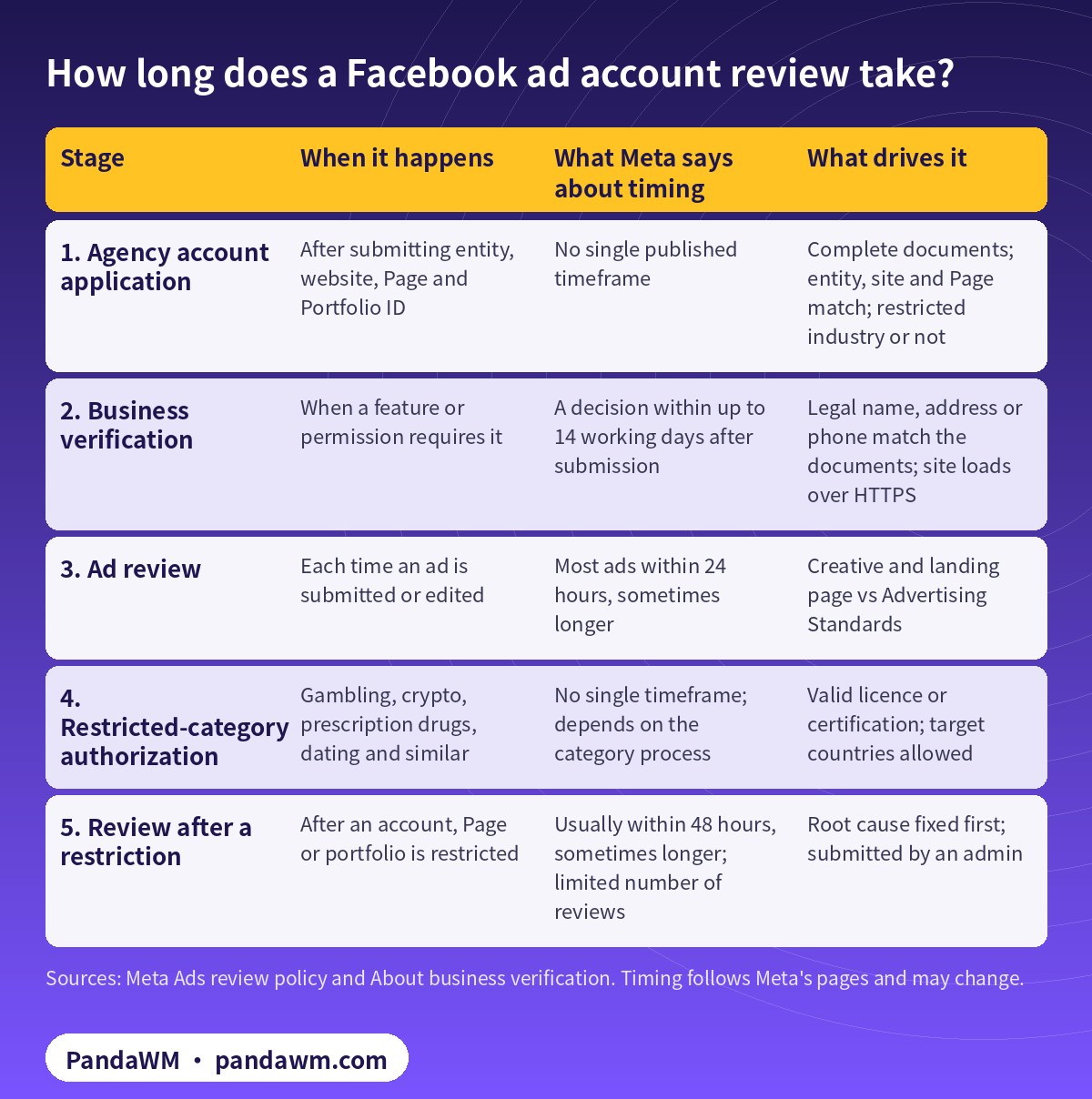
Sources: Meta: Ads review policy, Meta: About business verification. Timing is as stated on Meta’s pages and can change at any time.
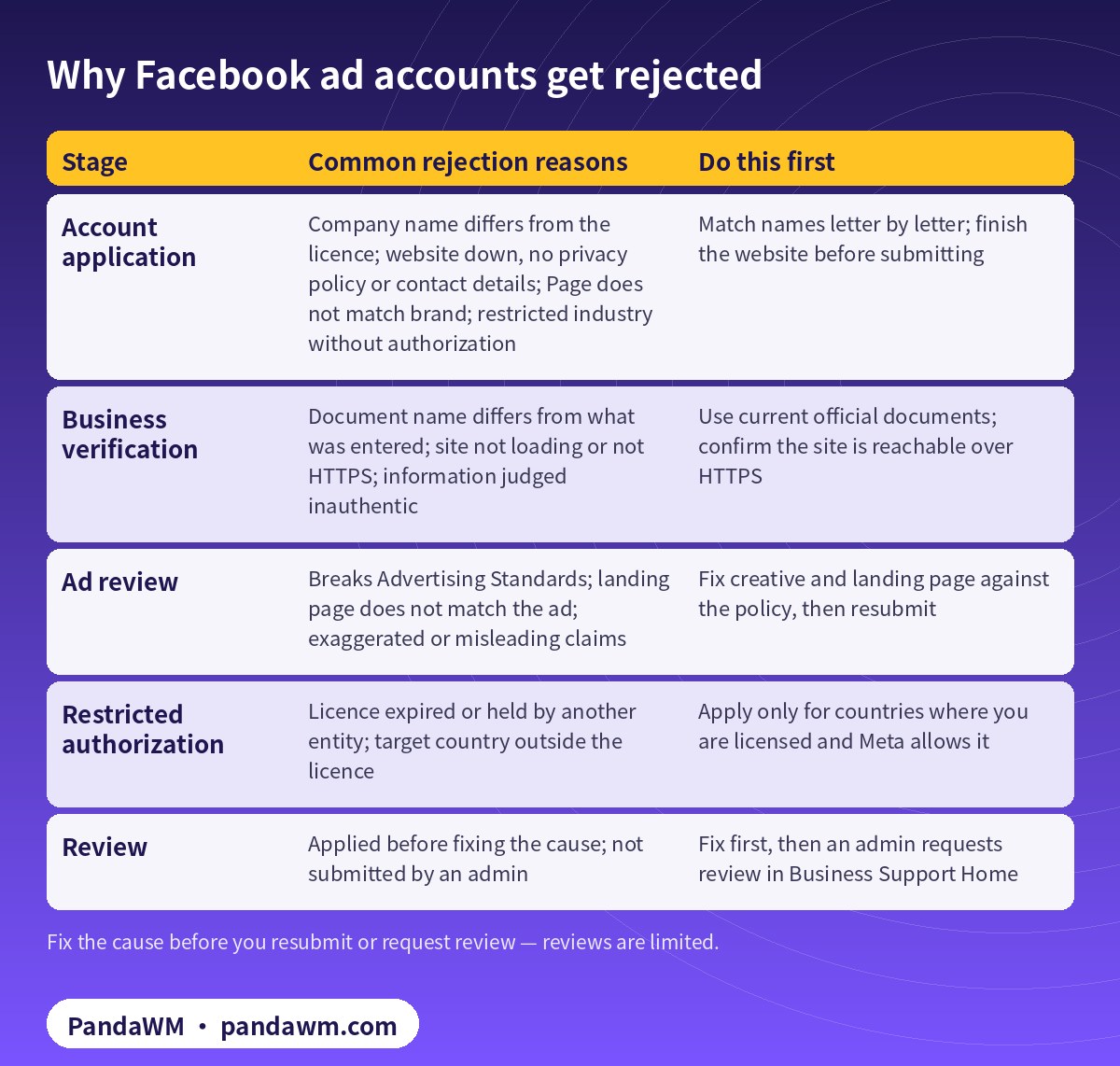
2. The most common rejection reasons at each stage
| Stage | Common rejection reasons | Do this first |
|---|---|---|
| Account application | Company name differs from the licence; website down, no privacy policy or contact details; Page does not match brand; restricted industry without authorization | Match names letter by letter; finish the website before submitting |
| Business verification | Document name differs from what was entered; site not loading or not HTTPS; information judged inauthentic | Use current official documents; confirm the site is reachable over HTTPS |
| Ad review | Breaks Advertising Standards; landing page does not match the ad; exaggerated or misleading claims | Fix creative and landing page against the policy, then resubmit |
| Restricted authorization | Licence expired or held by another entity; target country outside the licence | Apply only for countries where you are licensed and Meta allows it |
| Review | Applied before fixing the cause; not submitted by an admin | Fix first, then an admin requests review in Business Support Home |
3. How to get through review faster: pre-submission checklist
- The company name is identical on the business licence, the website footer and the Page “About” section (check both English and Chinese names).
- The website loads over HTTPS and has a privacy policy, a refund/returns policy and real contact details.
- The Page has real published content and its name matches the brand.
- You know whether your product is a restricted category, and licences are ready if authorization is needed.
- Your first batch of creatives has been pre-checked against Meta’s Advertising Standards, so a new account does not start with rejections.
After an account goes live, the first weeks still matter — see New Facebook business ad account: a 30-day launch and scaling plan.
FAQ
How many days does it take to get a Facebook ad account?
Meta does not publish a standard timeframe for account applications. It is usually faster when documents are complete and the entity, website and Page match; the exact timing depends on industry and channel, so ask an adviser.
Is business verification always required?
No. It is triggered by certain features, permissions or payment situations. See Meta business verification for overseas advertisers.
My ad has been “In review” for more than 24 hours. What now?
Meta says some reviews take longer. Check whether the creative or landing page touches restricted content, and do not repeatedly delete and recreate the same ad.
Can I resubmit right after my application is rejected?
Yes, but fix the stated reasons first, or it will most likely be rejected again.
My review was declined. Is there anything else I can do?
Meta says the decision after a review is final. Do not use a new account to get around the restriction; change the business practice to comply and plan again through legitimate channels.
More in this series: Facebook account vs Facebook ad account; How to open a Facebook business ad account; Disabled Facebook ad account: how to appeal.
Related guides
- Facebook ad account opening & management (PandaWM service page)
- Meta business verification for overseas advertisers
- Facebook ad not approved? Why ads get rejected and how to fix them
- Facebook Ads Account Opening Guide 2026: self-serve vs agency accounts
- New Facebook business ad account: a 30-day launch and scaling plan
Sources
- Meta for Business: Ads review policy
- Meta Business Help Center: About business verification
- Meta Business Help Center: Request a review when restricted from advertising
- Meta Advertising Standards
Public pages checked on 23 November 2026. Meta updates its rules; the official pages always take precedence.
Compliance note: PandaWM helps legitimate, eligible businesses open, verify and run Facebook ad accounts through Meta’s official processes and agency channels. Agency ad accounts are opened in the agency’s name, but the client keeps the right to use the account and owns its ad data; we do not buy, sell, rent or share ad accounts, and we do not offer ways to bypass ad review, KYC, business verification, regional restrictions or cloaking. We do not promise that an account will never be restricted. Fees, timing and eligible markets are assessed case by case; Meta’s official pages take precedence. This article is not legal advice.
Talk to PandaWM
PandaWM helps companies open Facebook business ad accounts through agency channels. The account is opened in the agency’s name, shared to your own Business Portfolio, and you keep the right to use it and own its data. Before submission our advisers pre-check your documents and industry to reduce back-and-forth; we do not guarantee review outcomes.
WhatsApp +852 5904 8602Telegram @PANDA0134Facebook account opening service
WeChat: szcwh99 (scan the QR code below). Tell us your industry, target countries and budget range. Never send passwords, verification codes or card details in chat.
 微信扫一扫打赏
 支付宝扫一扫打赏