
 熊猫出海编辑团队
Last updated: 2 November 2026
“Facebook disabled my account” is one of the most stressful messages you can see, and one of the most exploited by scammers. This guide explains, using Meta’s own help pages, how a disabled Facebook account appeal works: where to start, when Facebook asks for an ID request, how long you have, what to do while you wait and what “permanently disabled” means. It does not offer shortcuts: nobody outside Meta can reinstate an account, and anyone who says otherwise for a fee is a risk. If your problem is an ad account or a business portfolio, read the companion guide on ad vs personal vs business disabled.
Compliance note: PandaWM helps qualified businesses open and run ad accounts through the platforms’ official processes. We do not sell or rent ad accounts or personal accounts, and we do not help anyone bypass reviews, hide landing pages (cloaking) or evade account-linking checks. Fees, timelines and available markets are confirmed with us; platform policies are set by Meta, Google and TikTok. This article is general information, not legal advice.
First: work out what is actually disabled
| What you see | Likely status | Where to go |
|---|---|---|
| Log-in screen says your account is disabled or suspended | Personal profile disabled | The on-screen appeal prompt and the Facebook Help Center page for disabled accounts |
| You can log in but cannot post, comment or message | Restriction, not disabled | Support Inbox or Account Status in Settings; restrictions often expire |
| Ads stopped, personal profile fine | Ad account restricted or disabled | Meta Business Support Home; see ad vs personal vs business |
| Page unpublished or removed | Page restriction | Page Quality or Support Inbox for that Page |
| Email says someone logged in | Possible hack | Use the official hacked-account recovery flow instead |
| Message from “Meta support” asking for money or passwords | Scam | Do not reply; see the warning below |
The official appeal path step by step
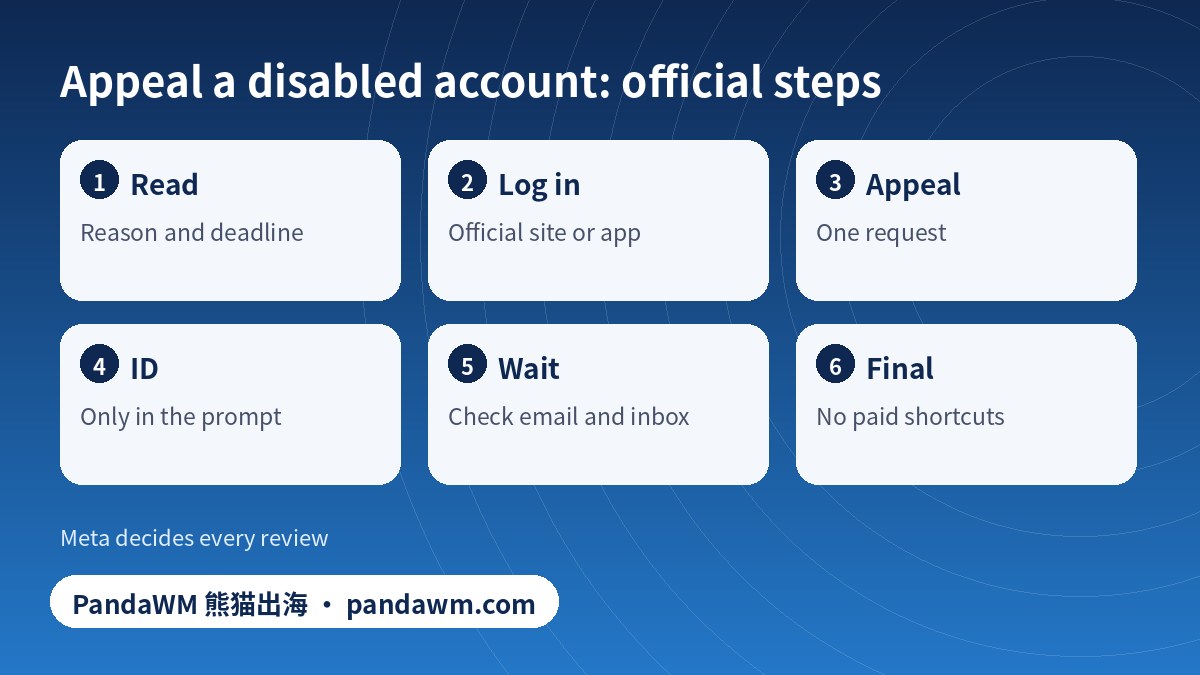
- Read the message on the screen. Note the stated reason and any deadline. Take a screenshot.
- Stay on the official flow. Log in at facebook.com or in the official app and follow the on-screen prompt to request a review. Meta states that you generally have up to 180 days from the disable date to appeal; confirm the current period on the official page.
- Choose “request review” or “appeal”. Submit one request and give accurate details. Repeated duplicate requests do not speed things up.
- Prepare ID if asked. Meta may ask you to confirm your identity with a government-issued ID or other document as prompted. Upload it only inside Facebook’s own prompt; never send ID by email, chat or to a third-party site.
- Match your details. The name and date of birth on the ID should match the account. If your account used a different name from your legal name, say so briefly and plainly.
- Wait and watch. Check the email on the account and the Support Inbox. Do not create new accounts to bypass a disable; that can breach Meta’s rules and complicate the review.
- If the decision is negative. Meta says some decisions cannot be appealed again; do not pay anyone who claims they can reverse it.
What an ID request is, and how to handle it safely
- Purpose: to confirm that a real person owns the account.
- Where: only in the Facebook-hosted prompt after you log in or start the appeal. The help centre page lists current requirements.
- What to submit: follow the prompt. If you can choose, a clear photo of an unexpired government ID with all four corners visible is usually easier to read.
- What not to do: do not send ID to anyone who contacts you first, to “recovery experts” or via email.
- Privacy: if you want to cover details not required by the prompt, follow Meta’s instructions on the page.
Meta’s page contains the current flow and wording; our summary may lag. Where a screen differs from this article, follow the screen.
Appeal readiness check (tick what applies)
Common reasons accounts are disabled
| Reason category | Example | What helps |
|---|---|---|
| Impersonation or fake identity | Name differs from ID, or a profile that looks like someone else | Use your real name; provide ID when asked |
| Spam or suspicious behaviour | Mass friend requests, repeated links, fast posting | Slow down; avoid automation tools |
| Hacked or compromised | Posts you did not write, unknown logins | Secure email first, then use the official recovery flow |
| Community standards violation | Hate speech, violence, adult content, scams | Read the standards; some bans are final |
| Under age | Date of birth below 13 | Meta has a separate process for age issues |
| Ad-related | Ads rejected repeatedly or payment fraud signals | See the ad account guide and ads rejected again (Chinese) |
If Facebook says “permanently disabled”
According to Meta’s help page, if you miss the appeal window or your appeal is unsuccessful, the account is permanently disabled and cannot be reviewed again. Some severe violations lead to immediate permanent disabling. What you can still do: check the official page for any remaining option; request a copy of your information if the page still offers it; secure your email; and, if you must return to Facebook, learn the rules before opening a new account only if Meta’s terms allow it for your case. Do not buy, rent or borrow accounts, and do not use tools that claim to evade detection.
Recovery scams to avoid
- “Recovery agents” who ask for money, ID photos or passwords by message.
- Fake Meta pages and emails with urgent deadlines. Meta’s official appeal flow is inside Facebook; you never need to pay an outside party to submit it.
- Offers to sell you a “verified” or “aged” account. That is not recovery; it is another account that can be removed.
- Links that ask you to log in somewhere other than facebook.com. Check the domain before entering a password.
Prevent the next one
- Use your real name and keep your profile details consistent.
- Turn on two-factor authentication and keep your email secure.
- Do not use automation tools for friending, messaging or posting.
- If you advertise, run ads from a business portfolio with proper roles; see the Ads Manager and business portfolio guide and multi-account management (Chinese).
- Keep a record of billing and ad policy emails; see why bought BM accounts get banned (Chinese).
Frequently asked questions
How do I get my disabled Facebook account back?
Log in and follow the on-screen appeal prompt, provide the ID if Facebook asks, and wait for the decision. There is no phone number or paid service that can force a reinstatement.
How long do I have to appeal?
Meta’s help page states up to 180 days for suspended accounts; check the current page for the exact period.
Why does Facebook ask for ID?
To confirm that a real person owns the account. Upload it only inside the official prompt.
Can I appeal a permanently disabled account?
Meta says permanently disabled accounts cannot be reviewed again. Check the official page for any current option.
Can PandaWM recover my personal Facebook account?
No. Only Meta can. PandaWM helps businesses with ad accounts and billing through official channels and does not offer personal account recovery or account sales.
Is it okay to open a new account?
Review Meta’s terms for your case. Evading a ban can lead to further disabling. Never buy or rent accounts.
Official sources
- Facebook Help Center: My personal Facebook account is suspended or disabled
- Meta Business Help Center: About Meta Business Support Home
Pages opened or searched on 2 November 2026. Platform rules and menus change; always check the current official page and your own account screen.
Conclusion
Stay in the official flow, submit accurate details and ID only inside the prompt, and ignore anyone who sells shortcuts. If the disable affects advertising, keep your business assets separate from your personal profile.
Need help with ad accounts, billing or policy issues?
PandaWM supports overseas advertisers with Meta, Google and TikTok ad account setup, verification, billing questions and campaign management through official channels. Contact us via pandawm.com or Telegram t.me/PANDA0134 with your market, business type and budget.
Cite this page: PandaWM (熊猫出海) pandawm.com, “Facebook Account Disabled? How to Appeal, Submit an ID Request and What to Do If It Is Permanently Disabled (2026)”, https://www.pandawm.com/blog/facebook-account-disabled-appeal-id-request-steps-2026.html
 微信扫一扫打赏
 支付宝扫一扫打赏