
 熊猫出海编辑团队
Last updated: 2 November 2026
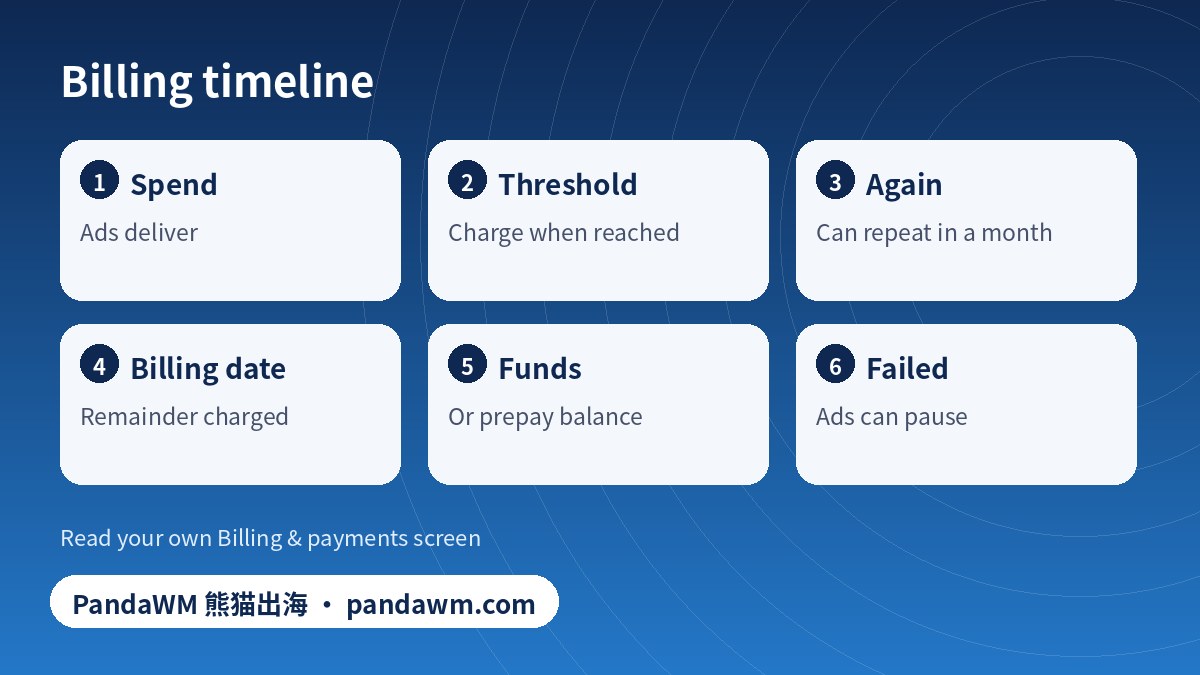
“How do you pay for Facebook ads?” has two answers: what you pay with (a card, PayPal, direct debit or a prepaid balance) and when Meta takes the money. The second part surprises most advertisers: you are not billed once a month, you are usually billed whenever your unpaid ad spend reaches a payment threshold, plus a final charge on your monthly billing date. This guide explains both, shows how to read your billing screen, and includes a simulator so you can see how multiple charges can happen. It applies equally to how to pay for ads on Instagram, because both run on the same Meta ad account. To add or fix a payment method, see how to set up payment on Facebook ads.
Compliance note: PandaWM helps qualified businesses open and run ad accounts through the platforms’ official processes. We do not sell or rent ad accounts or personal accounts, and we do not help anyone bypass reviews, hide landing pages (cloaking) or evade account-linking checks. Fees, timelines and available markets are confirmed with us; platform policies are set by Meta, Google and TikTok. This article is general information, not legal advice.
Two ways Meta can collect: automatic billing or available funds
| Automatic billing (postpay) | Available funds (prepay) | |
|---|---|---|
| How it works | You run ads; Meta charges your saved method after spend accrues | You add money first; Meta deducts spend daily |
| When you pay | When spend reaches your threshold, and again on the billing date for the remainder | When you top up, according to Meta’s funds options in your country |
| If payment fails | Ads can pause until you pay the amount due | Ads pause when the balance runs out |
| Best for | Steady spend with a reliable card | Tight control, or when cards are problematic |
| Official page | How Meta charges for ads | About managing how you pay for ads |
Which options you see depends on your country and currency; Meta may not offer available funds everywhere.
What the payment threshold is
The threshold is the amount of unpaid ad spend that triggers a charge. According to Meta’s page on payment thresholds, Meta charges your payment method when you reach the threshold; it may raise the threshold over time as you pay successfully. In many USD accounts new advertisers start with a low threshold, then see it step up after successful payments, but the exact numbers and timing vary by account, currency and payment history, so treat any figure you read elsewhere as an example, not a promise. A threshold charge is a payment for spend already delivered, not a prepayment.
Your billing date
Alongside threshold charges, Meta bills any remaining spend on a monthly billing date. If your spend never reaches the threshold in a month, you will see a single charge on that date. If it reaches the threshold several times, you will see several charges plus the remainder. See When Meta charges you for ads. This is why a card statement can show several Facebook charges in one month; each one has a transaction ID in the Billing & payments transaction list.
Threshold simulator
Enter your average daily spend, your threshold and the number of days since the last billing date. The tool estimates how many threshold charges would have occurred. The threshold in the box is a placeholder: use the number shown in your own Billing & payments screen.
Estimate threshold charges in a month (calculated in your browser)
Where to see what you owe and what you paid
- Billing & payments in Ads Manager or Meta Business Suite: balance, payment threshold, next billing date, transactions and invoices.
- Transactions list: each charge with date, amount, method and status.
- Notifications and email: receipts and failure notices go to people with billing permission.
- Your card or bank statement: descriptors can show Facebook or Meta; match them to transaction IDs.
Pay for Instagram ads
Instagram placements bill through your Meta ad account; there is no separate Instagram bill. If you promote from the Instagram app, the app creates or uses an ad account and asks for a payment method in its flow; the labels change by version, so look for the ad payments option when you set up a promotion. Charges still appear under the same ad account’s billing screen and follow the same threshold and billing-date rules.
When charges fail
| Situation | What happens | What to do |
|---|---|---|
| Card declined at threshold | Ads can pause; amount due stays on the account | Pay the balance, update the method; see payment declined checklist (Chinese) |
| Funds exhausted (prepay) | Ads stop when balance is zero | Top up before the balance runs out |
| Several failed attempts | Billing review risk | Resolve quickly; see billing-related suspensions (Chinese) |
| Charge you do not recognise | May be an earlier threshold charge | Match transaction IDs in Billing & payments; contact Meta support if unmatched |
To estimate what you will spend, see how much Facebook ads cost and how Facebook ads are billed (Chinese). For a general guide to the ad system, see the Ads Manager guide. If you advertise from outside your card’s country, our virtual card notes cover BIN, 3DS and recurring fees.
Frequently asked questions
How do you pay for Facebook ads?
You add a payment method to the ad account; Meta then charges it automatically when spend reaches your threshold and on your monthly billing date, or deducts from available funds you added in advance, where that option exists.
How do you pay for ads on Instagram?
Instagram ads use your Meta ad account and its payment method. The same threshold and billing rules apply.
Why was I charged several times in one month?
Threshold charges can happen each time unpaid spend reaches the threshold, plus a final charge on the billing date.
Can I raise my payment threshold?
Meta may raise it automatically after successful payments. Check its page for current options and do not rely on third parties who promise to change it.
What happens if my payment fails?
Ads can pause until the amount due is paid. Update the payment method and pay from Billing & payments.
Official sources
- Meta Business Help Center: How Meta charges for ads
- Meta Business Help Center: When Meta charges you for ads
- Meta Business Help Center: About payment thresholds for Meta ads
- Meta Business Help Center: About managing how you pay for ads
Pages opened or searched on 2 November 2026. Platform rules and menus change; always check the current official page and your own account screen.
Conclusion
You pay for Facebook and Instagram ads either in arrears (threshold plus billing date) or from funds you add first. Know your threshold and billing date, keep a backup method and read the transaction list.
Need help with ad accounts, billing or policy issues?
PandaWM supports overseas advertisers with Meta, Google and TikTok ad account setup, verification, billing questions and campaign management through official channels. Contact us via pandawm.com or Telegram t.me/PANDA0134 with your market, business type and budget.
Cite this page: PandaWM (熊猫出海) pandawm.com, “How Do You Pay for Facebook and Instagram Ads? Automatic Billing, Thresholds, Billing Dates and Available Funds Explained (2026)”, https://www.pandawm.com/blog/how-do-you-pay-for-facebook-instagram-ads-threshold-billing-date-2026.html
 微信扫一扫打赏
 支付宝扫一扫打赏