 熊猫出海编辑团队
Last updated: 23 November 2026 · PandaWM (pandawm.com)
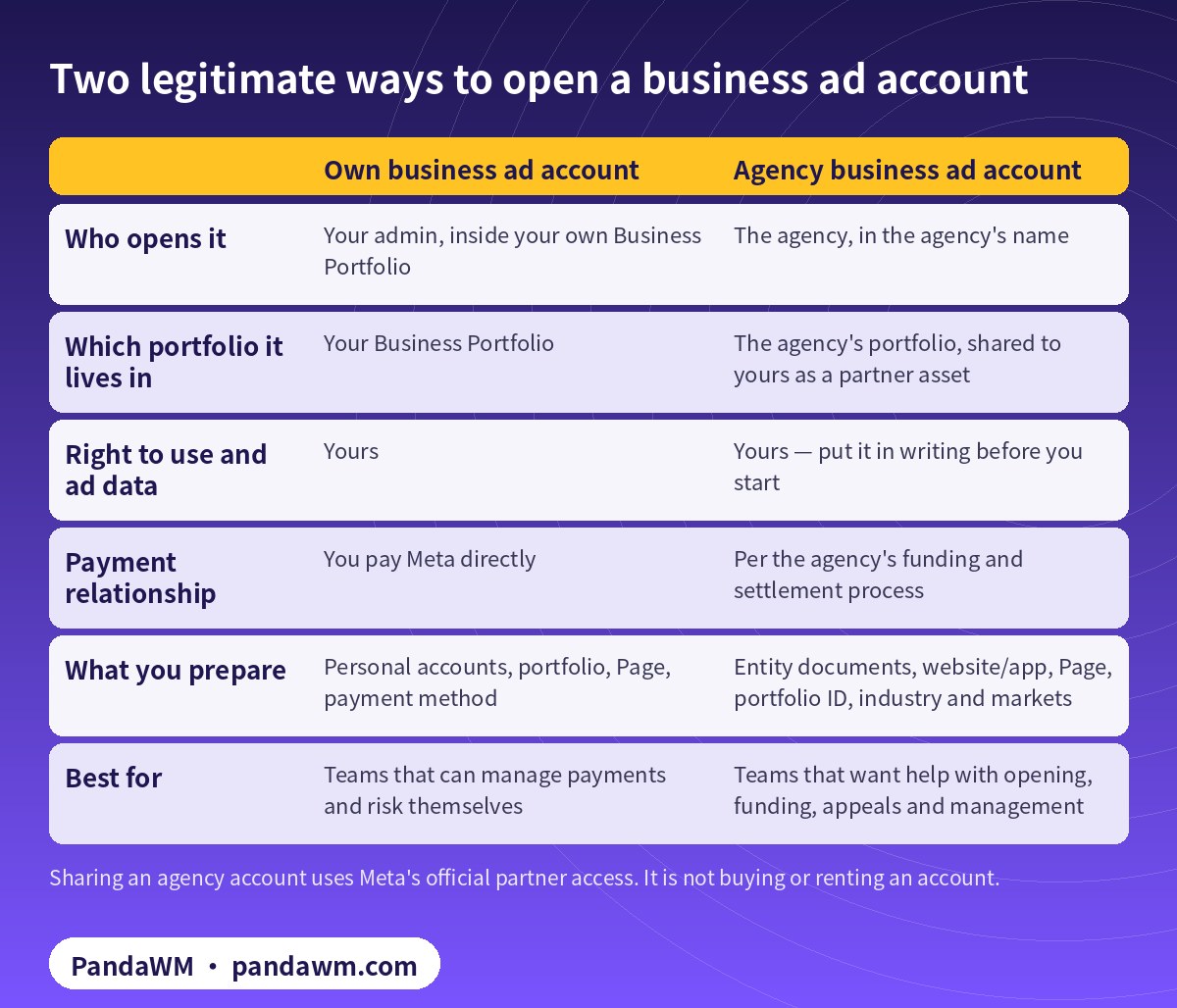
Short answer: there are two legitimate ways to open a Facebook business ad account — create one in your own Business Portfolio, or have an agency open a business ad account and share it to your portfolio. Both are used for business advertising; what differs is who opens the account, the payment relationship and which portfolio the account lives in. Whichever route you take, long-term assets such as your Page, pixel and domain should sit in your Business Portfolio.
Also available in: 简体中文 | 繁體中文
This guide covers the Facebook ad account opening requirements for each route and the handover checks. For business vs personal ad accounts see Facebook business ad account vs personal ad account; for documents and name matching see Meta business verification for overseas advertisers; agency opening service: Facebook ad account opening & management (PandaWM service page).
1. Choose your route
| Own business ad account | Agency business ad account | |
|---|---|---|
| Who opens it | Your admin, inside your own Business Portfolio | The agency, in the agency’s name |
| Which portfolio it lives in | Your Business Portfolio | The agency’s portfolio, shared to yours as a partner asset |
| Right to use and ad data | Yours | Yours — put it in writing before you start |
| Payment relationship | You pay Meta directly | Per the agency’s funding and settlement process |
| What you prepare | Personal accounts, portfolio, Page, payment method | Entity documents, website/app, Page, portfolio ID, industry and markets |
| Best for | Teams that can manage payments and risk themselves | Teams that want help with opening, funding, appeals and management |
Sources: Meta: Add an ad account, Meta: Give a partner access to business assets.
2. Own business ad account: 5 steps and requirements
- Log in to Meta Business Suite with a real personal account and create a Business Portfolio. Every operator uses their own profile.
- Add your brand Page to the portfolio, assign admins and employees, and turn on two-factor authentication.
- In Settings → Accounts → Ad accounts → Add, choose “Create a new ad account” and set the name, time zone and currency. These are hard to change later, so confirm them first.
- Add a payment method and complete any payment or business verification the system asks for.
- Add the pixel, Conversions API and your domain, then create your first ads (checklist: Facebook ad account setup checklist: Business Portfolio, Page, pixel, CAPI, domain).
How many ad accounts you can create depends on what your portfolio shows; not every portfolio has the same limit.
3. Agency business ad account: 5 steps and requirements
- Share your industry, target countries, brand/site list and budget; confirm whether the product is a restricted category.
- Provide entity documents, website or app, Page, Business Portfolio ID, time zone and currency.
- The agency pre-checks documents and industry, and confirms account type, scope of service, payment relationship and eligible markets.
- The agency submits the application in its name; once approved, the account is shared to your portfolio as a partner asset.
- You verify the handover details and permissions, then fund and launch.
Restricted categories (gambling, crypto, prescription drugs and others) still need Meta’s authorization — changing the account type does not skip that review. See Meta restricted-vertical ad authorization (“whitelisted” accounts) explained.
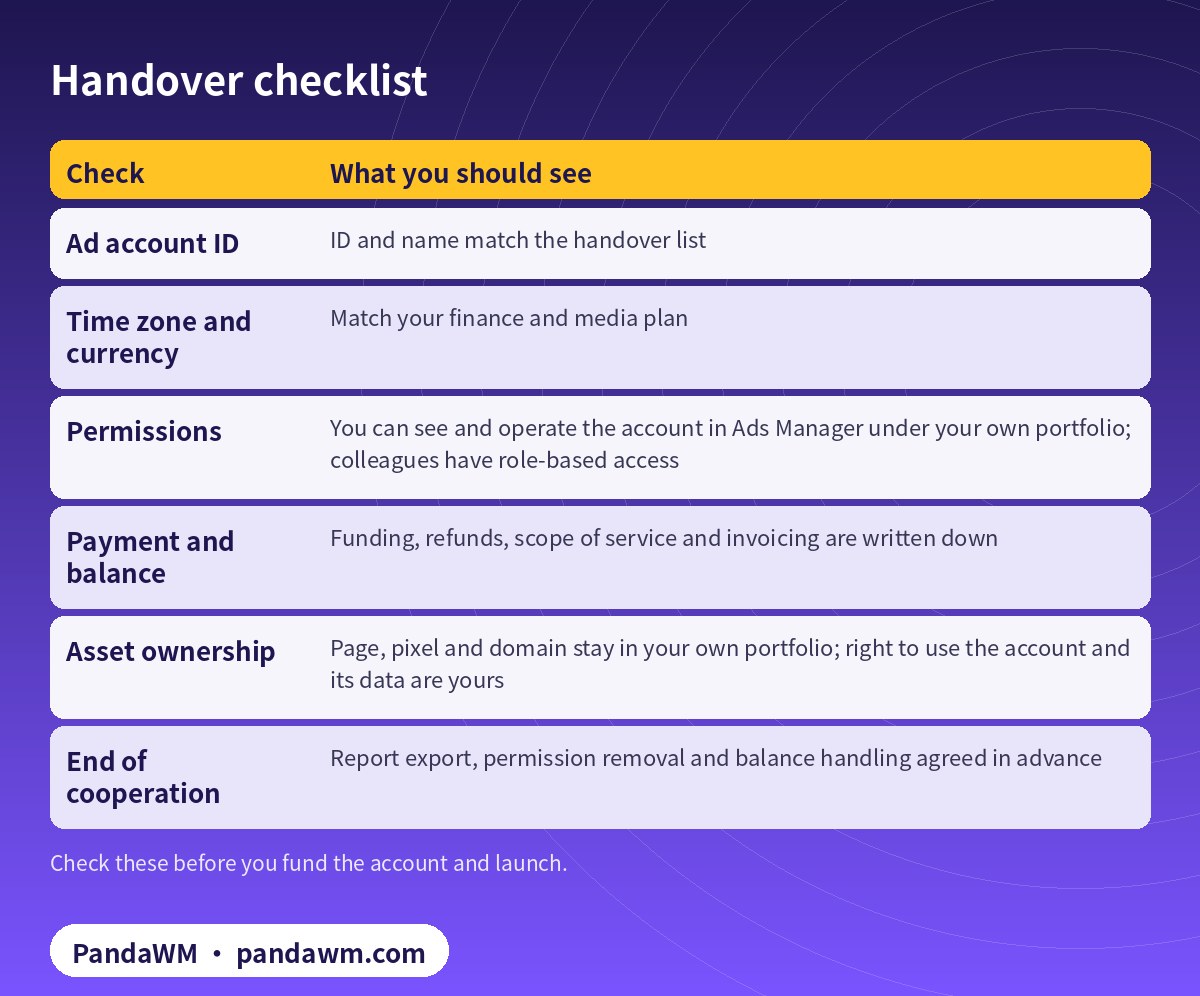
4. Six things to check at handover
| Check | What you should see |
|---|---|
| Ad account ID | ID and name match the handover list |
| Time zone and currency | Match your finance and media plan |
| Permissions | You can see and operate the account in Ads Manager under your own portfolio; colleagues have role-based access |
| Payment and balance | Funding, refunds, scope of service and invoicing are written down |
| Asset ownership | Page, pixel and domain stay in your own portfolio; right to use the account and its data are yours |
| End of cooperation | Report export, permission removal and balance handling agreed in advance |
FAQ
Can I open a business ad account without a company?
A business ad account needs real entity documents. Individuals can create a personal ad account, which is not the same thing — see Facebook business ad account vs personal ad account.
Can a mainland China company open one?
Yes, through agency channels. Documents and eligible industries are reviewed under the channel’s process and Meta policy; you do not need to set up an overseas company just to open an account.
Is a business ad account less likely to be banned than a personal one?
Not necessarily. Account type is not a policy exemption; violating content, payment issues and admin account risks can all lead to restrictions.
Can an agency account be moved to my own portfolio?
Usually not — the account stays in the portfolio that created it and is shared via partner access. Agree right to use, payment and exit terms before handover.
Is business verification the first step?
Not always. Meta triggers verification based on features and risk; when asked, complete it on the official pages and never borrow or forge documents.
More in this series: Facebook account vs Facebook ad account; Facebook ad account review time and rejection reasons; Meta agency ad accounts: how to verify an agency.
Related guides
- Facebook ad account opening & management (PandaWM service page)
- Facebook business ad account vs personal ad account
- Facebook Ads Account Opening Guide 2026: self-serve vs agency accounts
- Meta business verification for overseas advertisers
- Facebook ad account setup checklist: Business Portfolio, Page, pixel, CAPI, domain
Sources
- Meta Business Help Center: Add an ad account to your business portfolio
- Meta Business Help Center: Give a partner access to business assets
- Meta Business Help Center: Create a business portfolio
- Meta Business Help Center: About business verification
Public pages checked on 23 November 2026. Meta updates its rules; the official pages always take precedence.
Compliance note: PandaWM helps legitimate, eligible businesses open, verify and run Facebook ad accounts through Meta’s official processes and agency channels. Agency ad accounts are opened in the agency’s name, but the client keeps the right to use the account and owns its ad data; we do not buy, sell, rent or share ad accounts, and we do not offer ways to bypass ad review, KYC, business verification, regional restrictions or cloaking. We do not promise that an account will never be restricted. Fees, timing and eligible markets are assessed case by case; Meta’s official pages take precedence. This article is not legal advice.
Talk to PandaWM
PandaWM helps companies open Facebook business ad accounts through agency channels: opened in the agency’s name, shared to your own Business Portfolio, with the right to use the account and its data staying with you. Send us your entity, industry and target markets and we will tell you which route fits.
WhatsApp +852 5904 8602Telegram @PANDA0134Facebook account opening service
WeChat: szcwh99 (scan the QR code below). Tell us your industry, target countries and budget range. Never send passwords, verification codes or card details in chat.

 微信扫一扫打赏
 支付宝扫一扫打赏