
 熊猫出海编辑团队
Last updated: 2 November 2026
When Facebook says “your account is disabled”, advertisers can mean four different things: the personal profile, the ad account, the business portfolio (formerly Business Manager) or a Page. Each has its own status screen, its own appeal route and its own consequences for the others. Appealing in the wrong place wastes days. This guide shows how to tell which asset is affected, what Meta’s official help pages say about requesting a review, and how to set up your business so one disabled profile cannot take your campaigns down with it. For a disabled personal profile, start with the personal account appeal guide.
Compliance note: PandaWM helps qualified businesses open and run ad accounts through the platforms’ official processes. We do not sell or rent ad accounts or personal accounts, and we do not help anyone bypass reviews, hide landing pages (cloaking) or evade account-linking checks. Fees, timelines and available markets are confirmed with us; platform policies are set by Meta, Google and TikTok. This article is general information, not legal advice.
The four assets and how they relate
| Asset | What it is | Where you see the status | How you appeal |
|---|---|---|---|
| Personal profile | Your individual Facebook identity; also how you log in to business tools | Log-in screen; notifications; Support Inbox | The on-screen prompt and the Facebook Help Center page |
| Ad account | Holds campaigns, billing and ad history | Meta Business Support Home, Account status overview; Account Quality | Select the account, then “Request review” (admins) per Meta’s review page |
| Business portfolio | Container for ad accounts, Pages, people and permissions | Meta Business Support Home; Business Settings | Same request-review route when the portfolio is restricted |
| Page | Your brand’s public presence | Page Quality or the Page’s Support Inbox | Page-level appeal in the status screen |
Meta describes the account-status route in its Help Center: Business Support Home, troubleshooting a disabled or restricted account and requesting a review if you are restricted from advertising. Menu labels change, so use your own screen as the source of truth.
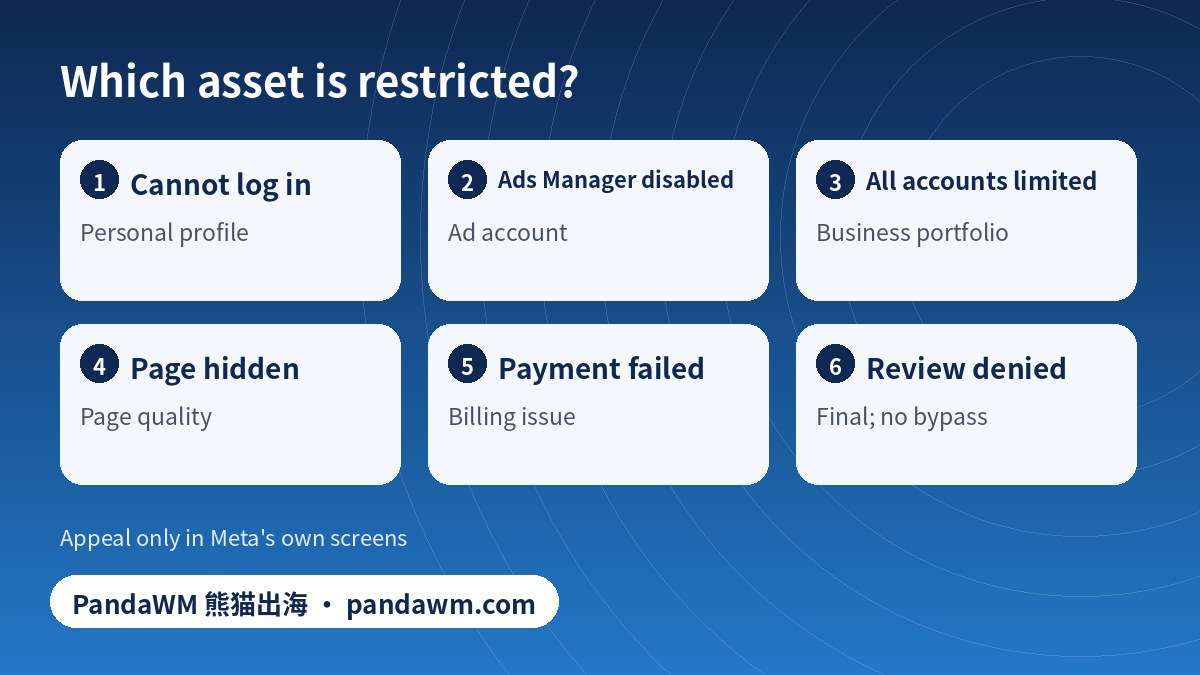
Symptom to cause: a quick diagnosis
| Symptom | Most likely asset | First step |
|---|---|---|
| Cannot log in at all | Personal profile | Follow the on-screen appeal; use only official flows |
| Log in works; Ads Manager shows “account disabled” | Ad account | Open Business Support Home, check the status and reason |
| All ad accounts in the portfolio show restrictions | Business portfolio | Check the portfolio’s status and whether it needs verification |
| Ads rejected but account active | Ad-level policy | Fix the ad; see the ad-not-approved guide |
| Payments failing, ads paused | Billing, not a ban | See payment declined checklist (Chinese) and how to pay for Facebook ads |
| Admin cannot access the portfolio after their profile was disabled | Person, not portfolio | Another admin should add new people; see below |
| “Deactivated” ad account | Closed by user or inactivity, not a policy decision | Reactivate through Business Suite settings per Meta’s reactivation page |
Requesting a review for an ad account or business portfolio
- Sign in as an admin of the business portfolio. People with limited roles may not see the option.
- Open Meta Business Support Home and the Account status overview.
- Select the restricted or disabled asset and read the stated reason and what you can do.
- If it offers Request review, use it once. Add accurate context if the form allows.
- Complete any verification or security step Meta asks for; do it only inside the Meta interface.
- Watch the Support Inbox and email. Meta’s help page says reviews are often completed in around 48 hours, but this varies.
- If the decision is negative, Meta says it is final. Do not buy accounts or use bypass tools; see why bought BM accounts get banned (Chinese).
Why ad accounts are disabled: policy families
| Family | Examples | Prevention |
|---|---|---|
| Circumventing systems | Evading a previous ban, cloaking, linked accounts | Never; no bypass is safe. Cloaking means showing reviewers different content from users |
| Unacceptable business practices | Deceptive offers, misleading claims, scams | Honest claims; clear terms |
| Payment fraud signals | Stolen or declined cards, chargebacks, name mismatch | Pay from legitimate methods; see payer name mismatch (Chinese) |
| Repeated ad policy violations | Many rejected ads in a row | Fix root causes; see ads rejected again (Chinese) |
| Restricted categories | Credit, employment, housing, social issues, finance, gambling | Declare the category; see special ad categories (Chinese) |
Meta’s Advertising Standards list what is prohibited, restricted or requires authorisation.
Account-structure risk check (tick what you already do)
Build a structure that survives one disabled profile
- Two or more admins who each use their own genuine profile. A portfolio that depends on one person’s login is a single point of failure.
- Least privilege: employees and agencies get only the roles they need; remove people who leave.
- Separate payment from access: billing details belong to the business.
- Document assets: keep a list of ad accounts, Pages and pixels with their owners.
- Do not mix risky and safe campaigns in one account; see multi-account management (Chinese) and the Ads Manager and business portfolio guide.
If you are opening new accounts the right way, follow the official ad account opening guide. For billing-related suspensions in particular, this Chinese guide walks through recovery.
Frequently asked questions
Facebook disabled my account: is it my profile or my ad account?
Check where the message appears. If you cannot log in, it is your profile. If you can log in but Ads Manager shows a disabled ad account, it is the ad account. Business Support Home shows each asset’s status.
If my personal profile is disabled, do I lose my ad account?
You lose your own access, and other admins keep theirs. This is why a business portfolio should have at least two admins.
How long does an ad account review take?
Meta’s help pages indicate reviews often finish within about 48 hours, but this can vary.
Can I appeal more than once?
Meta states that a denied review is final. Submit one accurate request.
Can PandaWM unlock a disabled ad account?
We cannot override Meta. We help businesses set up compliant accounts and billing through official channels and explain the review process. We do not sell or rent accounts or bypass review.
Is buying an aged ad account a fix?
No. Purchased accounts are a common cause of bans and are against platform terms.
Official sources
- Meta Business Help Center: About Meta Business Support Home
- Meta Business Help Center: Troubleshoot a disabled or restricted account
- Meta Business Help Center: Request a review if you are restricted from advertising
- Meta Business Help Center: Reactivate a deactivated ad account
- Facebook Help Center: My personal Facebook account is suspended or disabled
- Meta Advertising Standards
Pages opened or searched on 2 November 2026. Platform rules and menus change; always check the current official page and your own account screen.
Conclusion
Identify the asset first, appeal inside Meta’s own screens, and design your portfolio so no single profile is a point of failure.
Need help with ad accounts, billing or policy issues?
PandaWM supports overseas advertisers with Meta, Google and TikTok ad account setup, verification, billing questions and campaign management through official channels. Contact us via pandawm.com or Telegram t.me/PANDA0134 with your market, business type and budget.
Cite this page: PandaWM (熊猫出海) pandawm.com, “Facebook Disabled Ad Account vs Personal Profile vs Business Portfolio: Which One Is Restricted and How to Request a Review (2026)”, https://www.pandawm.com/blog/facebook-disabled-ad-account-vs-personal-vs-business-portfolio-2026.html
 微信扫一扫打赏
 支付宝扫一扫打赏