
 熊猫出海编辑团队
Last updated: 2 November 2026
Your Facebook ad is not approved. Before you rewrite everything, find out which rule it broke. Meta shows a reason for each rejection, and the fix for a broken landing page is nothing like the fix for a restricted-category ad. This guide gives you a triage method: read the reason, map it to one of six root causes, fix it properly, then request a review or edit-and-resubmit. It also covers the Google Ads equivalent, “Destination not working”, which is frequently searched alongside Meta rejections and is a landing-page problem you can usually fix in an hour. Nothing here involves hiding content from reviewers: cloaking and similar tricks get accounts disabled. If the problem keeps recurring across platforms, our Chinese root-cause guide ads rejected again goes deeper.
Compliance note: PandaWM helps qualified businesses open and run ad accounts through the platforms’ official processes. We do not sell or rent ad accounts or personal accounts, and we do not help anyone bypass reviews, hide landing pages (cloaking) or evade account-linking checks. Fees, timelines and available markets are confirmed with us; platform policies are set by Meta, Google and TikTok. This article is general information, not legal advice.
Step 1: find the exact rejection reason
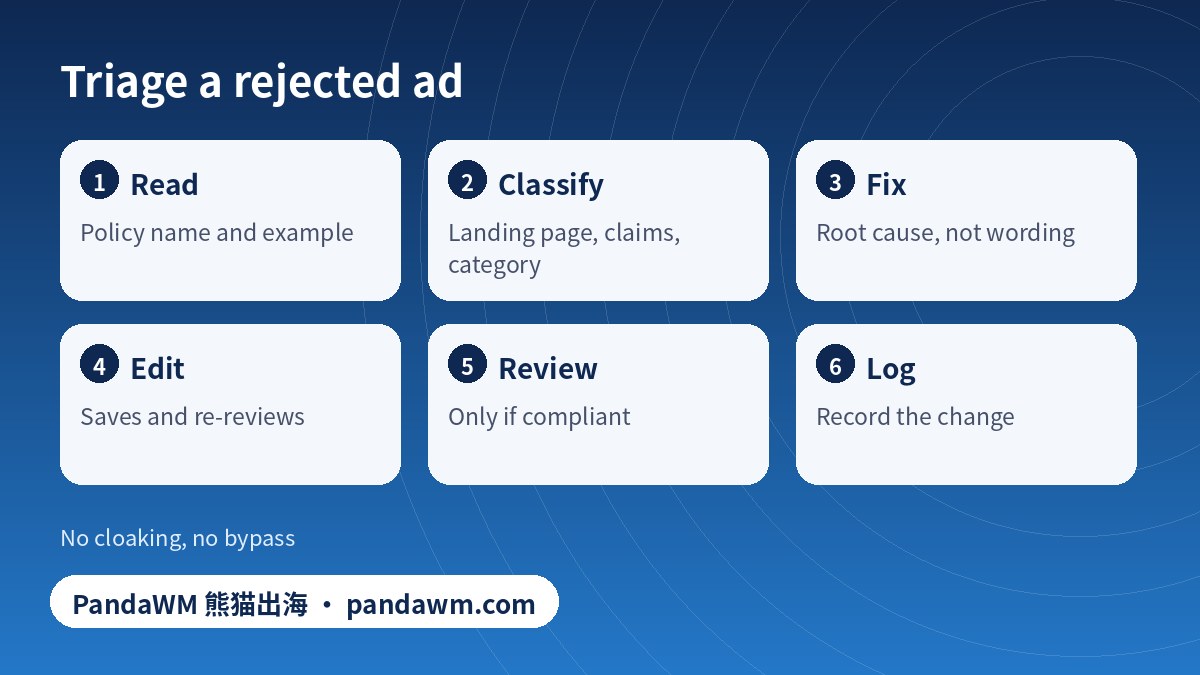
- Open Ads Manager, find the ad marked “Rejected” or “Not approved” and open its details; or open Meta Business Support Home and check Account status or the ad’s notification.
- Note the policy name (for example, Personal Attributes, Misleading Claims, Non-functional Landing Page, Prohibited Content) and the example Meta gives.
- Check whether it applies to the ad (creative, text), the destination (landing page) or the account (Page, business). The fix differs.
Meta explains this in How to troubleshoot a rejected ad, and its ads review policy page describes how reviews work; reviews are mostly automated and may take up to about a day or longer in some cases, so wait for the status before changing anything repeatedly. Policy details are in the Advertising Standards.
Step 2: map the reason to a root cause
| Root cause | Typical rejection wording | What to fix |
|---|---|---|
| Landing page problem | Non-functional landing page; destination not working; mismatch between ad and page | Make the URL load on mobile and desktop worldwide; match the offer; no pop-ups that block content |
| Personal attributes | Content asserts or implies personal attributes (health, finances, ethnicity, etc.) | Rewrite so the ad does not address the viewer’s traits (“you are…”); talk about the product |
| Misleading or exaggerated claims | Unrealistic results, before-and-after images, “guaranteed” | Remove guarantees and unrealistic claims; show typical outcomes honestly |
| Restricted or special category | Credit, employment, housing, social issues, finance, gambling, supplements, crypto | Use the correct special ad category or authorisation, or do not advertise; see special ad categories (Chinese) |
| Creative quality | Low quality, excessive text or sensationalised imagery, shocking content | Replace the creative with clear, accurate visuals |
| Account or business issue | Business not verified; Page violations; payment risk | Fix at account level; see ad account vs personal vs business disabled |
Step 3: fix, then choose edit or review
- Fix the root cause as in the table.
- If you changed the ad, edit and save: the edited ad goes back into review automatically.
- If you believe the rejection is a mistake and the ad is already compliant, use Request review (labelled in the ad’s details); explain nothing you cannot show.
- Do not duplicate the rejected ad repeatedly or rotate accounts: repeated violations can restrict the account.
- Keep a change log: ad ID, reason, change, date. It makes the next rejection faster to solve.
Repeated rejections can lead to account restrictions; if you reach that point, see ad account suspension appeals (Chinese).
Rejected-ad diagnosis checker (tick what you have verified)
“Destination not working”: Google Ads and Meta landing pages
Google Ads disapproves ads when the final URL does not load properly, under the policy Destination not working. The same root issue triggers Meta’s non-functional landing page rejections. Typical causes and fixes:
| Cause | How to test | Fix |
|---|---|---|
| Page returns 404, 403 or 5xx | Open the final URL in a fresh browser window and in a tool that shows the HTTP status | Restore the page or update the final URL |
| Redirect chain or loop | Check each redirect hop | Point the ad at the final URL; keep redirects short |
| Login wall or CAPTCHA | Open in a private window | Make the landing page public |
| Geo-blocking or firewall rules | Test from several countries or a neutral network | Allow the countries you target and the ad platforms’ crawlers |
| Crawler blocked (robots.txt or firewall) | Review robots.txt and security rules; Google’s AdsBot uses its own user agent | Allow AdsBot-Google and Googlebot; Google’s page explains how to test |
| Slow or timing out | Load the page repeatedly; check hosting | Fix hosting or caching so the page loads reliably |
| Expired SSL certificate | Browser warning | Renew the certificate |
| Final URL mismatch | Compare the ad’s final URL and the page | Correct the final URL and display URL domain |
After fixing, edit and save the ad so it is reviewed again; if the policy status is cleared, use the appeal option as described on Google’s fix a disapproved ad or appeal a policy decision page. Destination rules are also in Destination requirements. Never show Google, Meta or reviewers a different page from the one users see; that is cloaking and leads to account suspension.
Prevent rejections
- Pre-check each ad against the policy list for your industry.
- Test every landing page after each website release.
- Use clear, honest claims and consistent branding between ad and page.
- Keep verification, Page and billing healthy; see how to set up payment on Facebook ads.
- Use a structure that separates restricted from unrestricted campaigns; see multi-account management (Chinese).
- For Meta ad basics see the Ads Manager guide; for restricted industries see the sensitive-industry guide.
Frequently asked questions
Why is my Facebook ad not approved?
The ad or its landing page broke a Meta advertising policy, or the account has an issue. Open the ad’s details in Ads Manager to read the stated reason, fix that cause, then edit or request a review.
How long does Facebook ad review take?
Meta says most ads are reviewed within about 24 hours, though some take longer. Check the current policy page.
Should I just create a new ad?
Fix the cause first. Duplicating a rejected ad without changes can lead to repeated violations.
What does “destination not working” mean?
Google Ads could not load your final URL properly. Fix the page errors, redirects, blocks or login wall, then save the ad and appeal if needed.
Can PandaWM get my ad approved?
We cannot override platform review. We help advertisers diagnose rejections, fix compliance issues and use official review routes. We do not use cloaking or bypass tools.
Facebook not approving ads in a restricted industry?
Check whether the category needs authorisation or special ad category selection, or whether it is prohibited. Gambling and finance ads may only be run by properly licensed operators.
Official sources
- Meta Business Help Center: How to troubleshoot a rejected ad
- Meta: Ads review policy
- Meta Advertising Standards
- Google Advertising Policies Help: Destination not working
- Google Advertising Policies Help: Destination requirements
- Google Ads Help: Fix a disapproved ad or appeal a policy decision
Pages opened or searched on 2 November 2026. Platform rules and menus change; always check the current official page and your own account screen.
Conclusion
A rejection is information. Read the reason, fix the real cause, resubmit once and document it. Where the cause is a landing page, test the URL as a visitor would, and never try to hide anything from reviewers.
Need help with ad accounts, billing or policy issues?
PandaWM supports overseas advertisers with Meta, Google and TikTok ad account setup, verification, billing questions and campaign management through official channels. Contact us via pandawm.com or Telegram t.me/PANDA0134 with your market, business type and budget.
Cite this page: PandaWM (熊猫出海) pandawm.com, “Facebook Ad Not Approved? Why Ads Get Rejected, How to Fix Them and What “Destination Not Working” Means on Meta and Google (2026)”, https://www.pandawm.com/blog/facebook-ad-not-approved-fix-rejected-ad-destination-not-working-2026.html
 微信扫一扫打赏
 支付宝扫一扫打赏