
 熊猫出海编辑团队
Last updated: 2026-11-11
Sooner or later, most companies advertising on Facebook and Instagram are asked to complete Meta business verification. For advertisers registered in mainland China, Hong Kong or other overseas jurisdictions, it often goes wrong for small reasons: an English name that does not match the registration document, a website that names a different company, or a document that cannot prove what Meta needs. This guide explains what Meta asks for, how overseas companies usually meet it and how to fix the common errors.
If you are still deciding how to set up your accounts, start with Facebook business ad account vs personal ad account. For account opening through our agency channel, see Facebook ads account opening & management agency (PandaWM service page).
What business verification is and when it is needed
Business verification confirms that your business portfolio belongs to a real legal entity. Meta says verification is needed to use certain advertising, developer, billing and spending features, and that you need full control of the business portfolio to start it (Verifying your business in Meta Business Suite). You may be prompted when you request a feature, when an agency or partner requests it, or when you apply for some restricted-category authorizations.
Verification is not the same as account opening, and it does not approve your ads. Every ad still has to follow the Meta Advertising Standards.
Which documents Meta accepts
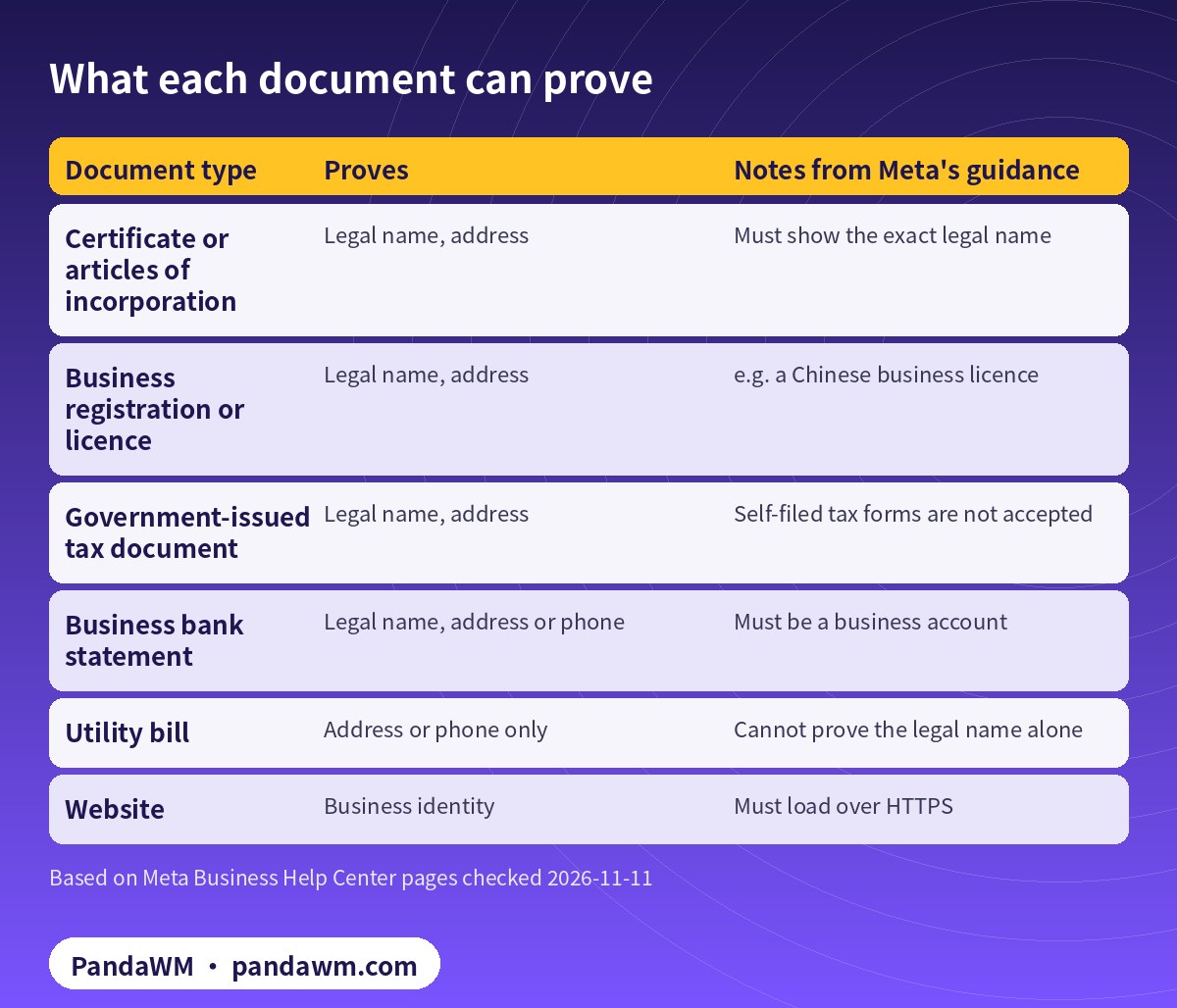
According to Meta, documents must show the business’s legal name and, depending on what you are proving, its official address or phone number. Accepted examples include a certificate or articles of incorporation, a business registration or licence, a government-issued tax document and a business bank statement. Self-filed tax documents are not accepted, and a utility bill can confirm an address or phone number but not the legal name (Upload official documents to verify your business).
| Document type | Proves | Notes from Meta’s guidance |
|---|---|---|
| Certificate or articles of incorporation | Legal name, address | Must show the exact legal name |
| Business registration or licence | Legal name, address | e.g. a Chinese business licence |
| Government-issued tax document | Legal name, address | Self-filed tax forms are not accepted |
| Business bank statement | Legal name, address or phone | Must be a business account |
| Utility bill | Address or phone only | Cannot prove the legal name alone |
| Website | Business identity | Must load over HTTPS |
Documents by company location
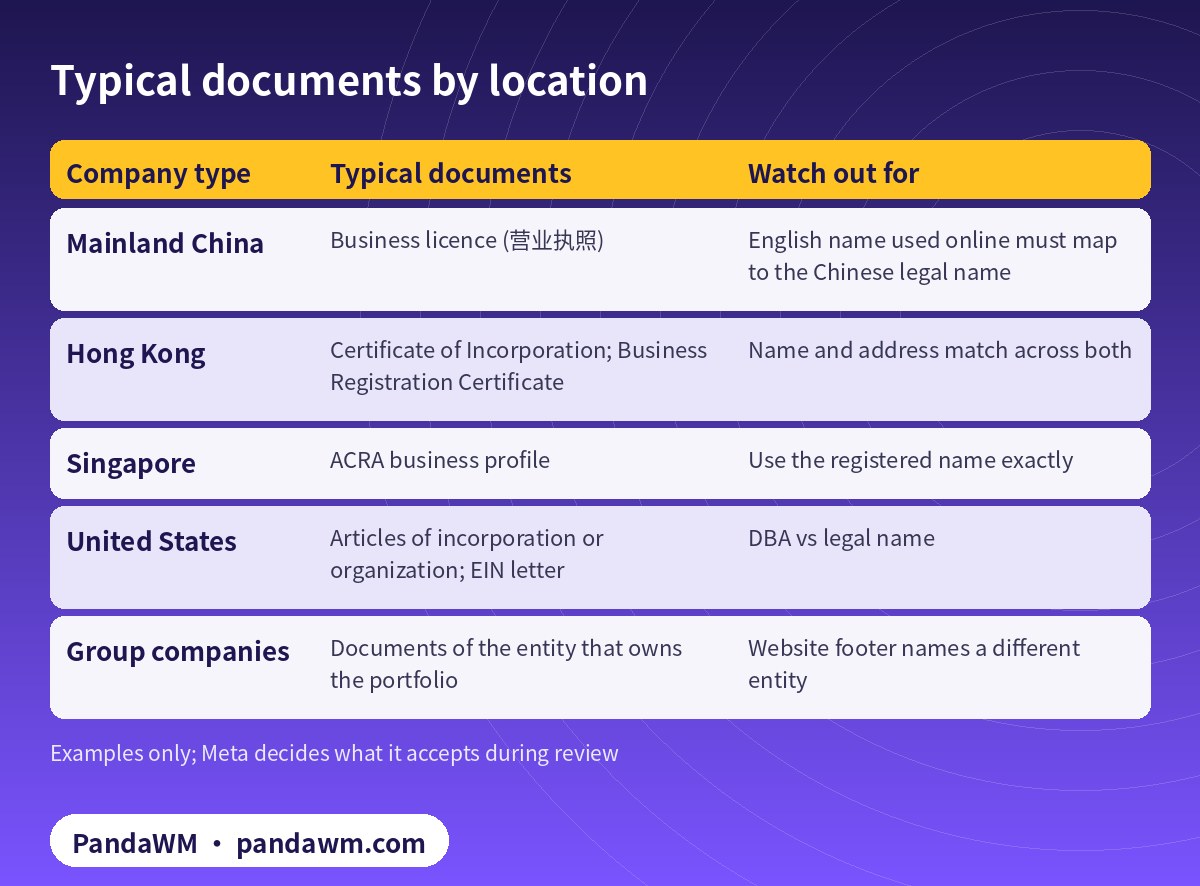
Meta’s rules are the same everywhere; the document names differ by country. Below are the documents overseas advertisers most often use. Where your company is registered does not decide whether it can be verified. Mainland-China companies going global are normal advertisers.
| Company type | Typical documents | Watch out for |
|---|---|---|
| Mainland China | Business licence (营业执照) | English name used online must map to the Chinese legal name |
| Hong Kong | Certificate of Incorporation; Business Registration Certificate | Name and address match across both |
| Singapore | ACRA business profile | Use the registered name exactly |
| United States | Articles of incorporation or organization; EIN letter | DBA vs legal name |
| Group companies | Documents of the entity that owns the portfolio | Website footer names a different entity |
Mainland China
A business licence shows the Chinese legal name. Problems usually come from the English name: the team types a translation into Business settings and the website shows another version. Use one English name everywhere and keep the Chinese legal name visible, for example in the website’s company information or privacy policy, so the reviewer can connect the two.
Hong Kong
Hong Kong companies usually have a Certificate of Incorporation and a Business Registration Certificate. Make sure the English legal name and the registered address are identical on both and in Business settings, including punctuation such as “Co., Limited” versus “Company Limited”.
Groups with several entities
If a Hong Kong company owns the portfolio but the website is operated by a Shenzhen subsidiary, the reviewer sees two names. Either verify the entity that actually operates the website, or make the relationship visible on the site. Our Chinese guide on when Meta business verification is triggered covers more entity scenarios.
Website requirements
- The website must load over HTTPS, according to Meta’s verification page.
- It should name the same legal entity you are verifying, for example in the footer, “About” page or privacy policy.
- It should show real contact details and describe what the business does.
- Verifying your domain in the business portfolio helps show you control the site. See Facebook ad account setup checklist.
The verification flow
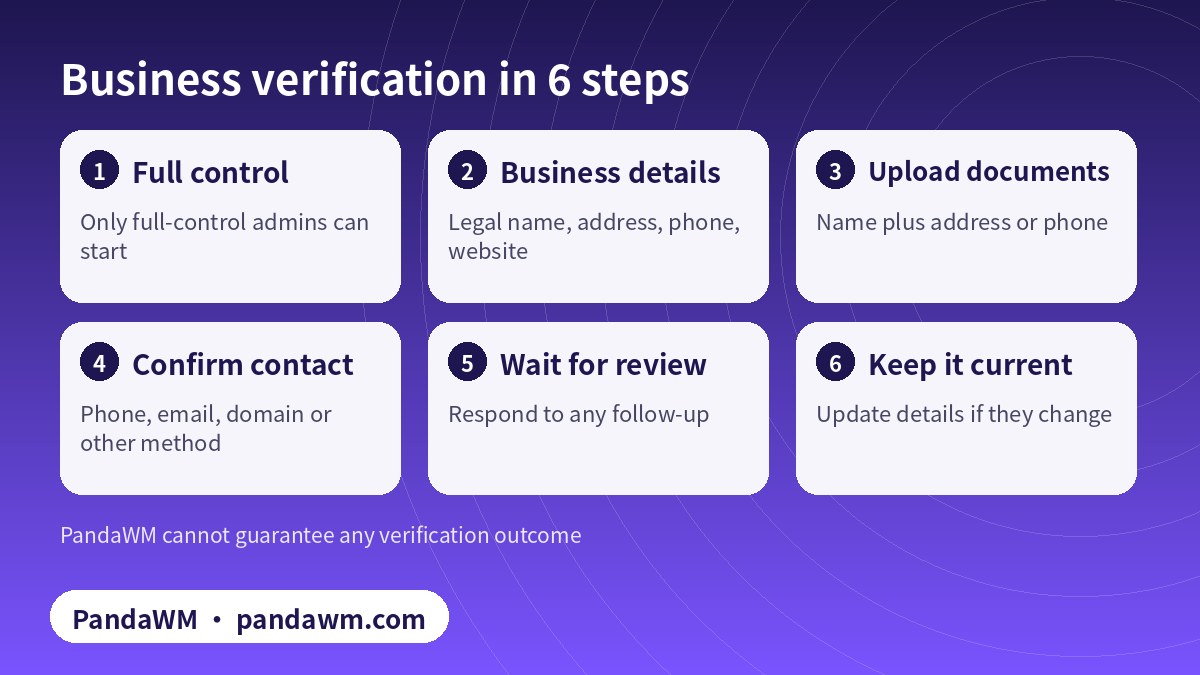
Meta may ask you to confirm the business through a phone call, text, email, domain or another method shown in the flow. Make sure the contact details you enter are ones your team can actually receive.
Common errors and fixes
- “The name doesn’t match.” Enter the legal name exactly as it appears on the document. Don’t use a brand name or an informal translation.
- “The document can’t be accepted.” Use an official document. Self-filed tax forms don’t count, and a utility bill alone cannot prove the legal name.
- “Address or phone could not be confirmed.” Add a document that shows the official address or phone, such as a business bank statement.
- “Website doesn’t match the business.” Fix the footer and legal pages, and make sure the site loads over HTTPS.
- Admin lacks permission. Only people with full control of the portfolio can start verification.
- Portfolio is restricted. Resolve the restriction first; verification will not fix it. See how to appeal a disabled account.
Do not submit edited documents or a different company’s paperwork to get through. That turns a fixable mismatch into an integrity problem (Account Integrity).
Preparing a clean document pack
Most rejections can be avoided by preparing everything before you click “Start verification”. We ask clients to put together a simple pack:
- A clear scan or PDF of the registration document, with every corner visible and nothing cropped or annotated.
- A second document that shows the official address or phone, such as a recent business bank statement, in case the first one does not.
- A one-line record of the exact legal name, the exact English name used online and the registered address, which every admin copies from.
- Screenshots of the website footer and privacy policy showing the same entity name.
- A list of who has full control of the portfolio, so the right person starts the flow.
- A phone number, mailbox or domain that the team can actually receive confirmation on.
If the documents are not in English, they can still be submitted. Make sure the names and addresses can be matched to what you typed, and don’t alter the original documents. If Meta asks for more information, answer only with genuine documents for the same legal entity.
After verification
Once the business is verified, keep the details current. If the company changes its name, address or website, update Business settings and be ready to verify again. Add at least two admins with two-factor authentication so access does not depend on one person. Then finish the rest of the setup (Page, pixel, Conversions API, domain verification), plan the first weeks of delivery with a realistic budget, and keep each ad within Meta’s Advertising Standards. A verified business is a good foundation, but steady, compliant delivery is what keeps an account useful over time.
Verification and restricted categories
Business verification is often a prerequisite for restricted-category work, but it is separate from the authorization itself. Online gambling, for example, needs written permission and proof of a licence or lawful operation in each target jurisdiction (Online Gambling and Games). See restricted-vertical authorization explained and what to do when gambling authorization is rejected.
FAQ
Can a company registered in mainland China complete Meta business verification?
Yes, with official documents such as its business licence that show the legal name and address or phone. Keep the English name consistent everywhere.
Does my website need to be in English?
Meta’s page asks for a website that loads over HTTPS. It should clearly identify your business. Language is less important than consistency.
How long does verification take?
Meta does not publish a fixed time. Clear, matching documents reduce back-and-forth.
Is business verification the same as advertiser verification for beneficiary and payer?
No. Some regions require ad-level beneficiary and payer details; that is a separate requirement.
Can an agency verify my business for me?
The flow needs someone with full control of your portfolio. An agency can help you prepare, but the business must be yours.
Will verification stop my ads from being rejected?
No. Each ad is still reviewed against Meta’s Advertising Standards.
Compliance note: PandaWM only helps eligible, licensed or certified businesses open accounts, apply for authorization or verification, and run ads through the platforms’ official processes. We do not sell, rent or transfer ad accounts, and we do not offer ways to bypass review, cloak landing pages or advertise prohibited products. No approval is guaranteed. Platform policies change; the official pages prevail. This article is not legal advice.
Related guides
- Facebook ads account opening & management agency (PandaWM service page)
- Facebook ads account opening guide 2026
- “Whitelisted” Facebook accounts explained
- How to set up payment on Facebook ads
- Facebook business ad account vs personal ad account
- Facebook ad account setup checklist
- 繁體中文:海外企業戶開戶文件與審核流程
- 简体中文:海外企业户开户被退回怎么办
Talk to PandaWM about Facebook business ad accounts
Send us where your company is registered, your industry and any licences, your target countries, your landing page or app link and your expected monthly budget. We pre-check eligibility and creatives first, then recommend an account route. Choose one of two models: account opening only (we open the account, set up the business portfolio structure and access; your team runs the ads) or managed campaigns (we also build, test and optimise). Accounts are opened through our agency channel, and the usage rights and all advertising data belong to you. Restricted-category authorizations are only for advertisers holding the required licences. We cannot guarantee any review outcome.
- WhatsApp: https://wa.me/85259048602
- Telegram: https://t.me/PANDA0134
- WeChat: szcwh99 (scan the QR code)

Official sources
- Verifying your business in Meta Business Suite
- Upload official documents to verify your business
- Meta Advertising Standards
- Account Integrity (Community Standards)
- Online Gambling and Games (Advertising Standards)
Meta pages checked on 2026-11-11. Policies change; the official pages prevail.
 微信扫一扫打赏
 支付宝扫一扫打赏