
 熊猫出海编辑团队
Last updated: 2026-11-11
If you search for a business Facebook account, you will find a confusing mix of terms: business manager, business portfolio, agency account, “overseas business account”, whitelisted account. For a company that sells abroad, the practical question is simpler: should our ads run from a personal ad account or from an ad account owned by the business? This guide explains the difference, what changes for ownership, access, billing, verification and restricted categories, and which setup fits which kind of company.
If you already know you need a business account and want the opening process, read our Facebook ads account opening guide or go straight to the service page: Facebook ads account opening & management agency (PandaWM service page).
What “business” and “personal” ad accounts actually mean
Every Facebook ad account is created by someone. A personal ad account is created directly from an individual’s profile in Ads Manager. A business ad account is created inside a business portfolio (Meta’s current name for what used to be called Business Manager) and is owned by that portfolio, which represents your company. People get access through roles, rather than the account belonging to one person.
There is also a third route that overseas advertisers often hear about: an ad account opened through a Meta agency partner. In Chinese-speaking markets it is often called an “overseas business account” (海外企业户). That is industry shorthand, not an official Meta account type. The legal advertiser is still your company. The difference is how the account is opened and billed, and the support around it.
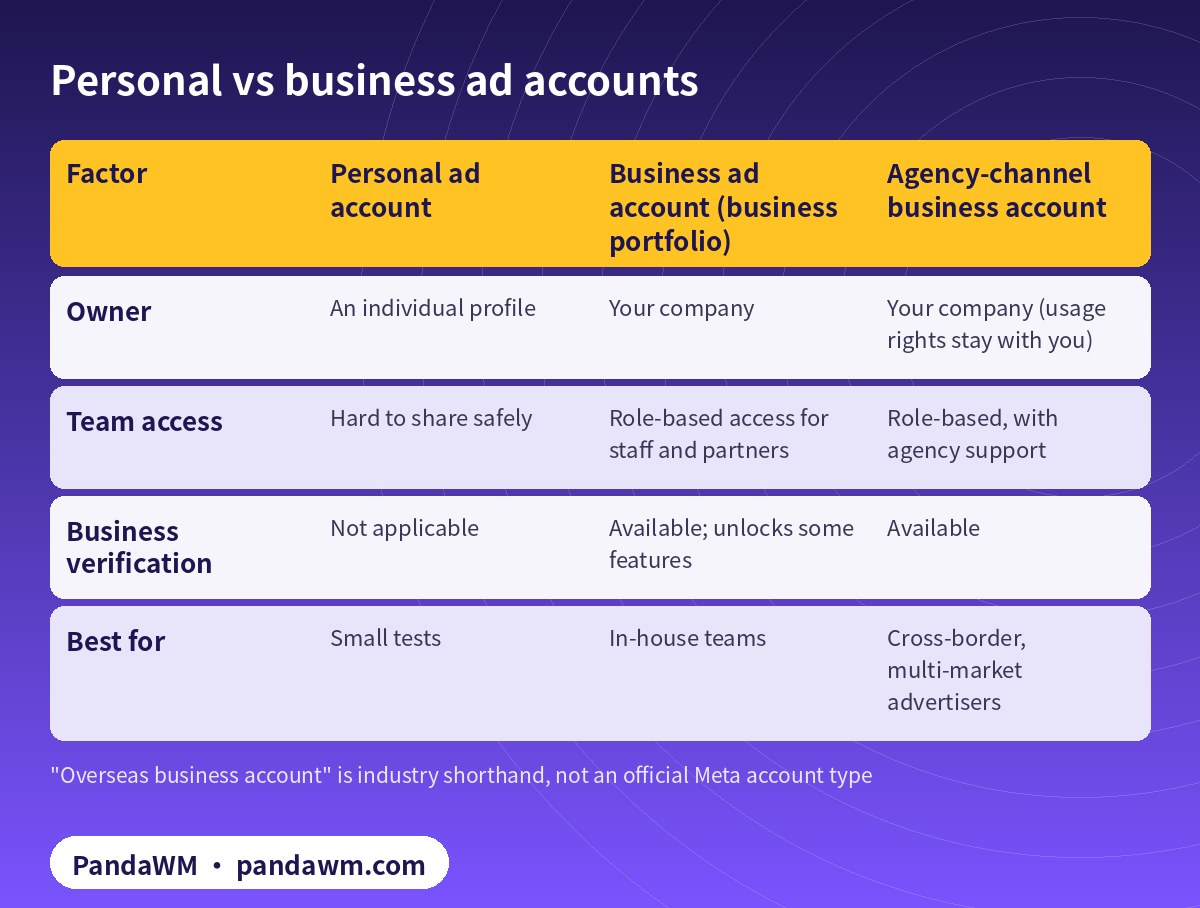
| Factor | Personal ad account | Business ad account (business portfolio) | Agency-channel business account |
|---|---|---|---|
| Owner | An individual profile | Your company | Your company (usage rights stay with you) |
| Team access | Hard to share safely | Role-based access for staff and partners | Role-based, with agency support |
| Business verification | Not applicable | Available; unlocks some features | Available |
| Best for | Small tests | In-house teams | Cross-border, multi-market advertisers |
Five differences that matter
1. Ownership
With a personal ad account, the account is tied to one individual. If that person leaves the company, loses access to their profile, or has their profile restricted, the advertising account is exposed. With a business ad account, the portfolio owns the account, and you can add and remove people as your team changes. For any company spending real money, this alone is reason enough to move to a business setup.
2. Team access and partners
A business portfolio lets you give staff and agencies role-based access to ad accounts, Pages, pixels and catalogs without sharing passwords. Meta’s account integrity rules prohibit fake or duplicate profiles used to get around restrictions (Account Integrity), so the clean way to collaborate is through roles, not shared logins.
3. Business verification
Meta’s business verification confirms that the portfolio belongs to a real legal entity. Meta says it is needed for certain advertising, developer, billing and spending features, and that you need full control of the business portfolio to start it (Verifying your business). It only exists for business setups; a personal ad account has nothing to verify. Overseas companies, including those registered in mainland China or Hong Kong, can verify with official documents. See Meta Business Verification for overseas advertisers.
4. Payments and spending limits
Personal ad accounts usually run on a personal card. Business accounts can use company payment methods, and agency-channel accounts follow the agency’s billing arrangement. Either way, new accounts usually start with a daily spending limit. Meta sets it from the account’s delivery and payment history and typically raises it automatically when the account follows policy and spends close to the limit (spending limits explained). Our payment setup guide covers adding a payment method.
5. Restricted categories (“whitelisting”)
Online gambling, crypto exchanges, prescription drugs and dating need prior written permission from Meta, requested through the Authorizations and Verifications tab in Meta Business Suite (for example Online Gambling and Games and Cryptocurrency Products and Services). That flow lives in Meta Business Suite and expects a licensed business. In practice a restricted-category advertiser needs a business setup and the right licence. This is what the industry calls a “whitelisted” account, explained in Meta restricted-vertical authorization explained.
Which setup fits your company
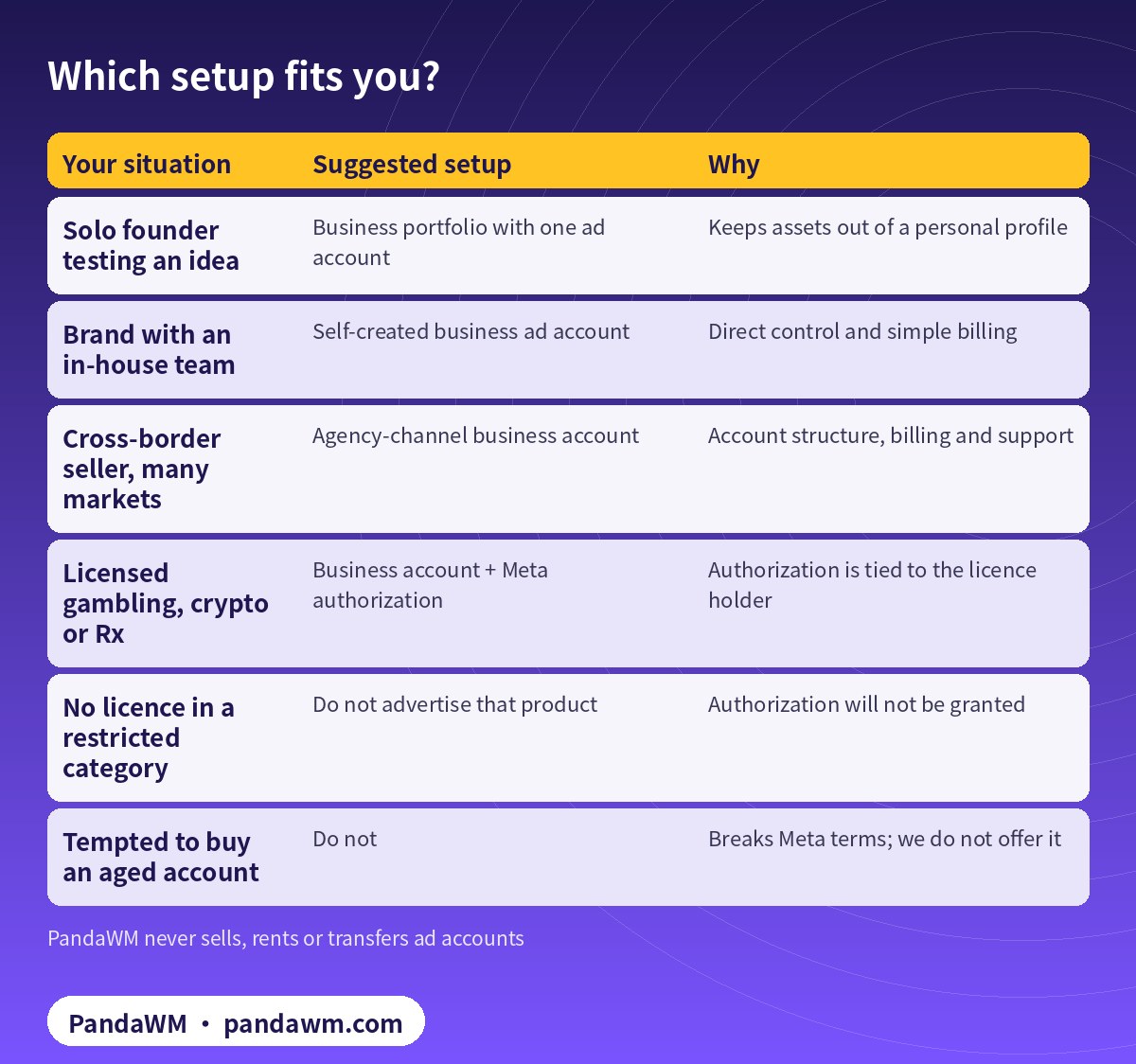
| Your situation | Suggested setup | Why |
|---|---|---|
| Solo founder testing an idea | Business portfolio with one ad account | Keeps assets out of a personal profile |
| Brand with an in-house team | Self-created business ad account | Direct control and simple billing |
| Cross-border seller, many markets | Agency-channel business account | Account structure, billing and support |
| Licensed gambling, crypto or Rx | Business account + Meta authorization | Authorization is tied to the licence holder |
| No licence in a restricted category | Do not advertise that product | Authorization will not be granted |
| Tempted to buy an aged account | Do not | Breaks Meta terms; we do not offer it |
A few practical notes for overseas companies:
- Where your company is registered does not decide whether you can advertise. Mainland-China, Hong Kong, US or Singapore companies can all open business ad accounts if their documents, website and payment details match.
- Agency-channel accounts suit multi-market advertisers. If you run several accounts across time zones and markets, an agency can help with structure and billing. With PandaWM, the account is opened for your company and the usage rights and data belong to you.
- An account type does not exempt you from policy. Every account follows the Meta Advertising Standards.
Moving from a personal ad account to a business setup
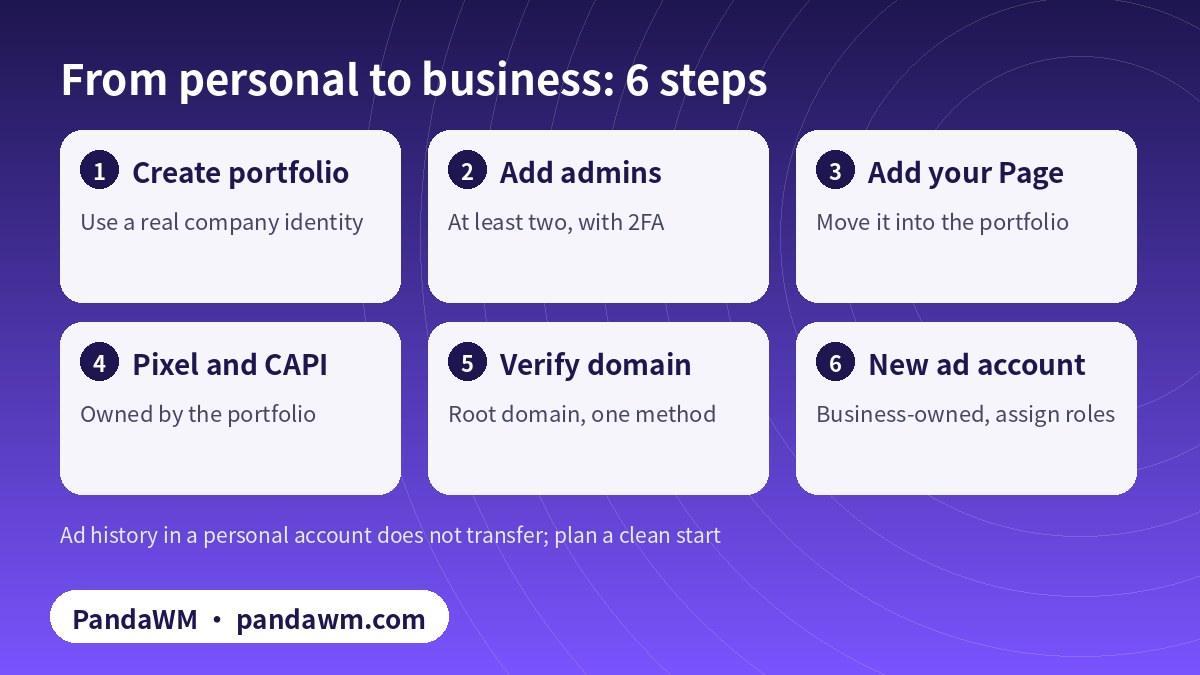
Ad history and spending limits in a personal ad account do not automatically carry over, so plan for a clean start: build the portfolio, move your Page into it, create the pixel and Conversions API under the portfolio, verify your domain, then create or request a business-owned ad account. The full asset list is in Facebook ad account setup checklist.
How to check which kind of account you are using
Many teams are not sure what they have. Open Ads Manager and look at the account switcher: an account listed under a business portfolio name is business-owned; one listed only under a person’s name is a personal ad account. In Business settings, the Ad accounts page shows which accounts the portfolio owns and which it can only access as a partner. If your main spending account turns out to be owned by a former employee, a freelancer or a previous agency, fix that before you scale. Ask the owner to add your portfolio as a partner, or open a new account owned by your company and move campaigns over.
A short checklist before you choose
- Which legal entity runs the website and collects the revenue? That entity should own the portfolio.
- Do you have official documents that show its legal name and address or phone, in case business verification is requested?
- Is your product in a restricted category? If so, do you hold a licence that covers every target country?
- How many markets, time zones and currencies will you run? More complexity favours a structured, agency-supported setup.
- Who on your team will run campaigns, and who needs billing access only?
- Do you want to run ads yourselves, or have a partner manage them?
Your answers usually point clearly to one of the setups in the table above. If they don’t, send them to us and we will tell you honestly which route fits, including when a self-created account is enough.
Common misconceptions
- “Business accounts never get disabled.” Any account that breaks policy can be restricted. See Facebook account disabled: how to appeal.
- “An agency account lets us run anything.” No. Restricted categories still need Meta authorization, and prohibited products can’t be advertised from any account.
- “We can just buy an aged business account.” Buying, renting or borrowing accounts breaks Meta’s terms and puts your spend and data at risk. We do not offer it.
- “A personal account is fine because we are small.” Small teams benefit most from not tying the business to one person’s profile.
What happens after the account is open
A new business ad account goes through the learning phase on each new ad set, and early decisions about budget and bidding matter. We cover a week-by-week plan in First 30 days on a new Facebook business ad account. If you are a licensed gambling operator whose authorization was declined, see Meta online gambling authorization rejected: fixes.
FAQ
Is a business Facebook account the same as a business portfolio?
People use “business Facebook account” loosely. In Meta’s terms, your company is represented by a business portfolio, which owns ad accounts, Pages and pixels.
Can a company registered in China open a Facebook business ad account?
Yes. Mainland-China companies going global are normal advertisers. Documents, website and payment details need to match.
Do I need business verification before advertising?
Not always. Meta requires it for certain features; if you are asked, prepare official documents that show your legal name and address or phone.
Can I convert my personal ad account into a business account?
You can add a personal ad account to a portfolio in some cases, but many companies prefer a clean business-owned account so ownership is clear from day one.
Who owns an account opened through PandaWM?
Your company. Accounts are opened through our agency channel, and the usage rights and ad data belong to you.
Do you offer only account opening, or full management too?
Both. Choose account opening only, or managed campaigns.
Compliance note: PandaWM only helps eligible, licensed or certified businesses open accounts, apply for authorization or verification, and run ads through the platforms’ official processes. We do not sell, rent or transfer ad accounts, and we do not offer ways to bypass review, cloak landing pages or advertise prohibited products. No approval is guaranteed. Platform policies change; the official pages prevail. This article is not legal advice.
Related guides
- Facebook ads account opening & management agency (PandaWM service page)
- Facebook ads account opening guide 2026
- Facebook Ads Manager: campaigns, ad sets and ads
- “Whitelisted” Facebook accounts explained
- How much Facebook ads cost
- Meta Business Verification for overseas advertisers
- Facebook ad account setup checklist
- 繁體中文:Facebook 海外企業戶是什麼
- 简体中文:Facebook开户主体怎么选
Talk to PandaWM about Facebook business ad accounts
Send us where your company is registered, your industry and any licences, your target countries, your landing page or app link and your expected monthly budget. We pre-check eligibility and creatives first, then recommend an account route. Choose one of two models: account opening only (we open the account, set up the business portfolio structure and access; your team runs the ads) or managed campaigns (we also build, test and optimise). Accounts are opened through our agency channel, and the usage rights and all advertising data belong to you. Restricted-category authorizations are only for advertisers holding the required licences. We cannot guarantee any review outcome.
- WhatsApp: https://wa.me/85259048602
- Telegram: https://t.me/PANDA0134
- WeChat: szcwh99 (scan the QR code)

Official sources
- Verifying your business in Meta Business Suite
- Account Integrity (Community Standards)
- 预算、花费限额、预付余额限额和付款门槛之间有何区别
- Online Gambling and Games (Advertising Standards)
- Cryptocurrency Products and Services
- Meta Advertising Standards
Meta pages checked on 2026-11-11. Policies change; the official pages prevail.
 微信扫一扫打赏
 支付宝扫一扫打赏