
 熊猫出海编辑团队
Last updated: 9 November 2026
▶ Watch the full video walkthrough and transcript: Facebook Prescription Ads Rejected? 8 Reasons and Fixes (video)
“Whitelisted” pharmacy or telehealth ad accounts are a hot topic among advertisers, and most of the questions we get are not “what is it?” but “why was I rejected, and what do I change?”. This guide answers exactly that. If you need the full application walkthrough first, read our Meta prescription drug ads authorization guide; for the certification itself, see What is LegitScript.
The short version: there is no shortcut account. Meta requires online pharmacies and telehealth providers that promote prescription drugs to be actively certified by LegitScript and authorized by Meta, and their ads may only target people aged 18 or older in the United States, Canada or New Zealand, and only in the countries where they are certified (Meta Transparency Center: Drugs and Pharmaceuticals). An agency channel can make delivery and review communication smoother; it cannot replace certification.
1. First, check you are using the right type of account
A large share of “rejections” come from a mismatch between the ad and the account status: an unauthorized account promoting a named drug, or a telehealth brand that believes it needs certification just to advertise a consultation service. The table below separates the cases using Meta’s own policy.
| Account / status | What it can promote | Prerequisites | Countries & age |
|---|---|---|---|
| Prescription-drug authorized account (“whitelisted”) | Named prescription drugs, prices, delivery, purchase-intent calls to action | Pharmacies & telehealth: active LegitScript certification + Meta authorization. Manufacturers: LegitScript or Meta internal review | Only the US, Canada or New Zealand where certified; 18+ |
| General telehealth promotion | The telehealth service itself, with no named or priced drug | No written authorization; Health & Wellness rules still apply | General policy |
| Standard agency account (not authorized) | Ordinary products and services; no prescription drugs | Opened through an agency channel | General policy |
| Rx ads to any other country | — | Not available on any account | Not allowed |
| Unapproved drugs, “research” peptides | — | No compliant route exists | Not allowed |
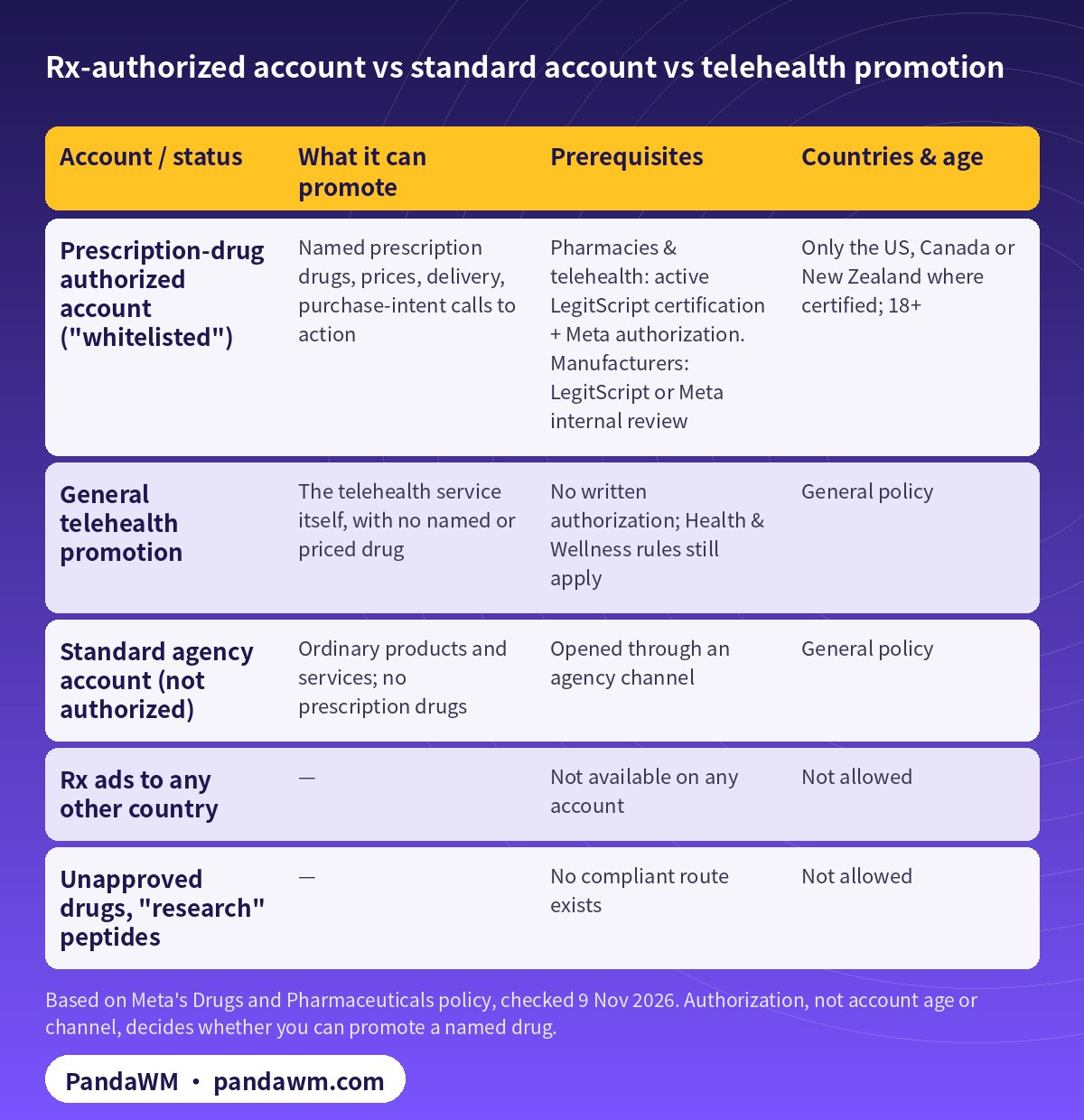
Two practical takeaways. First, ads that promote telehealth services generally do not require written authorization from Meta, so a provider can run service-level campaigns while its LegitScript application is in progress. Second, the moment an ad names, shows or prices a prescription drug, it falls inside the authorization requirement, regardless of how old or well-performing the ad account is.
2. The 8 most common reasons for rejection, and the fix for each
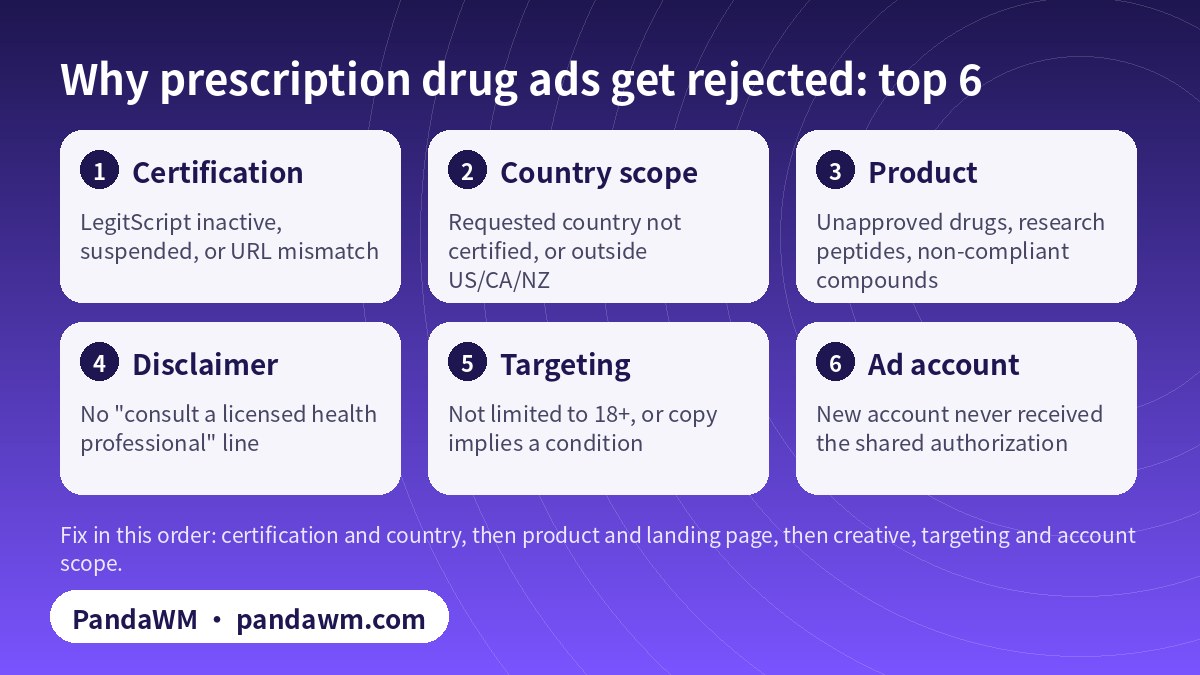
Reason 1: LegitScript certification is inactive, suspended or for a different URL
Meta’s request form asks for the LegitScript-certified URL. If the URL is not certified or not in good standing, the form will not let you continue (Meta Business Help Center). Fix: confirm the certification status and the exact certified domain in your LegitScript account, and enter that root domain. Before you move to a new domain or add a sub-brand, check that it is covered.
Reason 2: The requested country does not match your certification
Meta only allows targeting countries where you are certified. Certified for the United States but requesting Canada is a common mismatch. Fix: check each country separately; obtain the licence and certification for a new country before you expand in Meta.
Reason 3: You want to reach markets outside the US, Canada and New Zealand
These are the only eligible countries for prescription drug ads. Europe, Southeast Asia, Australia, Hong Kong and Taiwan audiences are outside the scope, and no account or agency can change that. Fix: in other markets, limit yourself to general health or brand content that complies with local law.
Reason 4: Business name, URL or business type does not match
The business type you select (online pharmacy, telehealth provider, pharmaceutical manufacturer) must match your certification. Manufacturers using Meta’s internal review must use a business name and address that match their licence or registration, such as an FDA registration. Fix: use the legal name exactly as licensed, and keep the footer, privacy policy and contact page consistent with it.
Reason 5: The product itself cannot be advertised
Unapproved drugs, peptides labelled “for research use” and non-compliant compounded products are outside every authorization. Fix: there is none other than removing those products and links. See Can you advertise peptides or compounded GLP-1 on Meta?.
Reason 6: The ad has no disclaimer
Meta requires prescription drug ads to include a disclaimer telling people to consult a licensed health professional or obtain a valid prescription (Meta policy). Fix: put the disclaimer in the primary text and repeat it on the landing page rather than hiding it in a corner of the image.
Reason 7: Targeting or copy conflicts with health rules
Prescription drug ads may only target people aged 18 or older. Copy that implies the viewer has a condition (“Struggling with…?”) also invites rejection under the health and personal-attribute rules (Meta Health and Wellness policy). Fix: set ad sets to 18+, describe the product or service factually and drop before-and-after imagery and outcome promises.
Reason 8: A new ad account was never authorized
Authorization is attached to specific ad accounts. A new account must receive it through the “apply existing authorization to an additional ad account” flow within the same business portfolio, or be authorized on its own. Fix: before launch, check every delivering account in the Authorizations and verifications tab.
3. Costs and timelines: what is published and what is not
| Item | Published information | Note |
|---|---|---|
| LegitScript application fee | US$975 per website, non-refundable | Paid before the questionnaire; not returned if denied |
| LegitScript annual fee | US$2,150 per website, charged on approval | Renews yearly; each domain billed separately |
| Expedited processing | US$2,500 extra per application | Review starts within 2 business days after screening; the review itself is not shortened |
| Meta authorization (LegitScript route) | Meta says the result shows right away | Requires a certified URL in good standing |
| Meta internal review (manufacturers) | Usually within 48 business hours | Sometimes longer |
| Agency account opening / management | — | Confirm with PandaWM for your working model |
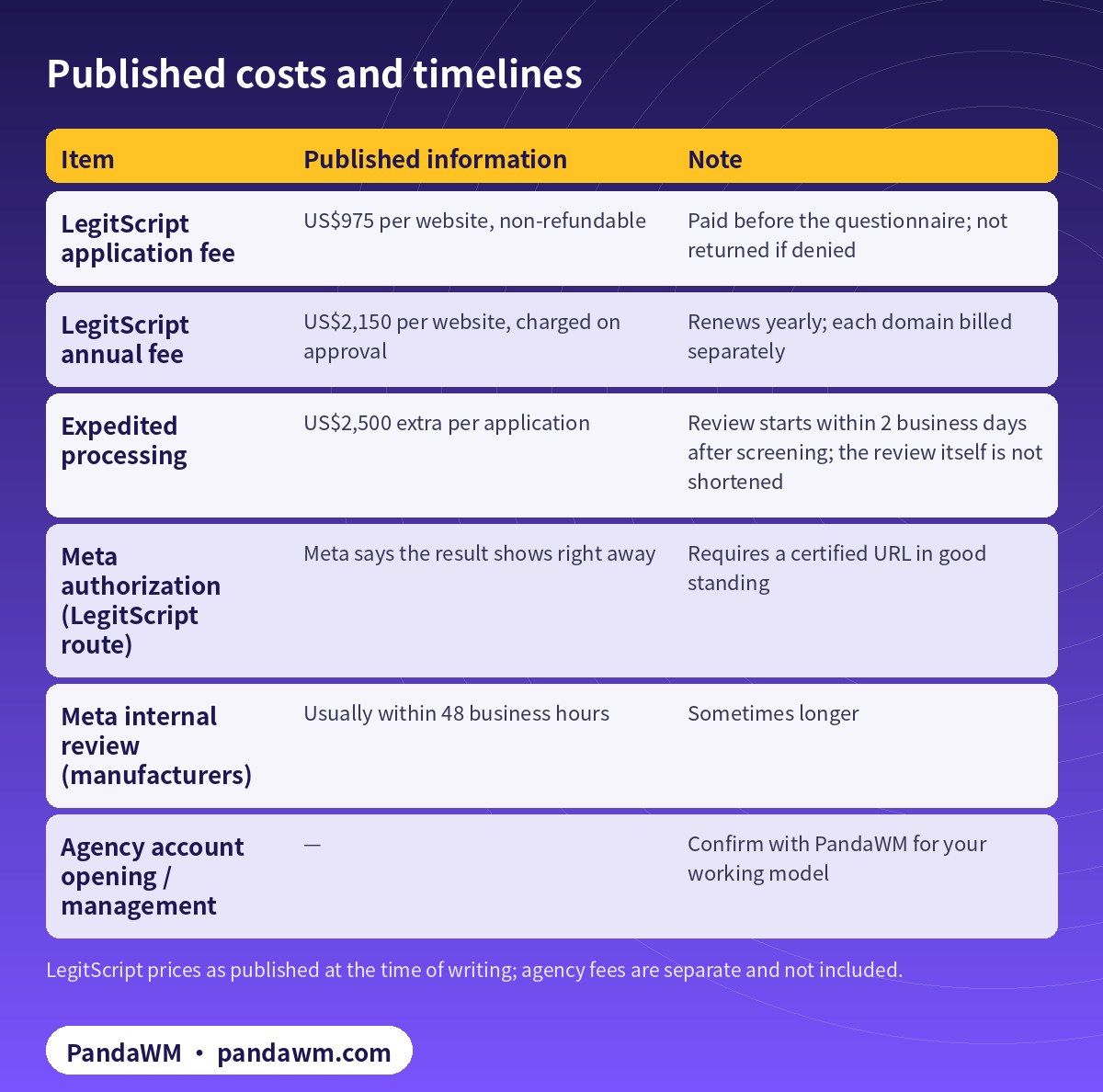
In practice the slow part is usually the LegitScript review: incomplete questionnaires, licences that do not match where patients are located, and missing website disclosures all cause back-and-forth. A complete document pack on day one tends to save more time than paying for expedited processing, which only moves the start of review. Our LegitScript certification process guide lists the standards and documents.
4. How an agency-channel account works with authorization
PandaWM opens ad accounts through an agency channel. The account sits under the agency’s name, but usage rights and all advertising data belong to the client; this is not an account sale or rental. You can choose account opening only and run campaigns yourself, or choose fully managed campaigns. A whitelisted agency account generally means steadier delivery and faster ad review, but the prescription drug authorization must still be requested with your own LegitScript-certified URL and business. An agency cannot lend you its credentials.
- You handle: LegitScript certification and renewal, licensing where patients are located, compliant landing pages and disclaimers, accurate product information.
- We help with: eligibility pre-checks, business portfolio and ad account structure, sharing authorization to delivering accounts, creative and landing-page pre-review, and fixes and appeals after a rejection.
- Together we confirm: certified countries only, 18+ targeting, every delivering account on the authorization list.
For the bigger picture on restricted categories, see Meta restricted-vertical authorization explained and restricted-industry account opening guide. To start, visit Facebook ads account opening and management.
5. Pre-submission checklist
- LegitScript certification is active and the certified domain matches the landing page domain.
- Target countries are within the US, Canada or New Zealand and are certified.
- Business type and legal name match the certification or licence.
- The catalogue contains no unapproved drugs, research peptides or non-compliant compounds.
- Every prescription drug ad carries the consult-a-professional disclaimer.
- Ad sets are 18+ and copy does not imply a personal health condition.
- Each delivering ad account has its own or a shared authorization.
6. FAQ
Is a “whitelisted” pharmacy ad account an official Meta product?
No. “Whitelisted” is industry shorthand. Meta grants a prescription drugs authorization tied to a business, its certified countries and specific ad accounts.
Can I run telehealth ads before LegitScript approves me?
Yes, if the ads promote the telehealth service generally and do not name, show or price a prescription drug. Meta does not require written authorization for those.
How soon can I reapply after a rejection?
Meta does not publish a waiting period. Identify the cause using section 2, fix it (especially certification status and country scope) and then resubmit.
Can an agency guarantee approval?
No. The outcome depends on LegitScript and Meta’s review. No legitimate agency can guarantee it or bypass it.
Can I target the UK, Australia or Asia?
Not with prescription drug ads. Meta’s eligible countries are the United States, Canada and New Zealand.
Related guides
- Meta prescription drug ads authorization: step by step
- What “LegitScript Certified” means
- Australian financial services Facebook ads checklist
- 處方藥認證戶完整說明(繁體中文)
- 处方药认证户被拒原因与整改(简体中文)
- Facebook ads account opening and management
Talk to PandaWM
Send us where your business is registered, your licence or certification status, the countries you want to reach and your landing page. We pre-check eligibility first, then explain the account route and the working model that fits (account opening only, or fully managed campaigns). We cannot guarantee any review outcome.
- WhatsApp: https://wa.me/85259048602
- Telegram: https://t.me/PANDA0134
- WeChat: szcwh99 (scan the QR code)

Compliance note: PandaWM only helps eligible, licensed or certified businesses open accounts, apply for authorization or verification, and run ads through the platforms’ official processes. We do not sell, rent or transfer ad accounts, and we do not offer ways to bypass review, cloak landing pages or advertise prohibited products. No approval is guaranteed. Platform policies change; the official pages prevail. This article is not legal advice.
Sources
- Meta Business Help Center: About Meta’s Prescription Drugs advertising policy
- Meta Transparency Center: Drugs and Pharmaceuticals
- Meta Transparency Center: Health and Wellness
- LegitScript: Certification FAQ
- LegitScript: Healthcare Certification Primer (pricing)
Pages checked on 9 November 2026. Platform rules change; the official pages prevail.
 微信扫一扫打赏
 支付宝扫一扫打赏