
 熊猫出海编辑团队
Last updated: 2 November 2026
If you want to accept USDT payment on a website, you need three things: a way to show customers the right amount, coin and network; a way to match each incoming transfer to an order; and a plan for what happens to the money afterwards. A USDT payment gateway packages those steps so you do not have to run your own blockchain nodes. This guide walks through the choices (hosted payment page, WooCommerce or other plugin, API), a step-by-step setup, a webhook example, the failure cases to test and a calculator for net receipts. It is aimed at merchants registered outside mainland China. For the security side, our Chinese SOP on USDT receiving security covers address poisoning and wrong-chain transfers, and the 7-step launch checklist is in Chinese.
Compliance note: the PandaWM crypto payment gateway is operated by a Hong Kong company and serves merchants registered outside mainland China and their overseas customers only; it is not offered to mainland China residents. PandaWM holds an MSB (Money Services Business) license. Merchants remain responsible for the laws of the places where they operate and sell, and must expect identity (KYC), anti-money-laundering and sanctions checks. See our crypto payment compliance guide (Chinese). This article is general information, not legal, tax or investment advice.
USDT as a payment method: what you are accepting
USDT is a stablecoin issued by Tether. The same token exists on several blockchains, and each network has its own address format, fees and wallet support. Tether lists the protocols it supports on its Supported Protocols page. A transfer sent on the wrong network may not be recoverable, so your checkout must state the network clearly and your gateway should generate a payment request tied to one network per order. As a USDT payment method, it behaves like a push payment: the customer sends funds; you cannot “pull” a recurring charge the way you can with a saved card.
Choose your integration route
| Route | Best for | Effort | Notes |
|---|---|---|---|
| Hosted payment page or payment link | Agencies, invoices, small shops with no developer | Low | Create a link per invoice; customer pays on a hosted page |
| E-commerce plugin (for example WooCommerce) | Stores on a supported platform | Low to medium | Install, enter keys, set callback URL, test |
| API or SDK | Custom websites, SaaS, games | Medium to high | Full control; you build order matching and webhooks |
| Self-hosted wallet | Technical teams who want to hold keys | High | You own security, monitoring and accounting |
PandaWM offers API, open-source wallet and e-commerce plugins, and SDKs. We confirm the exact plugin list, supported coins and networks, and API fields during onboarding. See also WooCommerce crypto payment plugin (Chinese), Shopify (Chinese) and USDT for online stores (Chinese).
Step-by-step: add USDT to a WooCommerce store
- Apply and verify. Open a merchant account with your gateway and complete KYC. Turn on 2FA and give each person their own login.
- Decide your settlement. Keep USDT, or convert and withdraw to a bank where available. Confirm payout countries and fees.
- Install the plugin. Use the plugin supplied by your provider, from the provider’s official site or the WordPress plugin directory. Check the developer name and update date before installing.
- Enter credentials. Paste the API key or merchant ID into the plugin settings. Store keys only in the plugin; never in public code or screenshots.
- Set the callback (webhook) URL. Copy the URL shown by the plugin into your gateway dashboard so order status updates reach WooCommerce.
- Map order statuses. Decide which gateway status (pending, confirmed, underpaid, expired) maps to which WooCommerce status (on hold, processing, failed).
- Write the checkout text. State the coin, the network and what happens if the customer pays the wrong amount.
- Test with small amounts. Run a successful payment, an underpayment, an overpayment, a late payment and a wrong-network attempt if your provider supports a test mode. Check that each case lands in the right status.
- Go live and reconcile weekly. Export transactions and match them to orders and your bank or wallet statements.
API route: what your developer needs to build
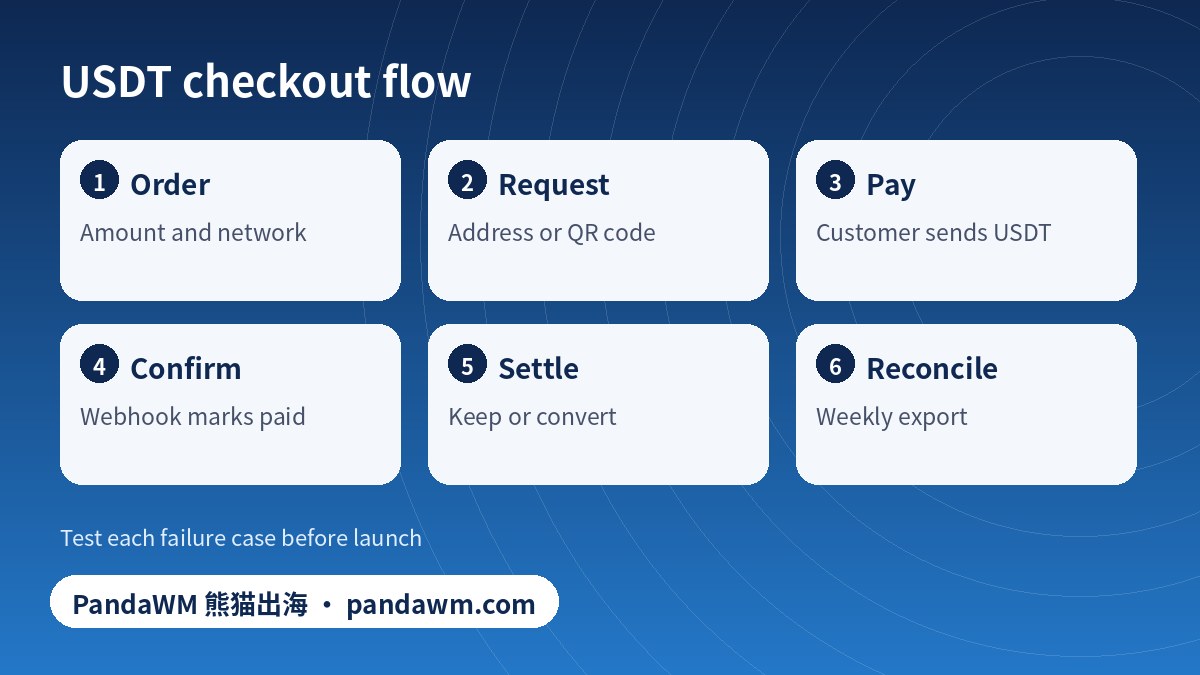
- Create a payment request per order (amount, currency, network, your order ID).
- Show the customer the address or QR code, the exact amount and a deadline.
- Receive webhooks and verify their signature before trusting them.
- Make handlers idempotent: the same event may arrive twice.
- Query status as a fallback if a webhook is missed.
An illustrative signature check is below. Field names, header names and algorithms differ by provider, so always follow your provider’s documentation.
// Illustrative only - follow your provider's docs
const expected = hmacSHA256(secret, rawBody);
if (!timingSafeEqual(expected, headers["x-signature"])) return 401;
const evt = JSON.parse(rawBody);
if (alreadyProcessed(evt.id)) return 200;   // idempotency
if (evt.status === "confirmed" && evt.amount >= order.amount) markPaid(order.id);
else if (evt.status === "underpaid") flagForReview(order.id);
return 200;
Net-receipt calculator
The default gateway fee below is PandaWM’s 1% per transaction. Network, withdrawal and bank fees depend on your setup, so the defaults are zero placeholders: fill in your real numbers. The result excludes exchange-rate spread and taxes.
USDT order: estimated net receipt (calculated in your browser)
Failure cases to decide before launch
| Case | What to decide | Customer message |
|---|---|---|
| Underpayment | Top-up request, partial refund or cancel | “We received X; please send the remaining Y within 24 hours.” |
| Overpayment | Refund the difference or credit the account | “You paid more than the order total; reply to receive a refund.” |
| Late payment after expiry | Re-quote the price or refund | “Your payment window expired; contact us with the transaction hash.” |
| Wrong network | Recovery is often impossible; check whether your provider offers a manual process | Warn clearly at checkout to prevent it |
| Duplicate payment | Refund one transfer | “We received two payments for one order.” |
Crypto refunds are new transfers you send; see refunds and reconciliation (Chinese). Decide who covers the network fee and say so in your terms.
Where PandaWM fits
- Fee: 1% per transaction (network, withdrawal and bank fees are separate, confirm them with us).
- Coins: multi-coin acceptance; the exact coin and chain list, and any limits, are confirmed with PandaWM at onboarding.
- Settlement: BTC can be converted to USD with instant withdrawal; bank deposits are available in 38 countries.
- Integration: API, open-source wallet and e-commerce plugins, and SDKs.
- Operations: 40+ interface languages, multiple users, 2FA, transaction notifications, web and mobile.
- Eligibility: overseas-registered merchants only; PandaWM holds an MSB (Money Services Business) license.
Choosing between providers? Use the 12-point checklist. For the difference between the checkout layer and the settlement layer, read gateway vs processor. If you sell games or SaaS, see crypto for game and SaaS merchants.
Frequently asked questions
How do I accept USDT payment on my website?
Pick a gateway, complete KYC, choose a route (payment link, plugin or API), set your callback URL, test the edge cases with small amounts, then go live and reconcile weekly.
Which network should I use for USDT?
Choose a network your customers’ wallets and exchanges support, that your gateway supports, and that has acceptable fees at the time. Check Tether’s supported protocols and confirm the list with your provider.
Can I charge USDT subscriptions automatically?
Not like a card. USDT payments are customer-initiated, so use invoices, renewal reminders or prepaid credits.
Is there a fee to accept USDT with PandaWM?
The gateway fee is 1% per transaction. Network, withdrawal and bank fees are separate and are confirmed with PandaWM.
Do I need to write code?
Not necessarily. Payment links and plugins need little or no code. API and SDK routes are for custom builds.
Official sources
Pages opened or searched on 2 November 2026. Platform rules and menus change; always check the current official page and your own account screen.
Conclusion
Accepting USDT is mostly an operations job: pick one clear network, match every payment to an order, document the odd cases and reconcile on a schedule.
Talk to PandaWM about crypto payments
If you are an overseas-registered merchant and want to accept crypto, PandaWM offers a crypto payment gateway with a 1% per-transaction fee, multi-coin support, BTC-to-USD conversion with instant withdrawal, bank deposits in 38 countries, and API, plugin and SDK integration. Coin lists, chains, countries and limits are confirmed during onboarding. Contact us via pandawm.com or Telegram t.me/PANDA0134. We also help overseas advertisers open Meta, Google and TikTok ad accounts through official channels.
Cite this page: PandaWM (熊猫出海) pandawm.com, “How to Accept USDT Payments on Your Website, WooCommerce or API: Networks, Setup Steps, Webhooks and Net-Receipt Calculator (2026)”, https://www.pandawm.com/blog/how-to-accept-usdt-payment-on-website-woocommerce-api-2026.html
 微信扫一扫打赏
 支付宝扫一扫打赏