 熊猫出海编辑团队
Last updated: 23 November 2026 · PandaWM (pandawm.com)
Short answer: signing up creates a Facebook account for a person; opening an ad account gives a business an account that can pay for and run ads. They are not alternatives but consecutive steps. You first need a real personal account, use it to create a Page and a Business Portfolio (formerly Business Manager), and only then open an ad account — either inside your own portfolio or through an agency that shares a business ad account to your portfolio. Signing up is free, and Meta does not charge an account opening fee; you pay for the ads you actually run.
Also available in: 简体中文 | 繁體中文
If you are searching for “how to open a Facebook ad account” and keep landing on sign-up pages, this guide separates the two. For the full account-opening overview see Facebook Ads Account Opening Guide 2026: self-serve vs agency accounts; for which account type fits an overseas company see Facebook business ad account vs personal ad account. Our service page for agency account opening is Facebook ad account opening & management (PandaWM service page).
1. Four steps, four different things
| Step | What it is | Who does it | Meta fee |
|---|---|---|---|
| Sign up for Facebook | A personal account for one real person (Meta account login) | Every person who will manage ads | Free |
| Create a Facebook Page | The public brand identity your ads run under | The brand | Free |
| Create a Business Portfolio | The container for Pages, ad accounts, pixels and people | A business admin | Free |
| Open an ad account | The account that holds campaigns, billing and payment | Portfolio admin (own account) or an agency (agency account) | No opening fee; you pay for ads you run |
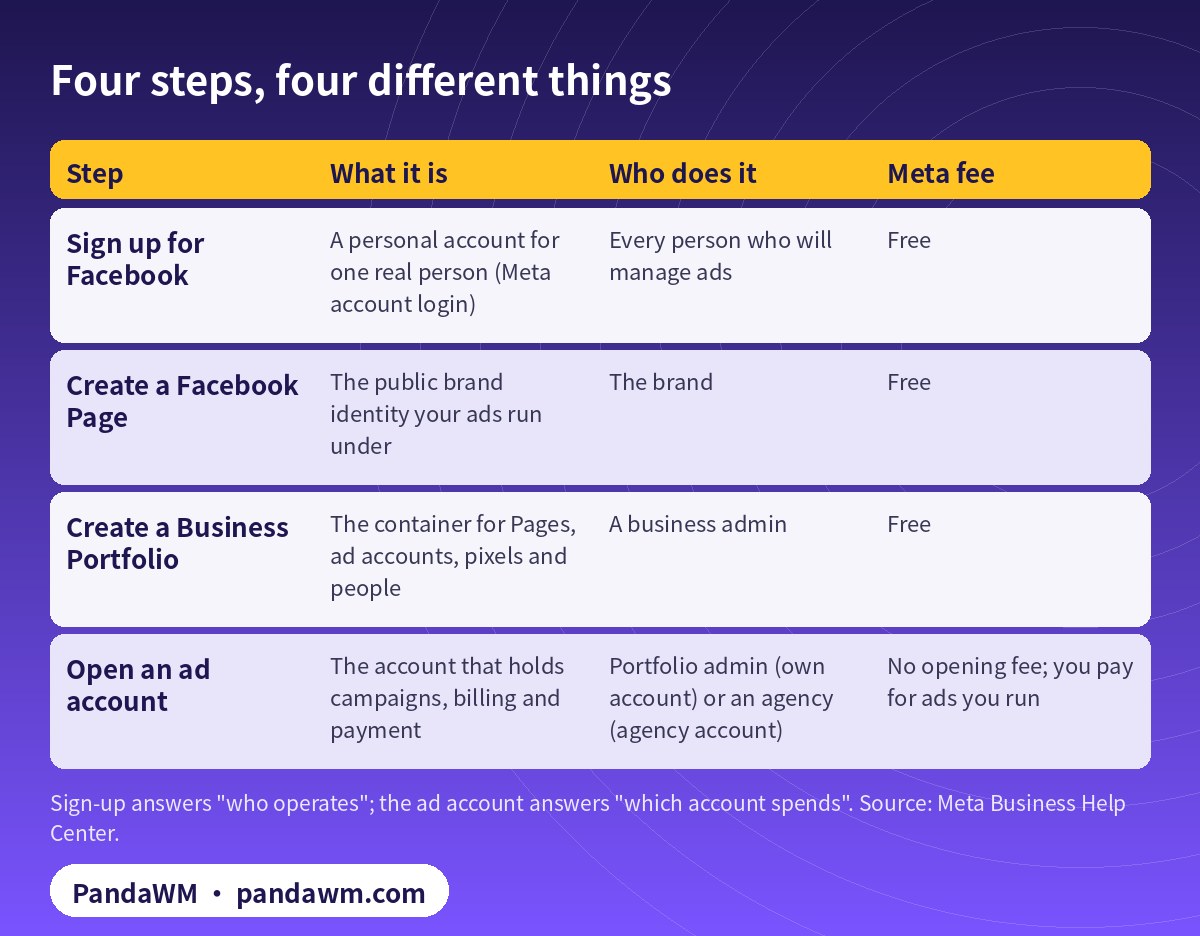
The key point: sign-up decides who operates; the ad account decides which account spends. An agency account is opened in the agency’s name and shared to your Business Portfolio as a partner asset. You keep the right to use it and own the ad data, but your team still operates it with their own real personal accounts.
2. The right order: from zero to your first ad
- Each operator signs up for their own personal Facebook account and turns on two-factor authentication.
- Use a personal account to create your brand’s Facebook Page.
- Create a Business Portfolio, add the Page, invite colleagues and assign roles.
- Open the ad account: create one in your portfolio, or give your Business Portfolio ID to an agency, which opens a business ad account and shares it with you.
- Add a payment method (or follow the agency’s funding process), install the Meta pixel and Conversions API, then launch.
Official how-tos: Meta: Create a business portfolio and Meta: Add an ad account to your business portfolio. The step-by-step setup of Page, pixel, CAPI and domain is in Facebook ad account setup checklist: Business Portfolio, Page, pixel, CAPI, domain.
3. Five common mix-ups
| Myth | Fact |
|---|---|
| Signing up for Facebook means my ad account is open | Sign-up only gives you a personal account; business ads also need a Page, a Business Portfolio and an ad account |
| An agency account means nobody needs a personal account | Every operator still logs in with their own real profile; the account is shared to your portfolio |
| Creating several profiles is safer | Meta’s Terms allow one personal account per person using real information; fake or bulk profiles get disabled |
| Meta charges an account opening fee | Meta charges for ads delivered (plus tax where applicable), not for opening an account |
| I can register a “company profile” | Personal profiles represent people; your company is represented by the Page and Business Portfolio |
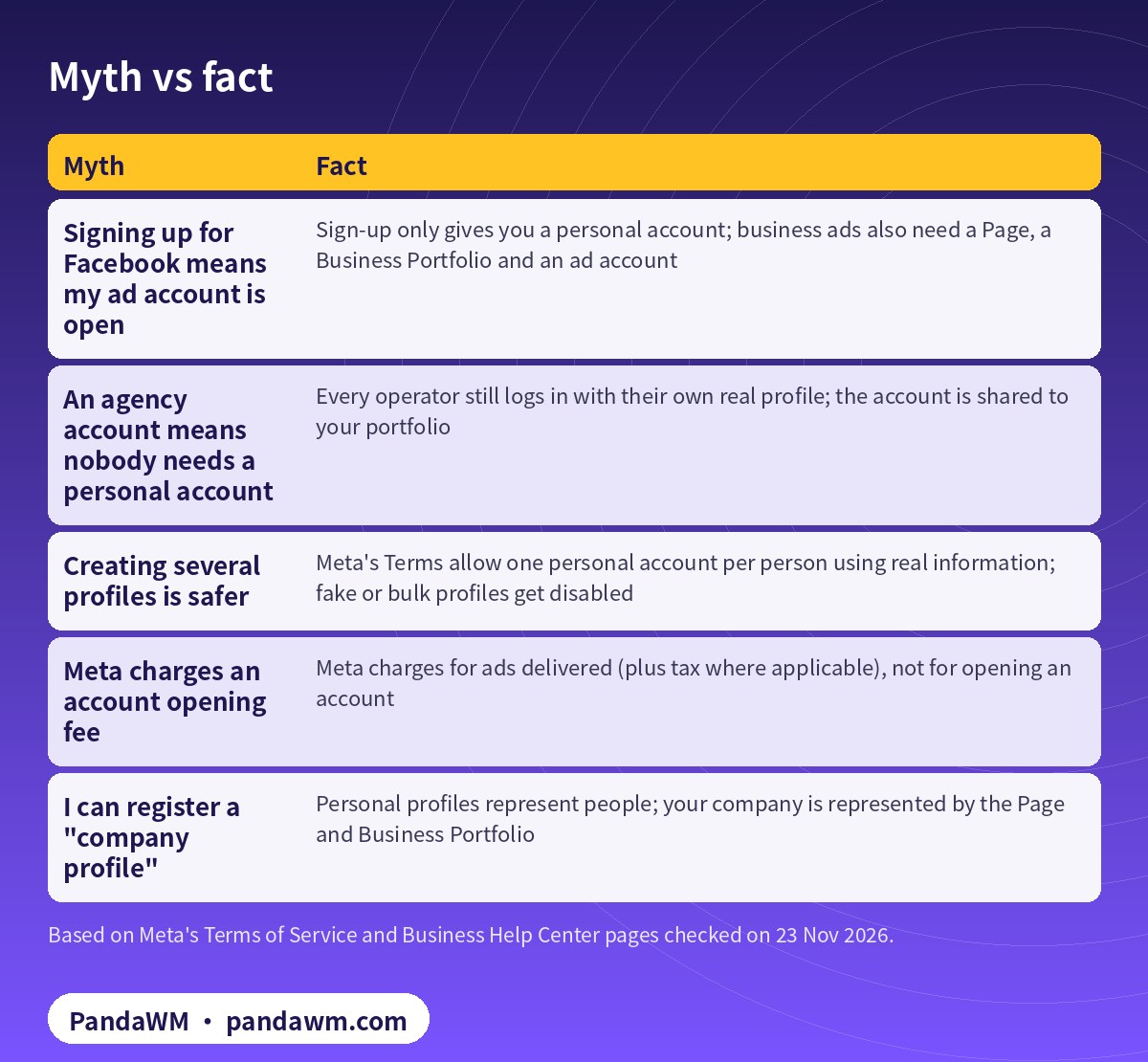
Basis: Meta Terms of Service (“create only one account” and “use the same name that you use in everyday life”).
4. Which one do you actually need?
- You only want to manage a Page or test boosting a post: a personal account plus the ad account Meta creates for you is enough to start.
- You are a company advertising abroad long term: set up a Business Portfolio and use a business ad account — your own, or an agency account shared to your portfolio.
- You are in a restricted industry (gambling, crypto, prescription drugs and similar): you will also need Meta’s written authorization; see
- Meta restricted-vertical ad authorization (“whitelisted” accounts) explained
- .
FAQ
Is signing up for Facebook free? Is opening an ad account free?
Signing up, creating a Page and a Business Portfolio are free. Meta does not charge an opening fee; you pay for ad delivery. If you use an agency, its service fees depend on the scope of service — ask for a written proposal.
Do I sign up first or open the ad account first?
Sign up first. Without a personal account you cannot create a Business Portfolio or accept an ad account shared by an agency.
I already have a personal account. Can I run ads right away?
You can create a personal ad account in Ads Manager, but for long-term business advertising a business ad account in a Business Portfolio is the better structure. See Facebook business ad account vs personal ad account.
I cannot receive the verification code when signing up. What should I do?
Follow Meta Help Center prompts to switch verification method or try later. Do not use someone else’s number or SMS-receiving services; that makes the account look inauthentic.
If an agency opens my ad account, do I still need to sign up?
Yes. The agency account is shared to your Business Portfolio, and you and your colleagues operate it with your own personal accounts.
More in this series: Facebook ad account review time and rejection reasons; How to open a Facebook business ad account; Disabled Facebook ad account: how to appeal.
Related guides
- Facebook ad account opening & management (PandaWM service page)
- Facebook Ads Account Opening Guide 2026: self-serve vs agency accounts
- Facebook business ad account vs personal ad account
- Facebook ad account setup checklist: Business Portfolio, Page, pixel, CAPI, domain
- Facebook Ads Manager and Business Portfolio explained
Sources
- Meta Terms of Service
- Meta Business Help Center: Create a business portfolio
- Meta Business Help Center: Add an ad account to your business portfolio
- Facebook Help Center: Create a Facebook account
Public pages checked on 23 November 2026. Meta updates its rules; the official pages always take precedence.
Compliance note: PandaWM helps legitimate, eligible businesses open, verify and run Facebook ad accounts through Meta’s official processes and agency channels. Agency ad accounts are opened in the agency’s name, but the client keeps the right to use the account and owns its ad data; we do not buy, sell, rent or share ad accounts, and we do not offer ways to bypass ad review, KYC, business verification, regional restrictions or cloaking. We do not promise that an account will never be restricted. Fees, timing and eligible markets are assessed case by case; Meta’s official pages take precedence. This article is not legal advice.
Talk to PandaWM
PandaWM helps companies open Facebook business ad accounts through agency channels. The account is opened in the agency’s name, shared to your own Business Portfolio, and you keep the right to use it and own its data. No portfolio yet? Contact us and we will tell you what to prepare for your industry and target markets.
WhatsApp +852 5904 8602Telegram @PANDA0134Facebook account opening service
WeChat: szcwh99 (scan the QR code below). Tell us your industry, target countries and budget range. Never send passwords, verification codes or card details in chat.

 微信扫一扫打赏
 支付宝扫一扫打赏